
Is your Thinner scale not turning on or showing a dim display? A dying battery is the most common cause, and replacing it is often a simple fix. Most Thinner brand digital bathroom scales, especially the popular Conair TH300 model, run on a single CR2032 lithium coin cell battery. This guide walks you through every step: how to identify your model, safely open the battery compartment, replace the battery correctly, and troubleshoot common issues.
Whether you’re fixing a scale you’ve used for years or rescuing one from the trash, this complete CR2032 battery change guide gives you everything you need to restore accurate weight readings fast.
Locate the Battery Compartment on Your Thinner Scale
Check for Standard Access Panel
On most Thinner scales like the Conair TH300, the battery compartment is on the underside, near the display. Look for a small rectangular or oval cover, about 1 inch by 2 inches, often labeled with an “OPEN” arrow. A sliding latch lets you pop it open without tools. If your scale has this, replacement takes under a minute.
Flip the scale over, slide the latch opposite to the arrow direction, and lift the cover gently. You should see the silver CR2032 battery held by a clip.
Identify Sealed or Screwed Models
Some models hide the battery behind a fully sealed back panel with no latch. These units may have rubber plugs covering Phillips screws or no visible openings at all. Use a fingernail or plastic tool to gently scrape away soft filler near the edges. Once removed, you may find tiny screws securing the casing. Use a precision Phillips screwdriver to remove them.
After opening, inspect the circuit board. If the battery is spot-welded in place, it is not user-replaceable.
No Model Number? Use Visual Clues
Many users report no visible model number on their scale. Do not worry. Rely on physical traits instead.
Key visual identification points:
- Glass or glossy top surface
- Four black rubber feet
- Slim, rectangular shape
- Digital LCD display
If it matches this description and uses a coin battery, it likely takes a CR2032. When in doubt, bring the old battery to a store for matching.
Remove the Old Battery Safely

Use the Clip or Tab Method
Most Thinner scales hold the battery with a black plastic tab or metal clip on one edge. Never force it out from the top. This can break the retaining mechanism.
Follow these steps:
- Slide the battery cover off
- Insert a small flat-head screwdriver under the edge of the battery
- Gently lift from beneath. The battery will pop up due to spring tension
Warning: The battery may jump 2-3 inches when released. Keep your hand over it as you lift.
Handle Stuck Batteries with Care
Users often think the battery is glued or jammed. In reality, it is just held tightly by pressure. Common mistakes include prizing too hard and breaking the plastic latch, using metal tools near circuitry which risks shorting, and touching battery contacts with oily fingers.
Pro tip: Press lightly under the battery’s edge with your screwdriver tip. It releases easily when the right spot is found.
Check for Soldered Battery Design
Flip the circuit board over. If the battery is attached with two metal wires or spot welds, it is soldered in place. This design appears in older models like the RH697 or unmarked units.
You will need:
- Soldering iron
- Desoldering pump or wick
- Skill to avoid damaging the board
Not recommended for beginners. Most users choose to replace the entire scale instead.
Install the New CR2032 Battery
Choose the Right Battery Type
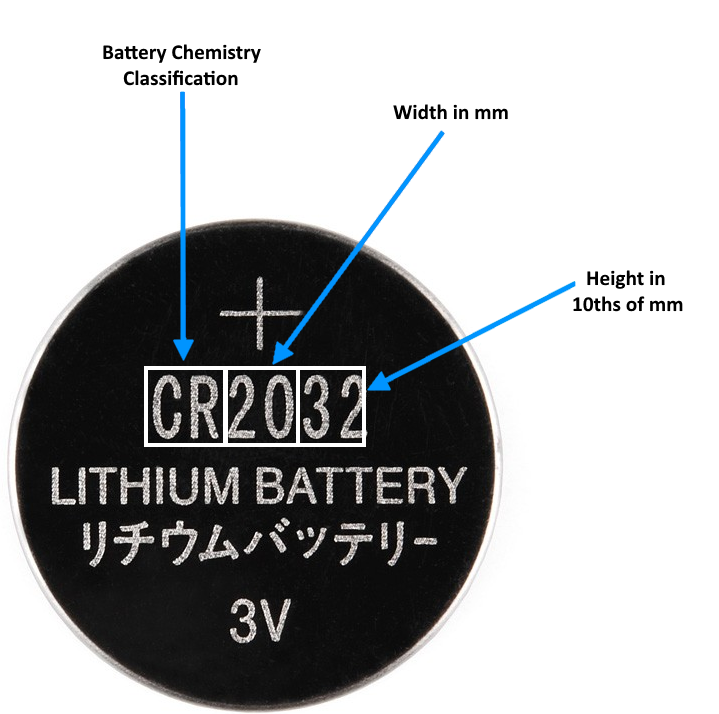
Always use a CR2032 3V lithium coin cell. Here is why the numbers matter:
- 20 = 20mm diameter
- 32 = 3.2mm thickness
- Delivers stable power for 1-2 years
Avoid CR2025 or CR2016. They are thinner and may not make proper contact, leading to intermittent performance.
Top battery brands to consider:
- Energizer CR2032 — Most reliable, longest lifespan
- Duracell, Panasonic, Sony — Also excellent
- Generic brands — May last only 3-6 months
Cost tip: Buy a 5-pack online for around $10. It is cheaper than replacing the scale.
Insert With Correct Polarity
Battery orientation is critical. When viewing the scale from the bottom, the positive (+) side faces up (label visible) and the negative (-) side touches the spring or base. Incorrect polarity means the scale won’t turn on, but it won’t damage it.
Installation steps:
- Insert battery at a slight angle
- Align with two retaining lips on one side
- Press down firmly until you hear a click
- Ensure full contact with both terminals
Visual cue: The battery should sit flat and secure, not wobbly.
Close and Test the Scale
Secure the Battery Cover
If your model has a latch, snap the cover back in place and slide the latch to lock. For screwed models, reinsert all tiny screws and tighten gently. Over-tightening can crack the casing.
If you removed rubber plugs, consider replacing them or leaving them off for easier future access.
Power Up and Calibrate
Place the scale on a hard, flat surface. Step on and off lightly. Most Thinner scales auto-calibrate on first use. You will see the display flash or show “0.0” before stabilizing.
Expected behavior:
- Immediate power-on
- Clear, bright display
- Accurate reading within 1-2 uses
Note: Some users report temporary inaccuracies, such as everyone reading 150 lbs. This usually resolves after recalibration through normal use.
Troubleshoot Common Post-Replacement Issues
Scale Won’t Turn On
Run through this checklist:
- Battery inserted positive side up
- Battery fully seated (press until it clicks)
- No corrosion on contacts
- Use a fresh, branded battery (test with another if possible)
If still dead, the issue may be internal damage or a soldered battery connection failure.
Intermittent Display or Flickering
This usually means poor contact. Fix it by removing and reinserting the battery, cleaning contacts with a cotton swab and rubbing alcohol, and ensuring no debris is under the battery.
Avoid touching metal contacts with fingers. Oils can interfere with conductivity.
Inaccurate or Stuck Readings
Common symptoms include the same weight for all users, sudden +31 lbs change overnight, or display not resetting to zero.
Solutions:
- Step off and back on. This triggers auto-reset.
- Remove battery for 30 seconds, then reinsert.
- Test on a different floor surface. Carpet affects accuracy.
If problems persist, the scale’s sensors may be damaged. Battery replacement will not fix hardware failure.
Prevent Future Battery Problems
Extend Battery Life
Follow these practices:
- Remove battery if storing long-term. This prevents leakage.
- Keep scale dry. Moisture corrodes contacts.
- Use high-quality batteries. Energizer lasts significantly longer than generics.
Average lifespan: 1-2 years with branded CR2032.
Avoid Throw-Away Scale Designs
Many newer Thinner-style scales use non-replaceable, soldered batteries. This is a form of planned obsolescence. Before buying a new scale, check reviews for “battery replacement” or “repairable,” look for easy-access compartments, and avoid models with no visible battery door.
Choose brands that support user serviceability to reduce e-waste.
Tools You Need for the Job
Essential Repair Kit
Gather these items before starting:
- Small flat-head screwdriver — Open latch, lift battery
- Precision Phillips screwdriver — Remove tiny screws on sealed models
- New CR2032 battery — Use Energizer for best results
- Tweezers (optional) — Handle battery without touching contacts
Tip: Keep a spare CR2032 in your drawer. It is used in remotes, watches, and many small devices.
When Replacement Is Not Possible
Recognize Non-Serviceable Models
If your scale has no screws or access points, battery spot-welded to circuit board, or no user-serviceable parts, then it is designed to be disposable. Attempts to replace the battery risk destroying the scale.
Your options:
- Replace the entire scale ($20-$60 cost)
- Recycle the old unit responsibly
- Upgrade to a repairable model with clear battery access
Consumer note: Many users call soldered designs wasteful. Vote with your wallet by supporting repairable products.
Universal Guide for All Digital Scales
Apply This Method Broadly
The steps above work for 90% of digital bathroom scales, not just Thinner models. Brands like Etekcity, Greater Goods, Fitindex, Taylor, and Weight Watchers all use CR2032 batteries and similar access methods.
Always follow this process:
- Flip the scale over
- Look for a battery label or latch
- Open gently
- Replace with positive side up
- Test before final reassembly
Pro tip: Take a photo before disassembly. It helps with reassembly on complex models.
Key Takeaways for Thinner Scale Battery Change
Replacing a Thinner scale battery is quick and easy if the model allows access. The CR2032 coin cell is inexpensive and widely available. Success depends on using the right battery, correct polarity, and gentle handling of clips and latches.
For sealed or soldered units, consider upgrading to a user-repairable scale to avoid future waste and cost. With this guide, you have not only fixed your scale. You have extended its life, saved money, and reduced e-waste.
Frequently Asked Questions About Thinner Scale Battery Change
How do I know if my Thinner scale needs a new battery?
Signs include the display being dim or blank, the scale not turning on at all, or showing inconsistent weight readings. If your Thinner scale has been in use for over a year, the battery is likely the culprit.
What battery does a Thinner scale use?
Most Thinner digital bathroom scales, including the Conair TH300, use a CR2032 3V lithium coin cell. This is the standard battery for most digital bathroom scales.
Can I replace the battery myself, or do I need a professional?
If your model has a battery compartment with a latch or screws, you can replace it yourself using basic tools. However, if the battery is soldered to the circuit board, professional replacement is not recommended. Most users opt to replace the entire scale in this case.
Why does my scale show the same weight for everyone after battery change?
This usually indicates poor battery contact or a low-quality battery. Remove the battery, clean the contacts with rubbing alcohol, and reinsert a fresh Energizer CR2032. The issue typically resolves after one or two weighings.
Are all CR2032 batteries the same quality?
No. Branded batteries like Energizer, Duracell, Panasonic, and Sony last 1-2 years, while generic brands may fail within 3-6 months. Always choose a reputable brand for reliable performance.
What should I do if my Thinner scale has no visible battery compartment?
If there is no obvious battery door, your model may have a sealed design. Check for rubber plugs near the edges that might hide screws. If the scale appears completely sealed with no access points, the battery is likely soldered and the scale is designed to be disposable.



