
Your bathroom scale suddenly won’t turn on. The display flickers, shows “Lo,” or gives inconsistent readings. Before you assume it’s broken, check the battery. Replacing the battery in a bathroom scale is a quick, straightforward fix that takes less than 10 minutes and costs just a few dollars. Most digital scales run on a CR2032 lithium coin cell, though some use AAA or AA batteries. With the right tools and steps, you can restore your scale to perfect working condition. In this guide, you’ll learn how to open the compartment, insert the new battery correctly, recalibrate, and test for accuracy, all while avoiding common mistakes that lead to failure.
Recognize Low Battery Warning Signs
Look for These Common Indicators
Your scale will tell you when the battery is dying. Watch for these signals that indicate it’s time for a replacement.
The display shows “Lo,” “BAT,” or “LOBAT” when you step on the scale. The screen appears dim, flickers, or goes completely blank. The scale fails to power on when you step on it, or the weight readings jump around and reset mid-measurement. You may also notice delayed startup or the scale shutting off unexpectedly during use.
Some models like the Modero WW26X and CVS Pharmacy scales explicitly display “Lo” when voltage drops below the operational threshold. Don’t confuse software glitches with battery failure. Always test the battery condition first before assuming your scale is broken.
Find the Battery Compartment Location
Where to Look on Your Scale
The battery compartment is always on the back or underside of the scale. Here’s how to locate it quickly.
Look for a small rectangular or circular cover on the bottom of the scale. You may see a battery symbol or text like “BAT” near the access point. On CVS Pharmacy models, the compartment is on the rear edge. On most other brands, it’s centered on the underside.
Place your scale on a soft towel or carpet to avoid scratching glass or plastic surfaces before you begin. This protects your scale’s finish while you work.
Open the Battery Cover Safely

Match Your Opening Method to Cover Type
Battery compartments come in several designs. Using the right technique prevents damage.
Snap-On Cover: Use a plastic pry tool or your fingernail to gently lift the edge. Apply light pressure and it will click open. This type is common on Modero WW26X models.
Screw-Secured Cover: Remove one or two small Phillips screws with a precision screwdriver. Keep these tiny screws in a safe place so they don’t get lost.
Coin-Style Twist Cap: Insert a coin or flathead tool and turn counterclockwise to open. Reseal by turning clockwise until snug.
Spring-Loaded Clip: Found in CVS scales. Use tweezers or a plastic spudger to push the metal clip backward. The battery will rise slightly and can be lifted out.
Never use metal tools near the battery terminals. They can short-circuit and damage the scale’s electronics.
Select the Correct Replacement Battery
Know Your Battery Type Before Buying
Using the wrong battery type can damage your scale or cause it to fail entirely.
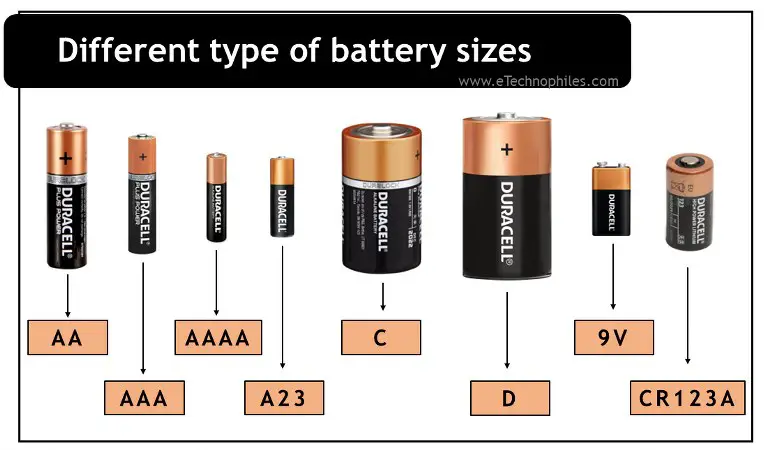
Most digital bathroom scales use a CR2032 3V lithium coin cell. This accounts for approximately 90% of all models on the market. Some larger or smart scales use AAA batteries, while heavy-duty or Bluetooth-enabled models may require AA batteries.
Check the old battery before disposing of it. The battery type is printed on the label. You can also find the specification inside the compartment or in your scale’s user manual. If you’re unsure, search for your scale’s model number online to confirm the correct type.
Choose Quality Brands for Reliability
Not all batteries are created equal. Premium brands last longer and perform better.
Top recommendations include Varta CR2032, Energizer CR2032, Duracell CR2032, and Panasonic CR2032. These brands last up to 18 months under daily use and resist leakage better than off-brand alternatives.
Low-cost generics may fail early or trigger false “Lo” warnings. Keep a spare CR2032 on hand since these batteries are also used in remotes, watches, and key fobs.
Remove the Old Battery Properly
Follow These Step-by-Step Instructions
Taking out the old battery correctly prevents damage to the compartment and ensures you know how to orient the new one.
First, observe the polarity. Note which side of the battery is facing up before you remove it. If the battery is held by a metal clip, use tweezers to push the clip backward gently. Let the battery rise slightly, then lift it out. If the battery is loose, slide or pinch it out with non-conductive tweezers.
Never force a stuck battery. Check for obstructions or corrosion first before applying more pressure.
Clean Corroded Battery Contacts

Restore Proper Electrical Connection
White or green residue on the terminals indicates corrosion. This prevents good electrical contact and causes power failure.
Remove the battery first. Dip a cotton swab in isopropyl alcohol (70% or higher) and gently rub both contact points. For stubborn buildup, use a soft pencil eraser. Let the compartment dry completely before inserting the new battery.
Cleaning corroded contacts restores proper connection and prevents future issues.
Insert the New Battery Correctly
Avoid Polarity Mistakes
A single reversed battery will prevent the scale from turning on entirely. Getting this step right is critical.
For CR2032 coin cells, the label side faces up. This is the positive (+) side. The flat side touches the spring or contact. Press down until it clicks into place.
For AAA or AA batteries, the spring terminal connects to the negative end. The flat contact connects to the positive end. Match the plus and minus symbols inside the compartment.
The positive side must face the correct direction or your scale won’t work.
Reassemble the Battery Cover
Secure It Properly
A poorly sealed cover lets in moisture, causing intermittent power or display errors.
For snap-on covers, align the edges and press evenly until you hear clicks. Don’t leave one side loose. For screw-secured covers, reinsert the screws and tighten gently. Over-tightening strips plastic threads. For twist caps, turn clockwise until snug. For clip systems, ensure the metal retaining clip is fully engaged over the battery.
Recalibrate Your Scale After Battery Change
Reset for Accurate Readings
Most digital scales auto-calibrate when powered on. Follow these steps to ensure accuracy.
Place the scale on a hard, flat, level surface. Tile or wood floors work well. Never calibrate on carpet. Step on briefly with bare feet, then step off. Wait 3 to 5 seconds for the display to show “0.0” or “CAL.”
If it doesn’t zero automatically, turn off, wait 10 seconds, and step on again. The Modero WW26X requires stepping on and off to reset. CVS scales auto-zero and display “0.0” when ready.
Test for Accuracy

Verify Your Scale Works Correctly
Use known-weight items to confirm the scale is reading accurately.
Place the scale on a level surface and wait for “0.0” to appear. Use a 5-pound bag of sugar, a 10-pound dumbbell, or proper calibration weights. Place the test weight on the center of the scale and compare the reading to the known value. Repeat 2 to 3 times for consistency.
The acceptable range is plus or minus 0.5% to 1% of total weight. For 150 pounds, that’s 148.5 to 151.5 pounds. Inaccurate scales can mislead fitness or medical tracking by up to 10%.
Troubleshoot Common Post-Replacement Issues
Fix Problems That May Occur
If your scale still isn’t working after battery replacement, these solutions can help.
The scale won’t turn on. This usually means wrong polarity or a loose battery. Recheck the plus and minus alignment and reseat the battery firmly.
The “Lo” message still shows. The battery may not be fully seated or could be defective. Remove and reinsert the battery. Try a fresh battery from a quality brand.
The display flickers or is dim. Poor contact or a weak battery is the cause. Clean the terminals and replace with a premium brand battery.
Readings are inconsistent. Your scale may need recalibration or could be on an uneven surface. Recalibrate on a hard floor and avoid rugs.
The battery drains quickly. Low-quality batteries or cold environments cause this issue. Use lithium CR2032 batteries, which perform better in cold than alkaline alternatives.
Maintain Your Scale and Battery
Extend Device Lifespan
Proper care keeps your scale working accurately for years.
Always use the scale on hard, flat surfaces to protect the load sensors. Wipe it clean with a dry cloth to remove oils and moisture. Avoid storing in bathrooms with high humidity. Remove the battery during long storage to prevent leakage. Check the battery monthly and replace it before it dies completely.
Alkaline batteries weaken below 32 degrees Fahrenheit. Lithium CR2032 batteries last longer in cold conditions and drain slower than alkaline.
Recycle the Old Battery Responsibly
Dispose Properly
Batteries contain toxic metals and should never go in household trash.
Recycle at Best Buy, Staples, or Home Depot using their in-store bins. You can also use municipal hazardous waste centers or local recycling programs. According to EPA data, over 180,000 tons of batteries end up in U.S. landfills yearly. Recycling recovers lead, steel, and lithium.
Bring the old battery when buying a new one. This ensures you get the correct match and allows for proper disposal.
Consider Rechargeable Battery Options
For AA and AAA Models Only
If your scale uses AA or AAA batteries, rechargeable options are available.
You can use 1.5V USB-rechargeable lithium batteries with 600 to 2500 mAh capacity. They recharge via USB-C or micro-USB and have low self-discharge, holding 90% charge after a year. This reduces waste for high-use households.
Rechargeable CR2032 batteries are not yet available. This option only works for scales that use AA or AAA batteries.
Frequently Asked Questions About Changing Bathroom Scale Batteries
How Do I Know if My Bathroom Scale Battery Is Dead?
Look for “Lo,” “BAT,” or a blank display. The scale failing to power on when stepped on, flickering numbers, or inconsistent readings also indicate a dead battery. Try replacing the battery first before assuming the scale is broken.
What Type of Battery Does My Bathroom Scale Use?
Most digital bathroom scales use a CR2032 lithium coin cell. Some larger or smart models use AAA or AA batteries. Check the old battery or compartment label to confirm the correct type.
Why Does My Scale Still Show “Lo” After Battery Replacement?
The battery may not be fully seated in the compartment. Remove it and reinsert carefully, ensuring it clicks into place. The new battery could also be defective. Try a fresh battery from a quality brand like Energizer or Varta.
Can I Use Any Brand of CR2032 Battery in My Scale?
Not all brands perform equally. Premium brands like Energizer, Varta, Duracell, and Panasonic last longer and are more reliable. Generic batteries may fail prematurely or cause false “Lo” warnings.
How Often Should I Replace My Bathroom Scale Battery?
With daily use, a CR2032 battery typically lasts 6 to 18 months. AAA batteries last 12 to 24 months, while AA batteries can last 18 to 36 months. Battery life depends on usage frequency, temperature, and humidity.
Do I Need to Recalibrate My Scale After Changing the Battery?
Most digital scales auto-calibrate when you step on them after battery replacement. Place the scale on a hard, flat surface. Step on briefly, then step off. Wait for “0.0” to appear before taking measurements.
Key Takeaways for Changing Your Bathroom Scale Battery
Replacing the battery in your bathroom scale is one of the easiest home maintenance tasks you’ll perform. With a CR2032 coin cell and a few minutes, you can restore full function and keep tracking your health goals accurately.
Remember to use high-quality batteries from trusted brands like Energizer or Varta. Always insert the battery with correct polarity, with the positive side facing up for coin cells. Clean any corrosion from the contacts before inserting the new battery. Recalibrate by placing the scale on a hard, flat surface and stepping on it briefly.
Test your scale with a known weight after replacement to ensure accuracy. If problems persist, check polarity, clean contacts, or try a different battery brand. Keep this guide handy for the next time “Lo” appears on your display.



