Is your Eufy scale displaying weight in pounds when you prefer kilograms? Many users face this small but frustrating issue when switching from imperial to metric units. The good news is that changing your Eufy scale from lb to kg takes just seconds, whether you use the physical button on the device or adjust it through the EufyLife app. This guide covers every Eufy smart scale model, including the popular Smart Scale C1, P1, and P2 series, with clear step-by-step instructions to get your weight showing in kilograms.
Change Units Using the Physical Button
For most Eufy scale models, the fastest way to switch units is using the UNIT button on the device itself.
Locate the UNIT Button
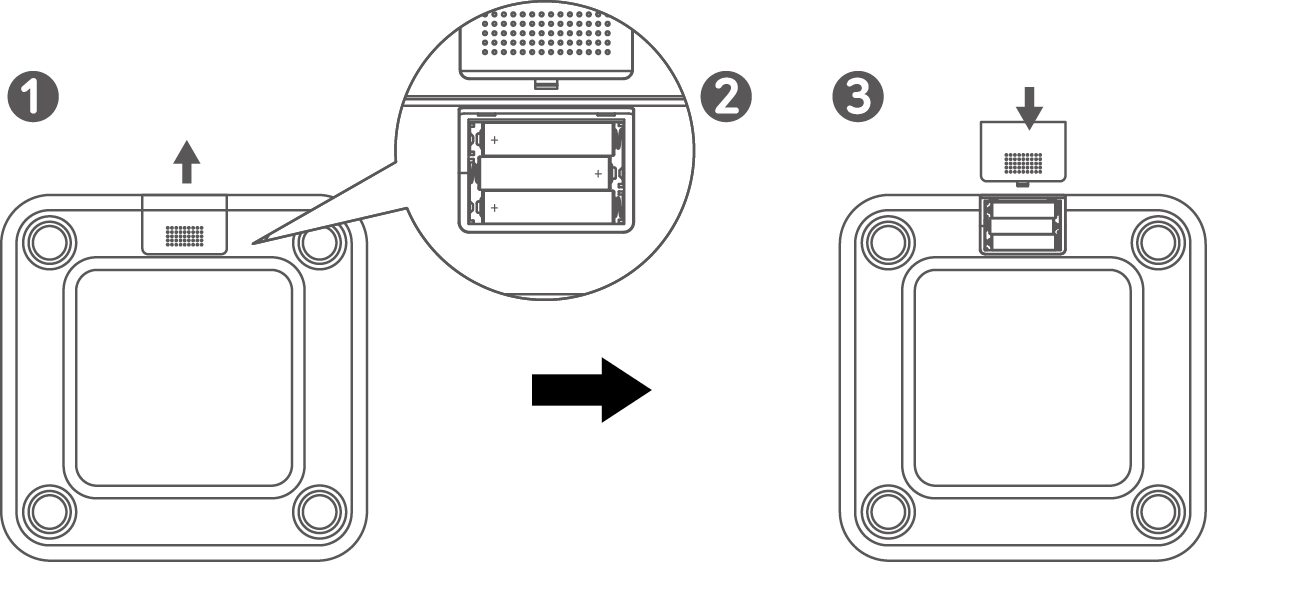
Flip your Eufy scale over and look for the small UNIT button on the back. It is typically positioned near the battery compartment. Press it once to cycle through available units. Most models display pounds (lb), kilograms (kg), and sometimes stone (st). Note that the Smart Scale C1 (T9146) and Smart Scale P1 (T9147) do not support stone, so only lb and kg will appear on these models.
Watch the Display Change
Each press of the UNIT button changes the unit instantly. Continue pressing until you see kg appear on the screen. When kilograms display, stop pressing. Your scale is now set to kilograms. The next time you step on the scale, your weight will show in kg.
Pro Tip: Step on the scale barefoot after changing units to verify the update. The unit indicator appears briefly during startup.
Change Units Through the EufyLife App

If your Eufy scale connects via Bluetooth or Wi-Fi, the EufyLife app offers a more permanent solution for managing units. This method works well when sharing the scale with others who may have different preferences.
Open the EufyLife App
Launch the EufyLife app on your smartphone. Ensure your phone’s Bluetooth is turned on and you are logged into your account. Your scale should appear on the home screen if it has been previously paired.
Change Unit for Non-P2 Models
If you are using a C1, P1, or older model, follow these steps. Tap the three-dot menu in the upper right corner of the app screen. Select Unit from the settings menu. Choose kg from the available options. Confirm the change. The next time you weigh yourself, the scale will display in kilograms. This setting syncs across all users on the account unless individual profiles are configured.
Adjust Unit for P2 Series
The P2 series uses a different navigation path within the app. From the app homepage, tap your P2 scale to open device settings. Scroll and select Unit. Pick kg as your preferred unit. Exit the menu. No manual button pressing is needed after making this change in the app.
Note: The P2 syncs unit settings automatically. Avoid pressing the UNIT button on the device after changing settings in the app, as it may override your app preference.
Fix Common Unit Change Problems
Sometimes the unit reverts or does not update as expected. Here is how to resolve frequent issues.
Unit Resets After Battery Change
Some Eufy scales reset to the default unit (often lb) after batteries are replaced or become drained. Press the UNIT button again after changing batteries to restore your preferred setting. Using the EufyLife app to lock the unit setting can prevent this issue on supported models.
UNIT Button Does Not Respond
If pressing the UNIT button produces no response, check the battery level first. Low power can disable non-essential functions. Try removing and reinserting the batteries to reset the scale. The button is small, so press firmly with deliberate pressure.
App Shows kg But Scale Shows lb
When the app displays kilograms but the scale still shows pounds, the two devices are out of sync. Force close the EufyLife app and reopen it. Recheck the unit setting in the app. Step onto the scale to trigger a sync. If the problem persists, unpair and re-add the scale in the app.
Model-Specific Unit Support
Not all Eufy scales support every unit option. Knowing your model helps you understand what is available.
Smart Scale C1 (T9146)
This model supports only kilograms and pounds. Stone mode is not available. Change the unit using either the UNIT button on the back or the EufyLife app.
Smart Scale P1 (T9147)
Like the C1, this model supports kilograms and pounds only. No stone option exists. Change the unit using the back button or through app settings.
P2 Series
The P2 series offers full unit control through the app interface. There is no need to press the physical button after initial app setup. The scale automatically detects user profiles and applies the correct unit per user when profiles are set up.
Keep Your Scale Set to Kilograms
Maintain consistent kilogram readings with these simple habits.
Use the App for P2 Models
Once you configure the unit through the EufyLife app, let the app manage the setting. Avoid pressing the physical button on P2 models, which may override your app preference.
Label Your Scale
Place a small piece of tape on the bottom of the scale with kg written on it. This serves as a reminder for you and others not to press the UNIT button accidentally.
Replace Batteries Proactively
Low batteries can cause settings to reset. Replace batteries every six to twelve months depending on usage frequency.
Frequently Asked Questions About Changing Eufy Scale Units
Can I change my Eufy scale from pounds to kilograms without the app?
Yes. Most Eufy scale models have a physical UNIT button on the back. Simply flip the scale over and press the button until kg appears on the display.
Why does my Eufy scale keep switching back to pounds?
This usually happens after battery replacement or when the battery is low. The scale resets to default settings when power is interrupted. Replace batteries promptly and consider using the app to lock your unit preference.
Does the EufyLife app work with all Eufy scale models?
The app works with Bluetooth and Wi-Fi connected models, including C1, P1, and P2 series. Some older basic models may not connect to the app and require manual button changes.
How do I change units on the Eufy P2 scale specifically?
Open the EufyLife app and tap on your P2 scale from the homepage. Scroll down and select Unit. Choose kg and exit the menu. The setting syncs automatically to the scale.
What should I do if my Eufy scale shows no response when I press the UNIT button?
Check the battery level first. Low batteries can prevent the button from working. Remove and reinsert the batteries, then try pressing the button firmly. If nothing works, the scale may need service.
Can I set different units for different users on the same Eufy scale?
On P2 series models with user profiles configured, each user can have their own unit preference. The scale automatically applies the correct unit based on which user is being weighed.
Key Takeaways for Changing Your Eufy Scale to Kilograms
Changing your Eufy scale from lb to kg is a quick process that takes either a button press or a few taps in the EufyLife app. For most models, the physical UNIT button on the back of the scale provides the fastest solution. For P2 models, using the app creates a more permanent setting that syncs automatically. If your unit keeps resetting, check your batteries and consider using the app to lock your preference. Once set, your scale will display weight in kilograms consistently, making tracking simple and accurate.