Is your Health o meter scale showing inaccurate readings or stuck on the wrong unit? You are not alone. Many users struggle with basic setup, from placing the scale on carpet to missing the tiny unit button underneath. Getting your Health o meter scale set up correctly ensures every weight reading is accurate, consistent, and tailored to your preference, whether you need pounds, kilograms, or stone. This guide covers everything from initial placement and power-up to unit switching, model-specific steps, and battery replacement. No fluff, no guesswork.
Find the Perfect Location for Accurate Readings
Where you place your scale determines its accuracy from the very first use. Choosing the wrong surface leads to inconsistent numbers and frustration.
Place on Hard, Level Flooring
Set your Health o meter scale on tile, hardwood, or concrete. Avoid carpet, rugs, or uneven surfaces at all costs. These materials absorb pressure and distort readings, making your scale virtually useless. If the scale wobbles when you place it, the surface is not level. Reposition until all four corners sit flush against the floor.
Visual cue: After stepping off, the display should return to 0.0 consistently. If it shows random numbers or fails to reset, relocate the scale immediately.
Keep Away from High-Traffic Zones
Place your scale away from doors, appliances, or areas with frequent foot traffic. Vibrations from nearby movement can interfere with the digital sensors, causing erratic readings. For clinical models like the 500KL or 2210KL-AM, follow hospital protocols for stable, dedicated weighing stations.
Power On and Initialize Your Scale
Most digital Health o meter scales calibrate themselves automatically, but only if powered correctly. Skipping this step guarantees inaccurate readings.
Insert Batteries the Right Way
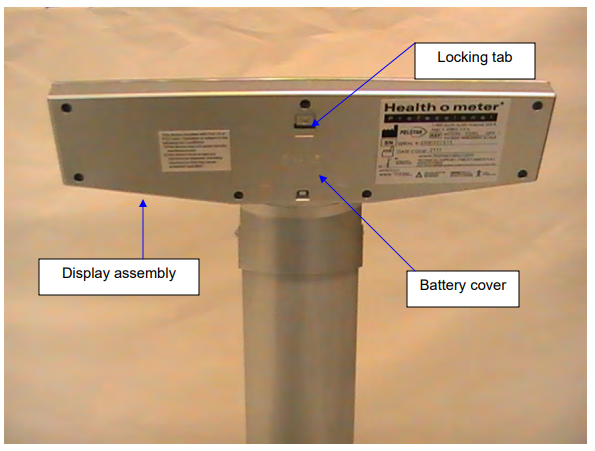
Check your model battery type before purchasing. Most digital scales use either a 9V battery common in HDM and BFM series models like HDM165DQ-53 and BFM920-01, or four AAA batteries found in portable models. Clinical units like the 600KL often support AC adapters. Open the battery compartment on the back of your scale. Match the plus and minus symbols exactly, then close the compartment securely.
Warning: Using expired or mismatched batteries causes dim displays or complete failure to turn on. Always use fresh batteries from a trusted brand.
Complete Auto-Zero Calibration
Step lightly on the scale or press the power button. Watch the display carefully. If it flashes CAL then shows 0.0, calibration was successful. If the display gets stuck on 8888 or remains blank, remove the batteries, wait thirty seconds, reinsert them, and try again.
Pro tip: Never skip the zero reset. Moving the scale, even slightly, requires recalibration before accurate use.
Switch Weight Units: Pounds to Kilograms

Changing units takes seconds with the right button, but doing it wrong leads to dangerous misreads. This step is more important than most users realize.
Locate the Unit Button
Flip your scale over and look for the unit switch button. It is typically a recessed button marked Unit, Switch, or MODE, sometimes with lb/kg labeling. Some models require a paperclip to press the button. Press it once and watch the display cycle through available units: lb to kg to st if your model supports stone. Wait one to two seconds between presses.
Example: The BFM142DQ-99 displays kg in blue. Pressing the unit button changes it to lb shown in white.
Confirm Your Selection
Once your preferred unit appears on the display, stop pressing the button. Step on the scale to verify it now displays weight in the selected unit. The setting saves automatically, even after you turn the scale off and back on later.
Critical error to avoid: Seventy kilograms equals approximately 154 pounds. Always double-check the unit symbol before recording your weight. This confusion leads to serious tracking errors.
Model-Specific Setup for Common Health o Meter Scales
Instructions vary slightly by model. Use these common examples as your guide for the most popular Health o meter scales.
HDM165DQ-53 Glass Scale Setup
Place the scale on a hard floor. Insert a 9V battery into the compartment on the back. Step on the scale lightly and it auto-powers on. The display shows 0.0 within two seconds. Press the bottom button to toggle between lb and kg. This model measures in 0.2 lb increments for reliable tracking.
BFM920-01 Body Fat Scale Setup
Stand barefoot on the metal electrodes for accurate body fat readings. Ensure the scale sits on tile or wood, never carpet. Press the side button to cycle through weight units. Wait for 0.0 to appear before stepping on. Hold still during measurement because body fat analysis uses bioelectrical impedance technology.
Expert note: Never use body fat scales immediately after showering or exercising. Hydration levels significantly skew results.
500KL Clinical Scale Setup
Place the clinical scale on a flat, level surface. Use a 9V battery or connect the AC adapter for continuous power. Press and hold POWER plus UNIT together for five seconds to enter setup mode. Select your preferred unit using the front keypad. Exit setup by stepping off the scale.
Bluetooth models like the 500KL-BT: Pair with the companion app to set units and create user profiles directly from your smartphone.
HAP400-62 Dial Scale Setup
This analog scale requires no batteries. Rotate the dial to align the pointer with the zero mark. Adjust using the calibration knob if your model includes one. Step on and read your weight directly from the dial face.
Maintenance tip: Recalibrate monthly by checking a known weight against the dial reading.
Replace Batteries Before They Cause Problems
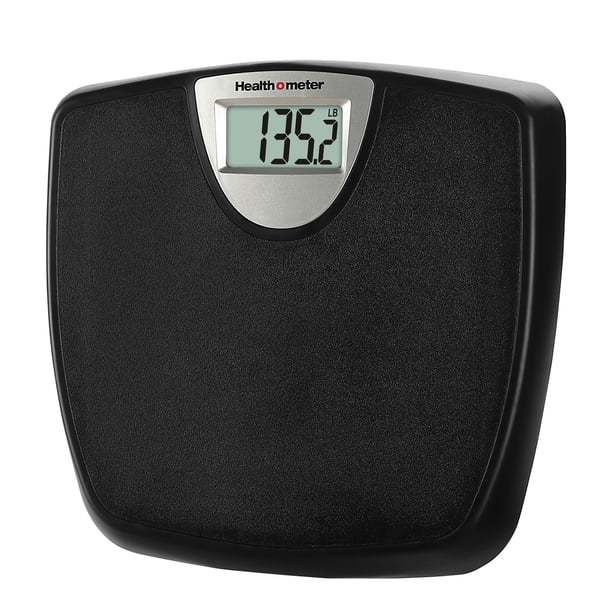
Weak batteries cause error messages, flickering displays, or complete power failure. Replacing them proactively prevents these issues.
Know When to Replace
Replace batteries annually or when you notice these warning signs. The display dims significantly. The scale refuses to turn on. The screen shows Lo or BAT indicating low battery.
Quick Battery Replacement Steps
Turn off the scale if possible. Flip it over and open the battery door. Remove the old battery, noting the orientation. Insert a fresh battery matching the correct type. Close the compartment securely. Allow the scale to auto-reset to 0.0 before using.
Time estimate: This entire process takes about two minutes. Difficulty level is easy for anyone.
Warning: Never mix old and new batteries in the same device. This risks battery leakage and permanent damage to your scale electronics.
Test Accuracy After Initial Setup
Verifying your scale works correctly before relying on it saves you from tracking incorrect data. Always test with known weights.
Use Calibrated Test Weights
Grab calibrated items like dumbbells or standard weights. Weigh the same object three times in succession. Results should match within plus or minus 0.2 lb for home models.
Acceptable deviation: Up to 0.2 lb for home scales, 0.05 lb for clinical-grade models like the 500KL.
Fix Common Reading Problems
| Symptom | Likely Cause | Solution |
|---|---|---|
| Numbers fluctuate | Uneven surface | Move to hard floor |
| Will not power on | Dead battery | Replace battery |
| Stuck on CAL | Failed calibration | Reboot with battery reset |
| Wrong unit displayed | Unintentional toggle | Reset using unit button |
| Body fat error | Wet feet or socks | Use bare, dry feet |
Never test with liquids or unstable objects. They shift during weighing and give false readings that lead you to believe the scale is broken.
Keep Your Scale Accurate for Years
Regular maintenance extends your scale life and ensures continued accuracy. These simple habits make a huge difference.
Re-Zero Before Every Weigh-In
Always recalibrate to zero before each use, especially after moving the scale even an inch. Step on lightly to trigger auto-reset to 0.0. This takes two seconds and guarantees accuracy.
Clean Without Damaging Electronics
Wipe the scale surface with a damp cloth only. Avoid harsh chemicals, cleaning sprays, and never submerge the scale in water. Dry immediately after cleaning to prevent moisture damage.
Store in Proper Conditions
Keep your scale in a dry, room-temperature area. Never store it in bathrooms where humidity damages electronics. Avoid leaving it near heaters or in direct sunlight.
Register Your Warranty
Visit homscales.com and register your model to get one to three years of coverage depending on your model. Registration also provides recall alerts and access to customer support.
Contact Health o meter support if problems persist: Call 1 (800) 815-6615 or email homprocs@homscales.com.
Final Checklist: Setting Up Your Health o Meter Scale
Before you step on, verify every item on this list. Skipping steps leads to inaccurate data and wasted effort.
Check that your scale sits on a hard, level surface. Confirm batteries are fresh and inserted correctly. Verify the scale powered on and reset to 0.0. Ensure units are set to lb, kg, or st as needed. Test with a known weight to confirm accuracy. Store the scale properly after each use.
Setting your Health o meter scale takes less than five minutes, but skipping these steps leads to inaccurate data that ruins your tracking. Whether you are monitoring fitness progress or tracking patient health, precision starts with correct setup. Now that yours is ready, step on with confidence.
Frequently Asked Questions About Setting Health o Meter Scales
Where is the unit button located on a Health o meter scale?
The unit button is typically located on the bottom or side of most digital Health o meter scales. It may be labeled Unit, Switch, MODE, or marked with lb/kg. Some models have a recessed button that requires a paperclip to press.
Why does my Health o meter scale show inaccurate readings?
Inaccurate readings usually stem from placing the scale on carpet or uneven flooring. Other causes include weak batteries, failing to re-zero before weighing, or using the scale on a high-traffic area with vibrations. Move to a hard, level surface and replace batteries if needed.
How do I reset my Health o meter scale to pounds?
Ensure the scale is on a flat surface and turned on. Locate the unit button on the bottom or side. Press it to toggle between kilograms and pounds until the display shows pounds. The setting saves automatically even after powering off.
How often should I replace batteries in my Health o meter scale?
Replace batteries annually or immediately when you notice a dim display, failure to power on, or Lo/BAT warning. Using expired batteries causes inconsistent readings and potential damage.
Can I use my Health o meter body fat scale after showering?
No. Never use body fat scales immediately after showering, swimming, or exercising. Wet skin and altered hydration levels significantly skew bioelectrical impedance measurements, giving inaccurate body fat percentages.