
Setting up your Beurer scale correctly is essential for accurate weight and body composition readings. Whether you own a basic model like the BG17 or a smart scale like the GS 485, improper setup can lead to inconsistent results, failed Bluetooth pairing, or missing data. This guide walks you through every step from battery installation to app syncing so you get reliable measurements from day one.
You’ll learn how to configure user profiles, calibrate the scale, and avoid common mistakes that affect accuracy. Whether you’re using a diagnostic scale with BIA technology or a simple digital model, this comprehensive walkthrough ensures you master your Beurer scale quickly and confidently.
Install Batteries Correctly
Before powering on any Beurer scale, proper battery setup is critical. Incorrect or missing steps here prevent activation and damage long-term performance.
Remove Insulating Strip First
All Beurer scales (BF 480, BG13, GS 485) come with a battery insulating strip inside the compartment. You must pull this out before the scale can power on. Skipping this step is the most common reason users report scale not turning on after setup.
Insert Fresh Batteries
Use new AAA or AA batteries as specified in your model manual. BF 480, BG13, and BG17 typically use AAA, while GS 485 may use rechargeable AA or standard batteries. Ensure correct polarity when inserting. For models with rechargeable batteries, fully charge before first use.
Warning: Old or weak batteries cause erratic behavior, failed calibration, flickering display, or sudden shutdowns. Replace every 6 to 12 months under daily use.
Choose the Right Surface
Where you place your Beurer scale directly impacts measurement accuracy.
Use a Hard, Flat Floor
Always set the scale on a firm, level, non-slip surface such as tile, hardwood, or concrete. Soft materials like carpets, rugs, or vinyl flooring absorb pressure and produce false low readings.
Avoid Moving the Scale
Once placed, do not relocate the scale between uses. Each move requires recalibration. If you must move it, wait 15 minutes after repowering to allow auto-zero stabilization.
Pro Tip: Test surface stability by stepping on the scale twice in a row without stepping off in between. If the second reading differs by more than 0.2 kg, the surface is unstable.
Set Measurement Units
Beurer scales support multiple weight units. Configure this during initial setup for consistent tracking.
Change Units via Set Button
On most models (BF 480, BG13, BF 600), follow these steps:
• Press and hold the Set button
• Use arrow keys to toggle between kg, lb, and sometimes st (stones)
• Press Set to confirm
The GS 485 allows unit changes through the Beurer Health Manager app, offering greater flexibility.
Note: Unit settings reset only if batteries are removed for more than 30 seconds. Otherwise, your preference is saved automatically.
Enter Personal Data for BIA Models

Diagnostic scales (BF 480, BG13, GS 485) use bioelectrical impedance analysis (BIA) to calculate body fat, muscle, and water. Accurate personal data is required for these calculations to work.
Select a Memory Slot
To assign your profile:
• Press Set
• Scroll through available slots using arrow buttons
• Press Set again to lock selection
Each slot stores one user’s full data including height, age, gender, and activity level.
Input Required Parameters
After selecting a slot, enter the following:
• Height (cm or inches)
• Age (years)
• Gender (male/female)
• Activity level (sedentary to very active)
Why It Matters: BIA algorithms rely on these inputs. Entering wrong height or age skews body fat percentage by up to 5 to 8 points, making tracking unreliable.
Pair GS 485 with Beurer App
The GS 485 connects via Bluetooth for automatic data syncing and trend tracking.
Install Beurer Health Manager
Download Beurer Health Manager from the App Store (iOS) or Google Play (Android). Open the app and create an account or log in if you already have one.
Complete Smart Setup
Follow these steps to pair your scale:
• Turn on Bluetooth on your phone
• In the app, tap “Add Device”
• Select GS 485 from the device list
• Enter personal details including date of birth, height, gender, and activity level
• Assign a short name (e.g., “John’s Scale”)
Turn on the scale and it will appear automatically if within range.
Sync Behavior: If the app is closed during weighing, data saves locally on the scale and uploads when reopened. Unrecognized users appear as “unknown” in the app.
Calibrate Your Beurer Scale
Proper calibration ensures precision. Most models auto-calibrate, but manual steps help fix errors.
Activate Auto-Zero Function
All Beurer scales perform auto-zero calibration when powered. Follow this sequence:
• Tap the scale gently (BG17, GS 485)
• Wait for display to show “0.0”
• Step on only after zero is confirmed
Never step on before the zero sequence completes or readings will be inaccurate.
Recalibrate After Battery Change
If readings drift after replacing batteries:
• Remove batteries
• Wait 30 seconds
• Reinsert and tap to activate
• Wait for “0.0” before use
This resets internal sensors and fixes offset errors.
When to Recalibrate: After moving location, following battery replacement, or if readings fluctuate unexpectedly.
Take Accurate Measurements
Even perfect setup fails without correct measurement technique.
Step On Barefoot for BIA
For models with electrodes (BF 480, BG13, GS 485), stand barefoot on metal pads. Ensure full foot contact with both electrodes. Keep feet dry and clean because sweat or lotion affects conductivity and produces errors.
Stand Still During Reading
Follow this process for accurate results:
• Step on once “0.0” appears
• Stay motionless with arms at sides
• Distribute weight evenly
• Wait 5 to 10 seconds for full diagnostic results
The scale turns off automatically after completion.
Best Time to Measure: First thing in the morning, before eating or drinking, for consistent body composition tracking.
Manage Multiple Users
Beurer scales support household use with memory for up to 8 users.
Switch Between Profiles (BF 480, BG13)
To switch users:
• Press Set before stepping on
• Use arrows to select your memory slot
• Confirm with Set
• Step on after “0.0” appears
Each user must have their own saved profile for accurate BIA results.
App-Based Recognition (GS 485)
The scale identifies users by weight range, time of day, and measurement pattern. If no match is found, data logs as “unknown.” To fix this, re-enter user weights in the app, weigh at consistent times, and avoid overlapping weight ranges between users.
Transfer and Track Data
Track progress over time using built-in memory or app integration.
Sync BF 480 via USB
Connect the scale to a PC using a USB-C cable. Launch Beurer Health Manager (desktop) and import data including weight, body fat percentage, muscle mass, water content, and BMI. This is ideal for clinical or fitness tracking.
Use GS 485 App Features
The mobile app offers several useful features:
• Automatic syncing when open
• Trend graphs for weight, fat, and muscle
• Cloud backup if enabled
• Export to PDF or CSV
• Manual entry into third-party apps
Sync Tip: Keep the app open during weighing for instant upload. Closed app means delayed sync.
Troubleshoot Common Problems
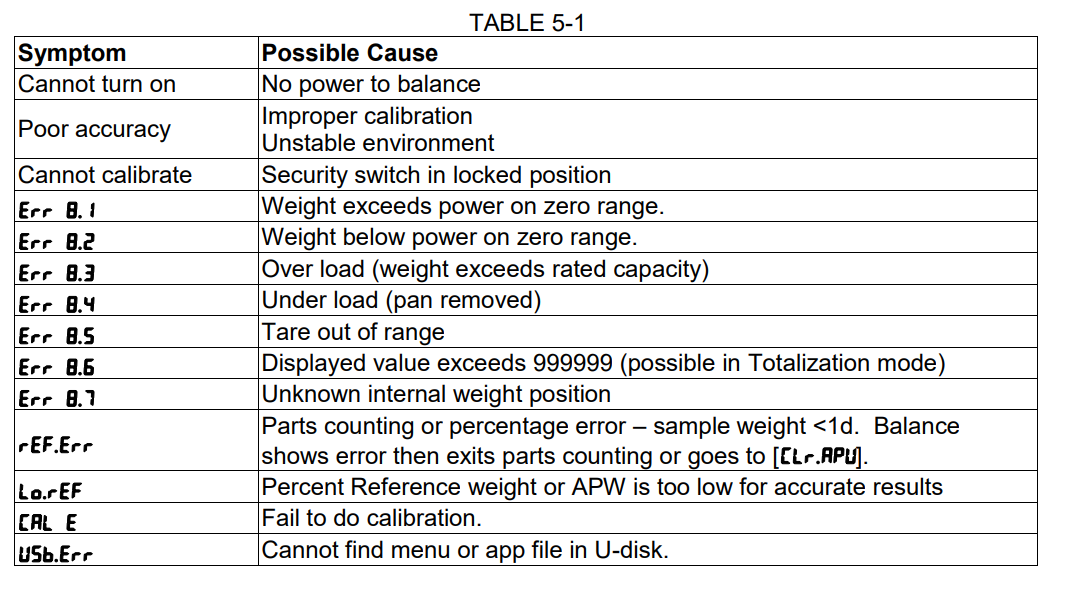
Fix issues fast with targeted solutions.
Scale Won’t Turn On
Causes: Insulating strip still in place or dead/reversed batteries.
Fix: Remove insulating tab and replace with fresh batteries, ensuring correct polarity.
Display Shows “Err” or “Lo”
“Lo” indicates low battery and requires immediate replacement. “Err” means overload or internal fault. Step off and retry. If persistent, recalibrate the scale.
Inconsistent Weight Readings
Likely causes include uneven or soft floor, scale moved recently, or dirty sensor contacts. Solutions involve placing on hard tile or wood, avoiding relocation, and cleaning the base with a dry cloth.
Body Composition Not Calculating
This happens when personal data is missing. Enter height, age, gender, and activity level, then save to a memory slot before measuring.
GS 485 Won’t Sync with App
Check the following:
• Is Bluetooth enabled?
• Is the Beurer app open?
• Is the scale within 3 meters?
• Try restarting phone and scale
If still failing, unpair and re-add the device in app settings.
Maintain Your Scale Long-Term
Proper care extends lifespan and accuracy.
Clean Safely
Wipe the surface with a soft, dry or slightly damp cloth. Never use abrasives, alcohol, or submerge in water. Avoid excessive moisture and do not leave the scale in steamy bathrooms.
Replace Batteries Promptly
Low power affects calibration and Bluetooth performance. Replace when the display dims, “Lo” appears, or the scale fails to turn on.
Store in Dry Location
Humidity damages internal electronics. Store in a well-ventilated, dry area away from showers or sinks.
Final Thoughts on Setting Your Beurer Scale
Setting your Beurer scale properly ensures accurate, repeatable results. Start with correct battery setup by removing the insulating strip, choose a stable hard surface, and always wait for auto-zero calibration before stepping on. For BIA models, enter accurate personal data including height, age, gender, and activity level, as these directly affect body composition calculations. Use the Beurer Health Manager app with the GS 485 for seamless tracking and data syncing.
Avoid common pitfalls like stepping on too early, using outdated batteries, or placing the scale on soft surfaces like carpets. With consistent measurement technique and regular maintenance, your Beurer scale delivers reliable health insights for years.
Frequently Asked Questions About Setting a Beurer Scale
Why won’t my Beurer scale turn on?
The most common cause is the battery insulating strip still being in place. Remove it from the battery compartment. If that is not the issue, check battery polarity or replace with fresh batteries.
How do I change the weight unit on my Beurer scale?
Press and hold the Set button, then use arrow keys to toggle between kg, lb, and st (stones). Press Set to confirm. For GS 485 models, change units through the Beurer Health Manager app instead.
Do I need to enter personal data for weight-only models?
No, personal data (height, age, gender, activity level) is only required for diagnostic scales with BIA technology like BF 480, BG13, and GS 485. Basic weight models work without this information.
How do I recalibrate my Beurer scale?
Remove the batteries, wait 30 seconds, reinsert them, and tap the scale gently to activate. Wait for “0.0” to appear before stepping on. Recalibrate after moving the scale or replacing batteries.
Why does my GS 485 show “unknown” in the app?
The scale cannot match your measurement to a saved profile. Re-enter user weights in the app, weigh at consistent times each day, and avoid having multiple users with similar weights measure at the same time.
How often should I replace batteries in my Beurer scale?
Replace batteries every 6 to 12 months under daily use. Replace immediately when “Lo” appears, the display dims, or the scale fails to turn on consistently.



