Changing your crane scale to display weight in pounds (lbs) is essential for operations in the U.S. and other regions using the imperial system. Whether you’re handling heavy loads in construction, logistics, or manufacturing, accurate weight readings in lbs ensure compliance, safety, and efficiency. Most digital crane scales allow quick unit switching between kilograms (kg) and pounds (lbs) through a simple menu-based process.
This guide walks you through the exact steps to set crane scale to lbs, including model-specific tips, calibration best practices, troubleshooting, and verification. You will learn how to make the change correctly, confirm accuracy, and avoid common mistakes, no matter if you are using an APOLLO, Kawasaki OCS, or generic digital crane scale.
Access the Settings Menu
Before changing units, you must enter the configuration menu of your crane scale. The interface varies slightly by model, but core functions remain consistent across most devices.
Turn On and Stabilize the Scale
Power on the crane scale using the designated button. Hang it freely with no load attached. Wait for the display to stabilize at zero reading or “0.0 kg.” A stable baseline ensures accurate navigation and prevents errors during setup.
Enter Unit Settings Mode
Use control buttons to access settings. These buttons are often labeled “MODE,” “UNIT,” “MENU,” or with arrows. Press “MODE” or “MENU” repeatedly until “Settings,” “Config,” or “Unit” appears. On some models, press and hold “UNIT” for 3 to 5 seconds to jump directly to unit selection. If prompted, enter a password or technician mode.
Pro Tip: If nothing happens, check battery level. Low power can freeze the interface.
Select Pounds (LBS) as Unit

Once in the unit settings, choose lbs from the available weight options. This step is straightforward but requires careful navigation through the menu.
Navigate to Weight Unit Option
Look for one of these menu paths. “Weight Unit,” “Measurement Settings,” “Units” then “kg/lbs,” or “System” then “Unit.” Use arrow keys or “+/-” buttons to scroll through choices until you find the unit selection.
Choose Pound (LBS) Display
Available units typically include kilograms (kg), pounds (lbs), grams (g), ounces (oz), Newtons (N), and stones (st). Highlight “Pound (lbs)” or “LBS” using your navigation keys. Press “OK,” “ENTER,” or “SELECT” to confirm your choice. The screen may briefly flash or show “SAVING” before returning to zero.
Visual Cue: After selection, the display should now read “0.0 lbs” instead of “0.0 kg.”
Save and Confirm the Change
Many crane scales require explicit confirmation to lock in new settings. Skipping this step is a common mistake that causes the scale to revert to kilograms.
Confirm Unit Switch
After selecting lbs, watch for prompts like “Save changes?”, “Apply new unit?”, or “Yes/No?” Use the appropriate button to confirm. If no prompt appears, power cycle the device and verify the unit remains in lbs.
Warning: Without confirmation, the scale may revert to kg after restart, especially on older or basic models.
Calibrate After Unit Change (Recommended)
Switching units does not recalibrate the sensor, but internal calculations change. For full accuracy, calibrate after setting crane scale to lbs.
When to Calibrate
Calibrate when first setting crane scale to lbs. Also calibrate after long storage or physical impact, when readings seem off, or as part of routine maintenance monthly or quarterly.
Perform Basic Calibration
Follow this general procedure, but always consult your manual for model-specific steps.
Hang scale freely and ensure no load and minimal vibration. Enter calibration mode by pressing “CAL” plus “ON,” “ZERO” plus “UNIT,” or holding “CAL” for 5 seconds. Wait for “CAL” or “0.0” to appear. Attach a certified test weight that matches your scale range. Wait 10 to 20 seconds for stabilization. Confirm with “ENTER.” The scale will exit mode automatically.
Success Signal: Display shows correct test weight within tolerance.
Note: Using incorrect or non-certified weights leads to inaccurate calibration. Never substitute with guesswork.
Verify Accuracy in LBS
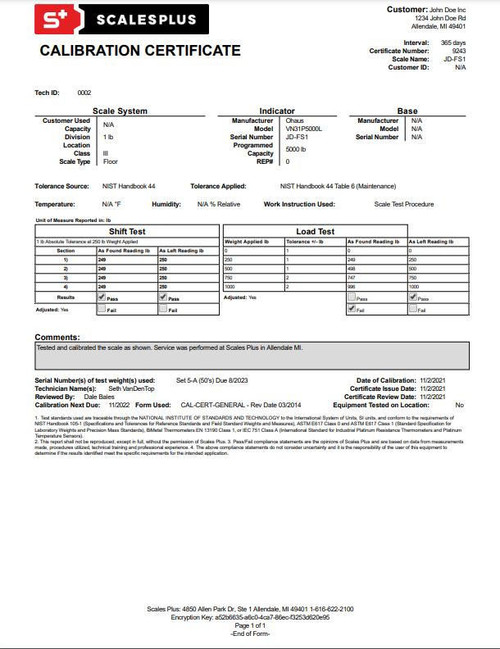
Never assume the scale reads correctly after a unit switch. Always test with known weight to confirm the change worked properly.
Test With Known Weight
Use a certified test weight such as a 50 lb calibration mass. Alternatively, suspend a container with precisely measured contents like water where 1 gallon equals 8.34 lbs. Hang it securely from the hook.
Check Display Reading
Allow 15 to 30 seconds for stabilization. Compare displayed value to known weight. Acceptable range depends on your scale accuracy specification.
| Scale Class | Tolerance Example |
|---|---|
| Industrial | ±0.5 lb |
| High-Precision | ±0.1 lb |
| General Use | ±1 lb |
If reading is outside tolerance, recalibrate or contact support.
Perform Tare Function Test
Place a bucket with known weight on the hook. Press “TARE” to zero it out. Add known weight inside. Verify net weight matches expected value. This confirms both unit and function integrity.
Model-Specific Instructions

While most digital crane scales follow the same logic, key differences exist between brands. Understanding your specific model ensures success.
APOLLO Crane Scales
Common models include APOLLO OCS-D and OCS-LCD. These scales feature clear displays, intuitive menus, and multilingual support.
To set to LBS, power on and wait for “0.0 kg.” Press and hold “UNIT” for 4 seconds. Screen cycles through “kg,” “lb,” and “N.” Release when “lb” appears. No confirmation is needed because the change saves automatically.
Battery tip: Replace CR2032 every 12 months to maintain memory retention.
Kawasaki OCS Series
The Kawasaki OCS series includes OCS-1T, OCS-5T, and OCS-10T. These models are known for durability and overload protection.
To set to LBS, press “MODE” until “SET” blinks. Press the arrow button to select “UNIT.” Press “+” to toggle to “LB.” Press “MODE” again to save and exit.
These models may require full recalibration after unit changes. Follow the built-in CAL sequence.
Generic Digital Scales
These scales are often sold under private labels or as OEM units. They may lack detailed manuals.
Try the universal shortcut of holding “ZERO” plus “UNIT” for 5 seconds. Alternatively, press “CAL” then “UNIT” and look for any blinking unit indicator. If unresponsive, search online using the model number printed on the back.
Troubleshoot Common Issues
Even with correct steps, problems can arise. Here is how to fix them fast.
Unit Will Not Change
Wrong button sequence is the most common cause. Consult your manual or try “UNIT” plus “MODE.” A frozen display can be fixed by removing batteries, waiting 30 seconds, and reinserting. Low battery requires replacement before proceeding.
Reset trick: Remove power for 60 seconds to clear stuck settings.
Display Reverts to KG
This happens when the change was not confirmed or memory reset. Re-enter the menu and confirm selection. Test after a power-off and power-on cycle. Some models lose settings if the battery dies, so replace batteries promptly.
Inaccurate LBS Readings
Possible reasons include no calibration after unit change, damaged load cell, electromagnetic interference, or side loading or swing. Recalibrate with a test weight if needed. Inspect for dents, corrosion, or misalignment. Move away from motors, welders, or radios. Hang load straight and avoid jerking.
If problems persist, contact the manufacturer with model and serial number.
Maintain Accuracy Long-Term
Setting crane scale to lbs is just the first step. Keeping it accurate over time matters more for safety and efficiency.
Follow a Calibration Schedule
For daily use, calibrate every 30 days. For occasional use, calibrate every 90 days. For critical applications, verify before each job. After damage or extreme conditions, calibrate immediately. Use NIST-traceable weights and log all calibration events.
Perform Daily Pre-Use Checks
Before each operation, inspect hooks and shackles for wear. Confirm the display turns on and zeros properly. Test the tare function. Verify the unit is still in lbs.
A 2-minute check prevents costly errors and accidents.
Store Properly
Keep the scale in a dry, temperature-stable environment. Avoid exposure to moisture, dust, chemical vapors, and strong magnetic fields. Use a protective case if available.
Why LBS Matters in Real Operations
Switching to pounds is not just about preference. It is often mandatory for compliance and safety.
U.S. Industry Standards
OSHA, ASME, and NTEP regulations often reference pounds for lifting limits. Blueprint specs, material sheets, and shipping documents use imperial units. Mismatched units can lead to overloading, fines, or equipment failure.
Logistics and Compliance
Weighing cargo for trucks, rail, or air freight requires lbs for DOT compliance. Agricultural operations rely on imperial pricing models. Exporters must match customer unit expectations.
Example: A 2,000 kg load equals 4,409 lbs. Misreading could exceed axle weight limits.
Final Tips for Success
Always read the manual first and never assume button functions are universal. Label your scale by attaching a sticker indicating “SET TO LBS” to prevent accidental changes. Train all team members on how to verify and reset units. Use a checklist that includes “Unit: lbs?” in pre-operation inspections.
Summary: Key Steps to Set Crane Scale to LBS
Power on the scale with no load. Access settings via “MODE,” “UNIT,” or menu button. Select “Pound (lbs)” from unit options. Confirm and save the change. Calibrate with a known test weight. Verify accuracy using a calibrated load. Document and maintain with regular checks.
By mastering how to set crane scale to lbs, you ensure precision, safety, and compliance across all lifting operations. Whether you are using an APOLLO, Kawasaki OCS, or generic model, the process is fast and foolproof when done right.
Frequently Asked Questions About Setting Crane Scale to LBS
How do I change my crane scale from kg to lbs?
Access the settings menu by pressing “MODE” or “UNIT” button. Navigate to “Weight Unit” or “Measurement Settings.” Select “Pound (lbs)” from the available options. Confirm the change and save. Recalibrate if needed for accuracy.
Does changing units affect crane scale calibration?
Changing units does not automatically recalibrate the sensor. The internal calculations change, so it is recommended to perform calibration after switching to lbs to ensure accurate readings.
Why does my crane scale revert to kg after I change it?
The change was likely not confirmed properly. Some models require explicit confirmation to save settings. Re-enter the menu, select lbs, and confirm the selection. Also check if the battery is low, as dying batteries can reset settings.
What is the best way to verify accuracy after setting crane scale to lbs?
Use a certified test weight of known value. Suspend it from the hook and compare the displayed weight to the known value. The reading should fall within your scale tolerance range. Perform a tare function test as well to confirm overall functionality.
Can I set any digital crane scale to display in pounds?
Most digital crane scales support multiple units including lbs, kg, g, and oz. However, interface and menu navigation vary by brand and model. Consult your specific user manual for accurate instructions.
How often should I calibrate my crane scale after switching to lbs?
Calibrate when first setting to lbs, after physical impact or extreme conditions, and routinely every 30 to 90 days depending on usage frequency. Critical applications should be verified before each job.
Key Takeaways for Setting Crane Scale to LBS
Setting your crane scale to display weight in pounds is a straightforward process that involves accessing the settings menu, selecting the lbs unit, and confirming the change. Most digital crane scales support this unit conversion through a simple menu navigation process. After changing the unit, always verify accuracy by testing with a certified weight and consider recalibrating to ensure precise measurements.
Regular maintenance and calibration are essential for long-term accuracy. Establish a calibration schedule based on your usage frequency and always perform pre-use checks to confirm the unit setting has not changed. Understanding your specific model, whether APOLLO, Kawasaki OCS, or generic, helps streamline the process and prevents common troubleshooting issues.
Accurate weight measurement in pounds ensures compliance with U.S. industry standards, facilitates proper documentation, and enhances safety in all lifting operations. Take time to master this process and train your team to maintain consistency across your operations.