
If you’ve just unboxed your Ozeri digital bathroom scale and are wondering how to set Ozeri scale for accurate weight and body composition tracking, you’re in the right place. Whether you own the Ozeri ZB13 Touch II Total Body Scale or the ZB14 Precision II Digital Scale, proper setup is essential for reliable results. This guide walks you through every step, from removing the battery strip to programming user profiles, enabling tare mode, and calibrating the scale. You’ll also learn how to switch units, reset the device, and avoid common mistakes that affect accuracy.
Activate Your Ozeri Scale
Before programming or weighing, your Ozeri scale must be powered on correctly. This initial activation step is critical for all models.
Remove Battery Insulating Strip
Flip the scale over and open the battery compartment. Pull out the plastic insulating strip beneath the batteries. This step is critical because the scale won’t turn on without it. After removal, lightly step on the scale. If it lights up, activation is successful.
Place on a Hard, Flat Surface
Use tile, hardwood, or concrete surfaces. Never place the scale on carpet or rugs. An uneven or soft surface causes inaccurate readings. Ensure the floor is dry and level before use.
Power On with StepOn Technology
Simply step barefoot onto the scale. The Ozeri scale activates automatically with no buttons needed. It displays weight and powers off after 10 seconds of inactivity.
Program User Profiles on Your Ozeri Scale
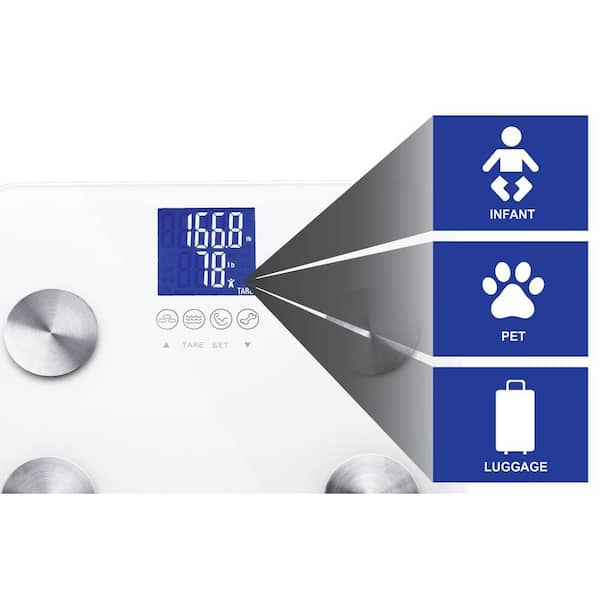
The Ozeri ZB13 supports up to eight user profiles, each storing gender, height, age, and reference weight for body composition tracking. This feature distinguishes it from the simpler ZB14 model.
Enter Setup Mode
Press and hold the SET button. The screen flashes PN, which stands for Profile Number, like P1. Release the button to begin setup.
Select Profile Number
Use the Up and Down Arrow buttons to choose P1 through P8. Press SET to confirm your selection. Each family member should have their own profile for accurate tracking.
Set Gender and Activity Level
Icons appear on screen showing male, female, male athlete, and female athlete options. Cycle through these using the arrow buttons. Press SET to save your choice. Select athlete mode if you train 14 or more hours per week and have a resting heart rate of 60 beats per minute or lower.
Enter Height
Adjust height using the arrow buttons. Units depend on your setting, either inches or centimeters. The range spans from 4 feet 10 inches to 7 feet 6 inches. Press SET to confirm.
Enter Age
Use the arrow buttons to set your age between 10 and 99 years. Press SET to save this information.
Save Reference Weight
The screen shows zero. Step barefoot onto the scale immediately. Stay still until weight and body metrics appear. The scale powers off automatically after 10 seconds. Success is confirmed when the next time you step on, it displays body fat percentage, water percentage, muscle percentage, and bone mass.
Enable Auto-Recognition for Users
Once profiles are set, the ZB13 automatically identifies users based on stored reference weight. This convenient feature saves time during daily weigh-ins.
How Auto-ID Works
When you step on, the scale compares your weight to all eight profiles. If your weight is within plus or minus 3 kilograms of a stored profile, it selects that user. The profile number appears on screen.
Handle Multiple Matches
If two users are too close in weight, the scale shows both profile numbers. Use the Up and Down Arrows to manually select the correct profile. If no selection is made, the scale turns off. For best results, keep at least 6.6 pounds between users to prevent conflicts.
Use Daily Weighing Mode
After setup, daily use is simple and automatic. Follow these steps for consistent results.
Step-by-Step Weighing
Place the scale on a hard, dry floor. Step on barefoot because socks block bioelectrical signals. Stand still until weight locks in. The scale displays weight first, then cycles through body fat percentage, water percentage, muscle percentage, and bone mass. The best time to weigh is morning, after using the bathroom, before eating or drinking.
View Body Composition
Metrics rotate every few seconds. Icons light up showing FAT, TBW, MUS, and BONE. You can step off after the first reading because the rest will continue displaying. Dehydration skews results, so avoid weighing after exercise, alcohol, or caffeine consumption.
Set Tare Mode for Infants, Pets, or Luggage
Use tare mode to weigh items like babies, pets, or bags by subtracting your weight. This feature is available only on the ZB13 model.
Activate Tare Function
Press the Tare button located under the scale. The TARE icon appears on screen.
Method One: Subtract Your Weight First
Step on alone without the baby or pet. Wait for weight to lock, then step off. Pick up the infant or pet and step back on. The scale shows your weight on the top line and the baby or pet weight on the bottom line with an infant icon.
Method Two: Weigh Together Then Alone
Step on carrying the item. Wait for the reading, then step off. Within 25 seconds, step back on without the item. Scale calculates the difference and displays both weights. Always hold infants securely and never rush the process. Note that body composition analysis is disabled in tare mode.
Change Weight Units on Your Ozeri Scale
Switch between pounds, kilograms, and stones anytime using the unit button.
How to Change Units
Step on to turn on the scale. Step off. Press the Unit button under the scale. The display cycles through pounds, kilograms, stones, and back to pounds. Wait for your desired unit to appear. The setting saves automatically until changed again.
Calibrate the Ozeri Scale
Your Ozeri scale auto-calibrates after movement or battery changes. This ensures continued accuracy.
When Calibration Happens
Calibration occurs during first-time use, after being moved or lifted, and after battery replacement. The first reading after these events is invalid.
Calibration Steps
Step on the scale. A weight appears, then C shows on screen. Step off and wait 10 seconds. The scale turns off and calibration is complete. Do not use the initial weight reading for tracking purposes.
Reset the Ozeri Scale
Reset when profiles are wrong, auto-ID fails, or weight changes significantly.
Reset ZB13 Touch II
Press and hold the Unit button for four or more seconds. A reset symbol appears. Scale powers off. All stored weights are deleted. Profiles remain but require new reference weights. Reset when weight change exceeds 6.6 pounds, when auto-recognition fails, or when display errors occur.
Reset ZB14 Precision II
Remove and reinsert batteries. This clears the last stored weight. There are no user profiles to delete on this model. After resetting ZB13, reprogram all users using the full setup process.
Interpret Body Composition Metrics
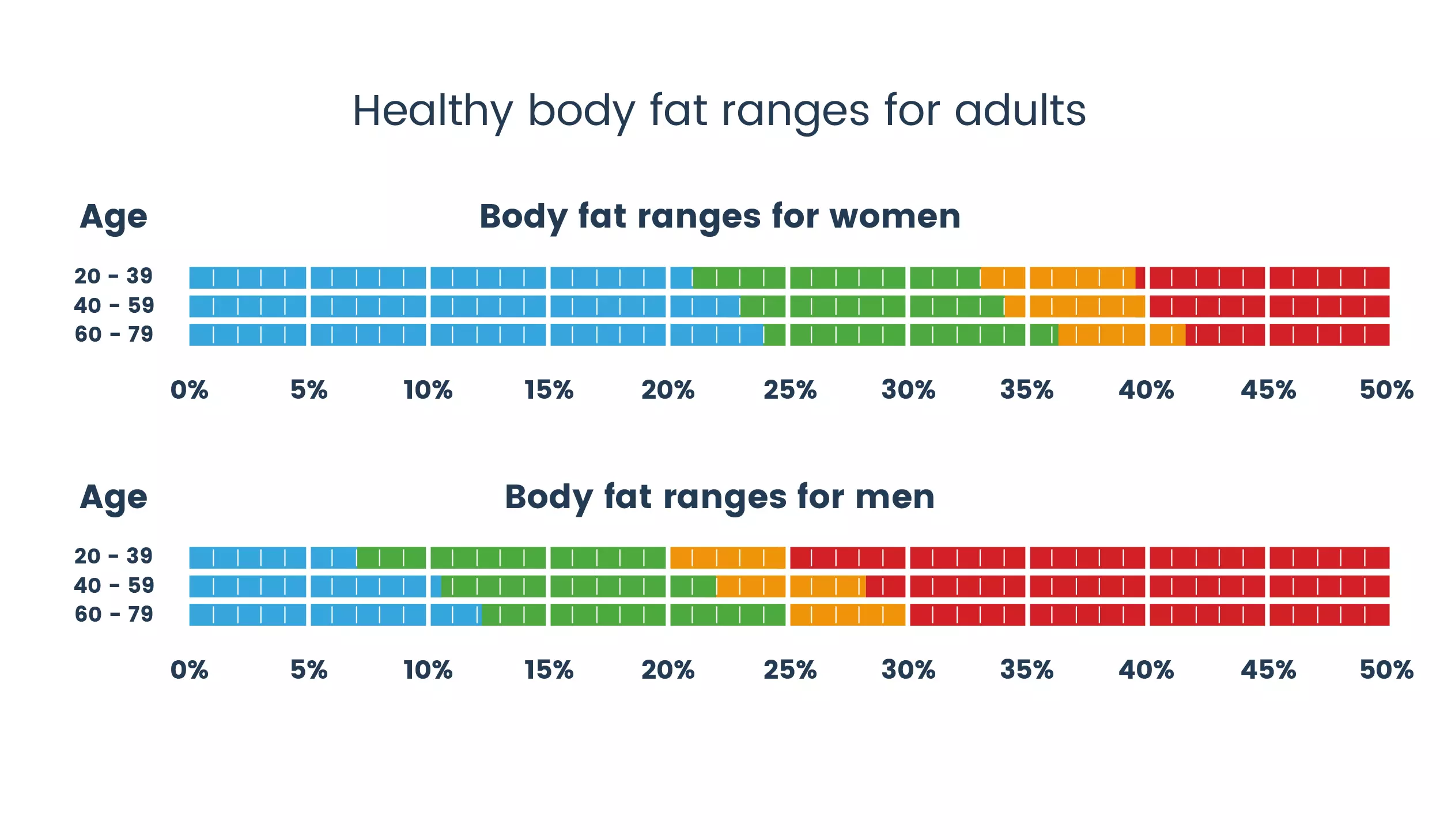
The ZB13 uses Bioelectrical Impedance Analysis to estimate body fat, water, muscle, and bone mass. These readings are home-use estimates, not medical diagnoses.
What Each Metric Shows
Body fat percentage healthy range is 8 to 25 percent for men and 21 to 36 percent for women. Body water percentage ranges from 50 to 65 percent for men and 45 to 60 percent for women. Muscle mass should exceed 48 percent for men and 34 percent for women. Bone mass typically ranges from 1.1 to 22 pounds.
Body Fat Indicator Symbols
A blank space indicates underweight. A zero symbol means healthy. A single plus sign means overweight. Double plus signs indicate obese.
Maintain Accuracy and Longevity
Keep your Ozeri scale accurate and in top condition with proper care.
Cleaning Tips
Wipe with a damp cloth and never soak the scale. Avoid alcohol, solvents, or abrasives. Dry thoroughly after cleaning.
Battery Care
Replace batteries when the display dims or fails to turn on. Use lithium batteries for ZB13 models or AAA for ZB14 models. Remove batteries if storing the scale long-term.
Usage Best Practices
Always step barefoot and with dry feet. Stand centered and do not shift or jump during measurement. Weigh at the same time daily for consistency.
Avoid Safety Risks and Errors
Follow these guidelines to protect your scale and your health.
Critical Warnings
Do not use with a pacemaker because BIA sends electrical current. The scale is not for pregnant women or children. Maximum weight capacity is 440 pounds. If a negative sign appears, step off immediately. Never use on wet floors or with wet feet. Do not disassemble or drop the scale.
Accuracy Killers
Avoid weighing after exercise, eating, or drinking. Do not use socks or lotions on your feet. Never place the scale on carpet or uneven floors. This device is not for medical diagnosis, so consult a doctor for health concerns.
Access Support and Warranty
Need help? Ozeri offers support and coverage for their products.
Warranty Details
The ZB13 includes one year of coverage for defects in materials and workmanship. The ZB14 includes two years of coverage. Accidental damage, misuse, commercial use, battery issues, and unauthorized repairs are not covered.
Contact Support
Call 1-877-299-1296 or email support@ozeri.com. Manuals are available at manual.tools.
Key Takeaways for Setting Up Your Ozeri Scale
Setting your Ozeri scale correctly ensures accurate, consistent health tracking. Remove the battery insulating strip first, then place the scale on a hard, flat surface. Program user profiles on the ZB13 for body composition analysis, and use tare mode safely for weighing infants or pets. Reset the scale when weight changes significantly or auto-recognition fails. With daily use under consistent conditions, your Ozeri scale becomes a powerful tool for long-term wellness management.
Frequently Asked Questions About Setting an Ozeri Scale
How do I turn on my Ozeri scale for the first time?
Remove the battery insulating strip from the compartment underneath the scale. Then simply step barefoot onto the scale to activate it automatically through StepOn technology.
Why won’t my Ozeri scale turn on?
The battery insulating strip must be removed before the scale will function. Check that batteries are properly installed and the compartment is closed securely.
How do I program user profiles on the Ozeri ZB13?
Press and hold the SET button until PN appears. Select a profile number using arrows, then set gender, height, age, and step on to save your reference weight.
Can I change weight units from pounds to kilograms?
Yes. Step on to turn on the scale, step off, then press the Unit button under the scale. The display cycles through pounds, kilograms, and stones. Wait for your desired unit.
How do I reset my Ozeri scale to factory settings?
For ZB13 models, press and hold the Unit button for four seconds. For ZB14 models, remove and reinsert the batteries.



