Setting a Tanita scale correctly is essential for accurate body composition readings. If you own a Tanita BC-534, properly configuring user profiles, height, age, and activity level ensures reliable measurements every time. Whether you’re setting up your personal profile or using guest mode, this guide walks you through each step with precision.
You’ll learn how to input data, adjust settings, reset profiles, and return to factory defaults. By the end, you’ll know exactly how to set a Tanita scale for consistent, personalized results that help you track your health journey effectively.
Clear User Data Before Setting Up
Clear old or incorrect profiles before setting up a new user. The Tanita BC-534 supports four user slots, and resetting ensures accuracy for each person who will use the device.
Erase a Specific User Slot
To clear data from slot 4, follow these steps:
- Press the Set button
- Press the second, third, and fourth buttons in sequence
- The display shows the current value (e.g., 48)
- Use the Up button to scroll until it reads 48
- Press Set to confirm deletion
This prepares the slot for new data entry. Repeat for other slots if needed before configuring fresh profiles.
Input Personal Profile Settings
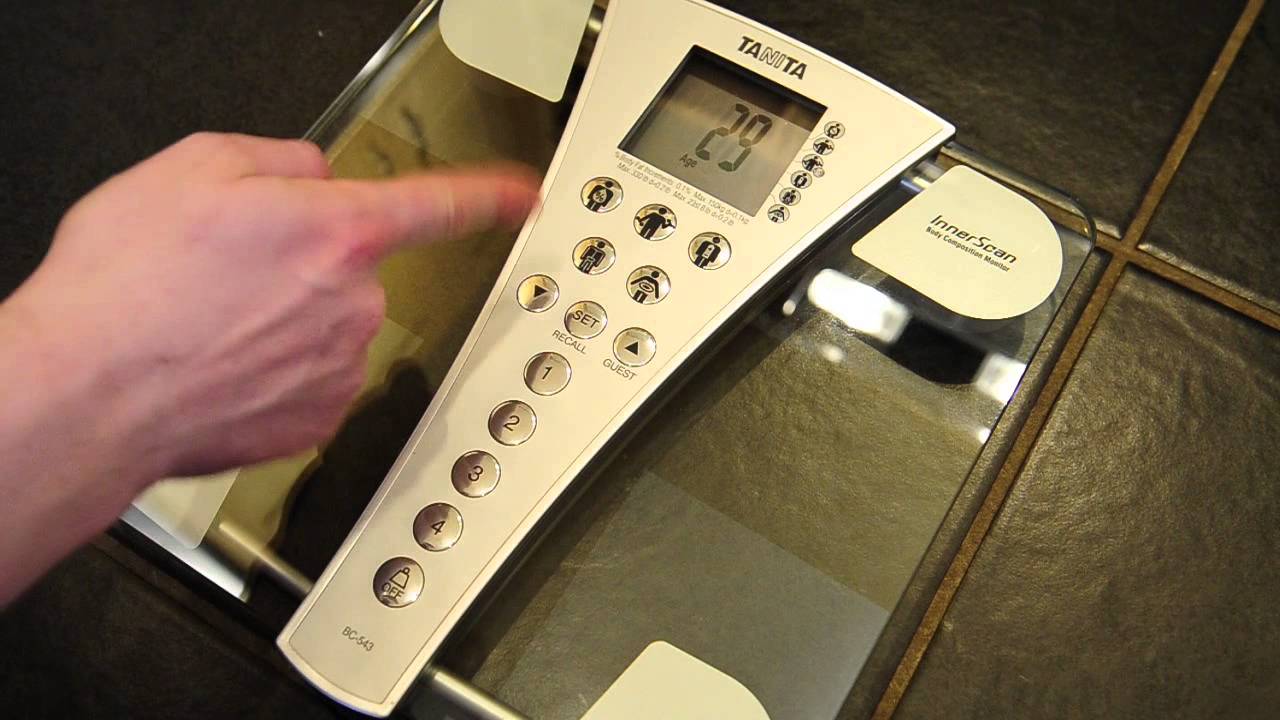
After clearing data, enter accurate personal information. The scale uses this to calculate body fat, muscle mass, and metabolic age accurately.
Select the Correct Demographic
A flashing icon appears at the top of the screen. This is your demographic setting. Choose the option that matches the user:
- Male
- Female
- Athletic male
- Athletic female
Use the Up or Down buttons to cycle through options. Athletic profiles adjust calculations for users with higher muscle mass.
Enter Height Accurately
Height impacts all body composition estimates. Set it precisely using these methods:
- Use the Down button to decrease in half-inch steps
- Use the Up button to increase quickly
For example, to set five foot six, hold the Down button until “5’6″” appears. Press Set to confirm. Incorrect height leads to skewed body fat and muscle readings.
Choose Activity Level
Select one of three activity levels:
- Low activity for sedentary lifestyle
- Moderate activity for exercise 1 to 3 days per week
- High activity for regular intense workouts
For moderate users, select the second option. The scale flashes your inputs three times to confirm age, height, and activity level. Once confirmed, the scale powers off automatically.
Use Guest Mode for One-Time Measurements
Guests can use the scale without saving data. This mode is ideal for visitors or temporary users who need a quick measurement.
Set Guest Age Quickly
- Press the Guest button
- Default age is 30
- To change to 40, press and hold the Up button to scroll rapidly
- Press Set when correct
Assign Guest Demographic and Height
Choose male or female using the arrow buttons. Set height by holding Up to fast-scroll until the desired height appears. Press Set to lock in the height value.
Choose Guest Activity Level
Select based on the guest’s routine. Choose low for minimal movement, moderate for occasional exercise, or high for active or athletic individuals.
Restore Factory Default Settings
If settings become incorrect or you’re starting over, reset everything to factory defaults.
Reset All Scale Settings
Press the Off button to return all stored values to default. This clears all four user profiles, guest settings, and custom height, age, and activity levels. This action cannot be undone, so reconfigure each profile after reset.
Start a Measurement After Setup
Once your profile is set, use the scale daily with ease by following these steps.
Access Your Profile
- Press button 1 or the number of your saved slot
- Wait for your age, height, and activity level to flash on screen
- The display will zero out, meaning it is ready for measurement
Step On Correctly
Place both feet bare on the metal electrodes. Stand still with feet centered and avoid touching metal parts with hands. Results appear in real time, showing body weight first, followed by body fat percentage, bone mass, daily calorie needs, weight maintenance level, and metabolic age.
Measure at the same time each day, such as morning, for consistent tracking.
Ensure Accurate Readings Every Time
Even with perfect setup, small mistakes can affect results. Follow these best practices to maintain accuracy.
Avoid Common Setup Errors
Wrong demographic selection skews fat and muscle ratio calculations. Height off by even one inch alters BMI and metabolic age estimates. Using bare feet on a damp floor causes signal interference.
Instead, dry your feet and the floor, stand straight, and wait for full results to display before stepping off.
When to Recalibrate or Reset
Recalibrate if readings seem inconsistent, if user profile changes occur such as a new activity level, or after long storage periods. Use the reset stored data or factory reset functions as needed.
Troubleshoot Setup Issues
Sometimes the scale does not respond as expected. Here is how to fix common problems.
No Response After Button Press
Check battery level first. Ensure the scale is on a hard, flat surface. Press buttons firmly and avoid tapping lightly.
Display Shows Wrong Units
If height shows in centimeters instead of feet, perform a factory reset. Re-enter height while watching the unit format. The scale may default to metric, and resetting forces it to prompt correctly.
Guest Mode Skips Height Entry
If the scale skips to measurement too fast, press Guest and wait for all prompts. Do not press additional buttons until asked. Let the sequence guide you through age, demographic, height, and activity level in order.
Maintain Your Tanita BC-534
Proper care extends the life of your scale and keeps readings accurate.
Clean After Each Use
Wipe electrodes with a dry or slightly damp cloth. Avoid harsh cleaners or submerging the device. Store in a dry, temperature-stable area away from moisture.
Replace Batteries Promptly
Low power causes errors or failed startups. Replace AA batteries when the display dims, the scale powers off mid-measurement, or buttons respond slowly.
Frequently Asked Questions About Setting a Tanita Scale
How do I reset my Tanita BC-534 to factory settings?
Press the Off button to reset every stored value to the factory default. This clears all user profiles, guest settings, and custom configurations. You will need to re-enter all personal data after resetting.
Can I use the Tanita scale without setting up a profile?
Yes, use Guest mode for one-time measurements. Press the Guest button, enter the guest’s age, select demographic, set height, and choose activity level. The measurement saves no data after the guest steps off.
Why does my Tanita scale show incorrect body fat percentage?
Incorrect readings usually stem from wrong demographic selection, inaccurate height input, or improper foot placement. Verify all settings match your actual information and ensure feet are bare and dry on the metal electrodes.
How many user profiles can the Tanita BC-534 store?
The BC-534 supports four personal data slots. Each slot stores age, height, activity level, and demographic information for a different user.
What does athletic mode do on a Tanita scale?
Athletic mode adjusts body composition calculations for users with higher muscle mass. Select athletic male or athletic female if you regularly engage in strength training or have a muscular build.
How often should I replace batteries in my Tanita scale?
Replace AA batteries when you notice dimming display, mid-measurement power-offs, or slow button response. Regular replacement prevents measurement errors caused by low power.
Key Takeaways for Setting Up Your Tanita Scale
Setting a Tanita scale like the BC-534 is straightforward once you understand the steps. Start by clearing any existing user data, then input accurate personal information including demographic, height, and activity level. Use guest mode for visitors who do not need permanent profiles. If settings become confused, factory reset restores default values.
With accurate setup, you will get reliable body fat, muscle, and metabolic readings every time you step on the scale. Measure consistently at the same time each day, keep electrodes clean, and replace batteries promptly. Now that you know how to set a Tanita scale, you are ready for smarter health tracking.