
You’re carefully measuring ingredients for a keto recipe or weighing supplements for precise dosing. You place your bowl on a digital scale and watch the numbers jump around. Is it 120.3g? 121.0g? And why does it read 0.5g when the bowl is empty? If you’ve ever struggled with inconsistent readings, misinterpreted decimals, or accidentally measured in ounces instead of grams, you’re not alone.
Knowing how to read a gram scale correctly is essential for accuracy in cooking, nutrition, science, and more. This guide walks you through setting up your scale, using the tare function, interpreting decimal values, calibrating for accuracy, and maintaining your device for reliable results every time.
Set Up Your Scale for Accurate Readings
Place your gram scale on a hard, flat, non-slip surface like a countertop or lab bench. Avoid soft surfaces such as rugs, towels, or wooden cutting boards, which absorb pressure and cause fluctuating readings.
Keep the scale away from vibrations near blenders or dishwashers, airflow from open windows or HVAC vents, and heat sources like stoves or direct sunlight. Even slight movement or temperature changes can affect sensitive sensors, especially in digital models.
Power On and Zero the Display
Turn on the scale by pressing the power or on/off button. Wait 3-5 seconds for the display to stabilize. Most digital scales will automatically reset to 0.0g.
If the display shows a non-zero value, press the tare or zero button to reset it. This ensures your measurement starts from a true baseline. Some scales remember the last weight or unit used, so always verify the screen reads 0.0g before placing any item.
Select Grams as Your Unit
Many gram scales support multiple units including grams, ounces, pounds, milliliters, carats, and grains. To ensure accuracy, confirm the unit is set to grams.
Locate the unit or mode button and press it until “g” appears on screen. Accidentally measuring in ounces gives a reading 28 times higher than grams. For example, 100g of flour equals about 3.5oz. If your scale is in oz mode, you’ll dramatically under-measure.
Use the Tare Function Correctly
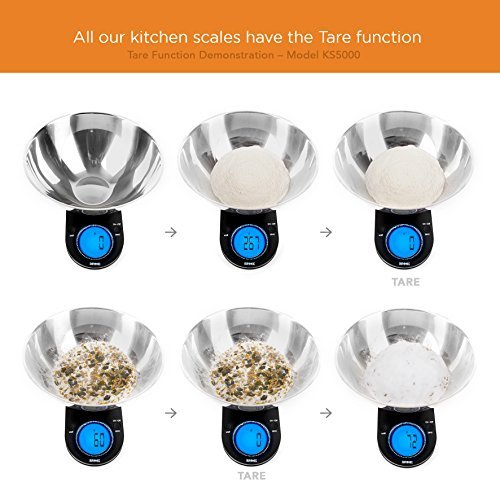
The tare function subtracts the weight of bowls, cups, or weighing paper so you measure only the ingredient. This is essential for accurate measurements.
Zero Out Container Weight
Place your empty container on the scale and wait 2-3 seconds for the weight to stabilize. Press tare. The display should return to 0.0g. Add your ingredient until the desired weight is reached.
For example, to measure 50.5g of sugar, place your bowl on the scale, press tare, then add sugar until the display reads 50.5g.
Re-Tare for Multiple Ingredients
You can tare multiple times in one session. After adding one ingredient, press tare again and add the next ingredient directly into the same bowl. This allows you to weigh multiple items sequentially without transferring or cleaning between steps.
For strict diets or chemical formulations, weigh each ingredient separately to avoid cross-contamination and ensure precision.
Read Digital Scale Displays
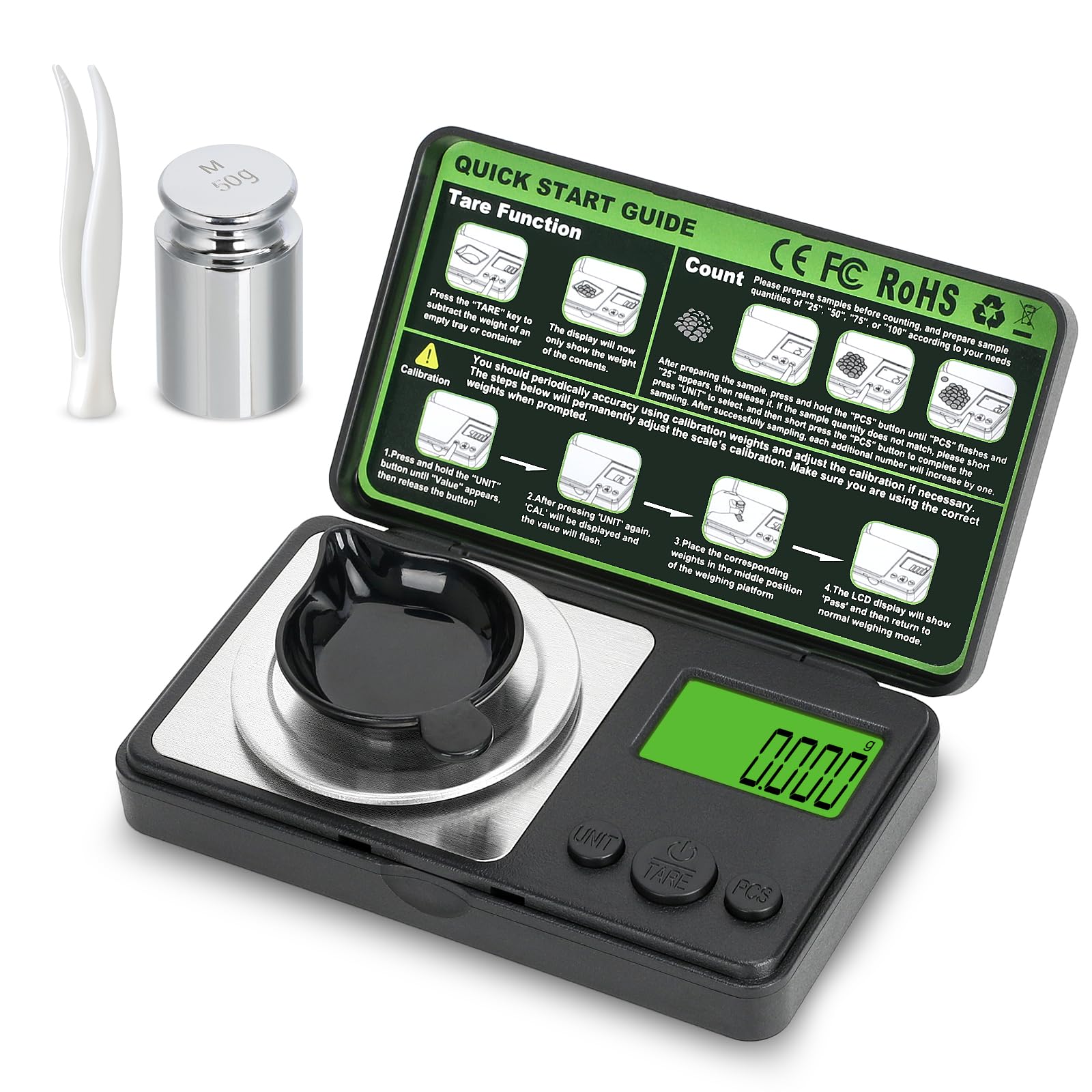
Digital scales show weight with decimal precision. Understanding what each digit means is crucial for accurate measurements.
Interpret Decimal Values
A display of 10.2g means 10 grams and 2 tenths, totaling 10.2 grams. A reading of 3.05g means 3 grams and 5 hundredths, totaling 3.05 grams. A display of 0.1g represents one-tenth of a gram, which is 100 milligrams. A reading of 0.01g represents one-hundredth of a gram, which is 10 milligrams.
A common mistake is assuming 10.2g means 10 grams plus 2 full grams. It does not. It means only 0.2g more than 10.
Know Your Scale’s Precision
Check your scale’s readability, which is the smallest increment it can display. A 0.1g precision is good for general cooking and baking. A 0.01g precision is needed for supplements, nootropics, and lab work. A 0.001g precision is used in jewelry and pharmaceuticals.
Low-cost scales may round or drift. A true 1.00g test weight should read exactly 1.00g, not 0.95 or 1.05.
Handle Small or Sticky Items
Never place powders, oils, or corrosive substances directly on the scale platform unless the manufacturer allows it. Use weighing boats, parchment paper, or small containers to protect the sensor and make cleanup easier.
Fine powders like protein, matcha, or creatine can cling due to static. To reduce this, ground the scale by touching metal, use anti-static weighing paper, and add powder slowly using a spoon or spatula.
For sticky items like honey or butter, lightly oil the container or spoon to prevent residue.
Read Analog and Balance Scales
How to Read a Dial Scale
Dial scales use a needle on a circular face. They don’t need batteries but are less precise than digital models.
Place the item on the platform and view the dial straight-on to avoid parallax error, which is misreading due to angle. Identify the increment between lines. If every 5 lines equals 50g, then each line equals 10g. A needle between 200 and 210 likely means 205g.
Dial scales cannot measure small amounts below 10g and are not suitable for baking or supplements.
How to Read a Balance Beam Scale
Balance beam scales use sliding weights on a beam and are common in labs and schools.
Slide all poises to zero and place the object on the pan. Move the large weight in 100g increments until the pointer nears the zero mark. Fine-tune with the small weight in 10g or 1g increments. Add both values together.
For example, large weight at 700g plus small weight at 50g equals 750g. The beam must be perfectly level, and the pointer should align with the zero mark when balanced.
Calibrate for Long-Term Accuracy
Even high-quality scales can drift due to temperature changes, frequent use, or physical shocks. Calibration resets the scale’s internal reference using a known weight, ensuring accuracy over time.
Calibrate Your Digital Scale
Turn on the scale and press and hold the cal, mode, or zero button until CAL or a number appears. Place a certified calibration weight on the platform and wait for the scale to accept the weight. The display may show PASS or return to 0.0g.
Do not use coins, keys, or household items unless their mass is certified and precise. A 50g coin might actually be 48.7g. Calibrate monthly or after moving the scale.
Maintain Your Scale
Clean Gently and Regularly
After each use, wipe the platform with a soft, dry cloth. For spills, use a slightly damp cloth, then dry immediately. Never immerse the scale in water.
Avoid harsh chemicals, abrasive scrubbers, and excessive moisture. Liquid entering the device can damage the sensor or battery compartment.
Store Properly
Keep your scale in a dry, temperature-stable location under a protective cover to prevent dust. Replace batteries as soon as the low-power symbol appears to prevent inaccurate readings.
Troubleshoot Common Issues
Fix Fluctuating Numbers
If the display jumps between values, check whether the surface is level and stable. Eliminate drafts by closing windows and turning off fans. Some scales take 5-10 seconds to stabilize, so wait longer.
Place a cutting board under the scale for added stability.
Resolve OL or Err Messages
OL means overload. You’ve exceeded the scale’s maximum capacity, usually 2,000-5,000g. Remove the item and check the scale’s limit. Use a larger-capacity scale if needed. Repeated overloading can permanently damage the load cell.
Fix Tare Problems
If tare doesn’t work, the container may be too heavy. Use a lighter container. The scale may be overloaded even before adding ingredients. There may be moisture or debris under the platform.
Try cleaning, drying, and restarting the scale.
Address Negative Readings
If the display shows negative values like -0.2g, remove all items, press tare, and clean the platform. Residual weight or static can cause this issue.
Match Precision to Your Task
Choose the right scale based on your needs. For general cooking and baking, 0.1g precision is sufficient. For supplements and nootropics, 0.01g precision is required. For jewelry and gemstones, 0.001g precision is necessary. For pharmaceuticals, use 0.001g precision with regular calibration.
A $30-$60 scale with 0.1g precision, physical buttons, and a tare function is ideal for most home users. Avoid models with touch-sensitive buttons that fail with wet hands, unnecessary features like timers or Bluetooth, or poor build quality with wobbly platforms or dim displays.
Apply Best Practices
Weigh Ingredients in Order
For recipes with multiple components, tare the container first. Add the first ingredient to target weight, then tare again. Add the second ingredient.
For example, making a sourdough starter involves taring the jar, adding 100g of flour, taring again, then adding 100g of water.
Convert Volume to Weight
Volume measurements like cups and spoons vary widely. Scooped flour can be up to 150g per cup, while spooned flour can be as low as 90g per cup.
Use these gram conversions as reference: 1 US cup all-purpose flour equals approximately 120g. 1 US cup granulated sugar equals approximately 200g. 1 tablespoon butter equals approximately 14g.
Frequently Asked Questions About Reading a Gram Scale
Why does my gram scale show a different weight every time I place the same item?
Fluctuating readings usually result from an unstable surface, drafts, or low battery. Place the scale on a hard, level surface away from airflow and vibrations. Replace the battery if needed. Some scales also need time to stabilize, so wait 5-10 seconds after placing the item.
How do I know if my gram scale is accurate?
Test your scale with a certified calibration weight or a known object. Place a 100g weight on the scale. If it reads exactly 100g, your scale is accurate. If it shows 98g or 102g, the scale needs calibration or may be faulty.
Can I use a gram scale to measure liquids?
Yes, most digital gram scales can measure liquids in grams, which equals milliliters for water-based liquids. Select grams as your unit and use a container. Press tare after placing the container, then add the liquid until you reach the desired weight.
What does the tare button do on a scale?
The tare button subtracts the weight of your container so only the ingredient weight displays. This lets you measure ingredients directly in a bowl or cup without manually subtracting the container’s weight.
How do I switch my scale from ounces to grams?
Locate the unit or mode button on your scale. Press it repeatedly until “g” appears on the display. Some scales require you to hold the button for a few seconds to change units.
Key Takeaways for Reading a Gram Scale
Reading a gram scale correctly involves understanding how to set it up properly, use the tare function to exclude container weight, and interpret decimal values accurately. Always select grams as your unit before measuring and ensure the display shows 0.0g as your baseline.
Choose a scale with appropriate precision for your task. For most cooking and baking, 0.1g precision is sufficient. For supplements and lab work, 0.01g or better is necessary. Calibrate your scale monthly and store it in a dry, stable location to maintain long-term accuracy.
Invest in a quality digital scale with physical buttons and a clear display. By mastering these skills, you’ll achieve precise, repeatable measurements for cooking, nutrition tracking, science experiments, and more.



