
If you’ve ever watched a clinician slide weights back and forth on a mechanical scale until a pointer lines up perfectly, you’ve seen a Detecto scale in action. These durable, eye-level mechanical scales are the gold standard in clinical weighing, trusted across hospitals, clinics, and home healthcare settings for their precision and reliability. Knowing how to read a Detecto scale correctly is essential for accurate patient monitoring, especially when tracking weight changes due to fluid retention, malnutrition, or chronic illness.
Unlike digital scales, Detecto’s mechanical beam system uses two sliding poises and a balance indicator to determine weight. There is no screen and no batteries, just physics. When used properly, it delivers consistent, highly accurate readings. In this guide, you will learn how to prepare the scale, position the poises, interpret the beam markings, and record both weight and height with confidence.
Prepare the Detecto Scale for Accurate Measurement
Before taking any measurement, proper setup ensures accuracy and longevity of the device. Taking a few minutes to prepare the scale prevents errors that could affect patient care.
Level Surface and Zero Check
Place the scale on a hard, level floor. Never place it on carpet or uneven ground, as this will skew results and make balancing impossible. Ensure both rear wheels are fully lowered and the front feet are stable.
Check that both poises are at the far-left zero position. Look at the balance indicator arrow at the end of the beam. With no one on the platform, it should be centered in the balance window. If not, adjust using the zero-adjust knob, typically located near the base or pivot point.
Daily Calibration with Test Weights
For clinical accuracy, verify calibration each morning using certified test weights such as 100 lb or 200 lb. Place the weight on the platform and check if the beam balances when the poises match the known weight. If not, use the calibration screw to fine-tune until equilibrium is achieved.
Never skip calibration in high-stakes environments like dialysis or bariatric care. Small inaccuracies can lead to serious clinical errors.
Position the Large (Bottom) Poise Correctly
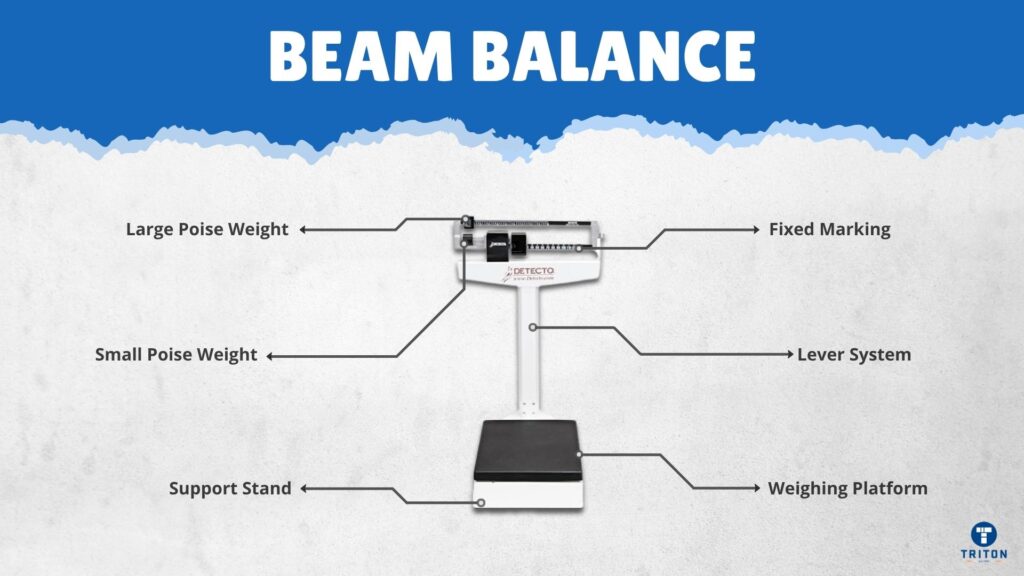
The first step in measuring weight is setting the coarse reading with the large bottom poise. This establishes the approximate weight range before fine-tuning begins.
Estimate Patient Weight
Visually assess or refer to prior records to estimate the patient weight. This helps avoid overshooting and speeds up the process considerably.
Slide the large poise along the lower beam to the nearest 50 lb increment above your estimate. For example, if the patient appears to weigh around 160 lb, set the large poise to 200 lb.
The large poise must snap fully into the notch. If it rests between grooves, readings can be off by up to 100 lb.
Watch the Balance Indicator
After positioning the large poise, observe the indicator arrow carefully. If the arrow drops below center, the poise is too light and you need to move it right. If the arrow rises above center, the poise is too heavy and you should move it left one notch.
Once the arrow drops slightly, you are close. The large poise now sets the approximate weight range, and you are ready to fine-tune.
Fine-Tune with the Small (Top) Poise
Now adjust the small top poise for an exact reading. This step requires patience and close attention to the balance indicator.
Slide Slowly and Watch Closely
Move the small poise gently to the right along the upper beam. Watch the balance indicator continuously. As the poise approaches the correct position, the beam will level out noticeably.
Stop when the arrow is perfectly horizontal within the balance window. If it rises, you have gone too far. Slide the poise back slightly and recheck carefully.
It may take a few seconds for the beam to settle completely. Be patient, as rushing leads to inaccurate readings every time.
Achieve Stable Equilibrium
Wait for the beam to stop moving completely. Even slight oscillations mean the balance is not final. True equilibrium occurs when the arrow holds steady at center.
Read the Total Weight from Both Beams
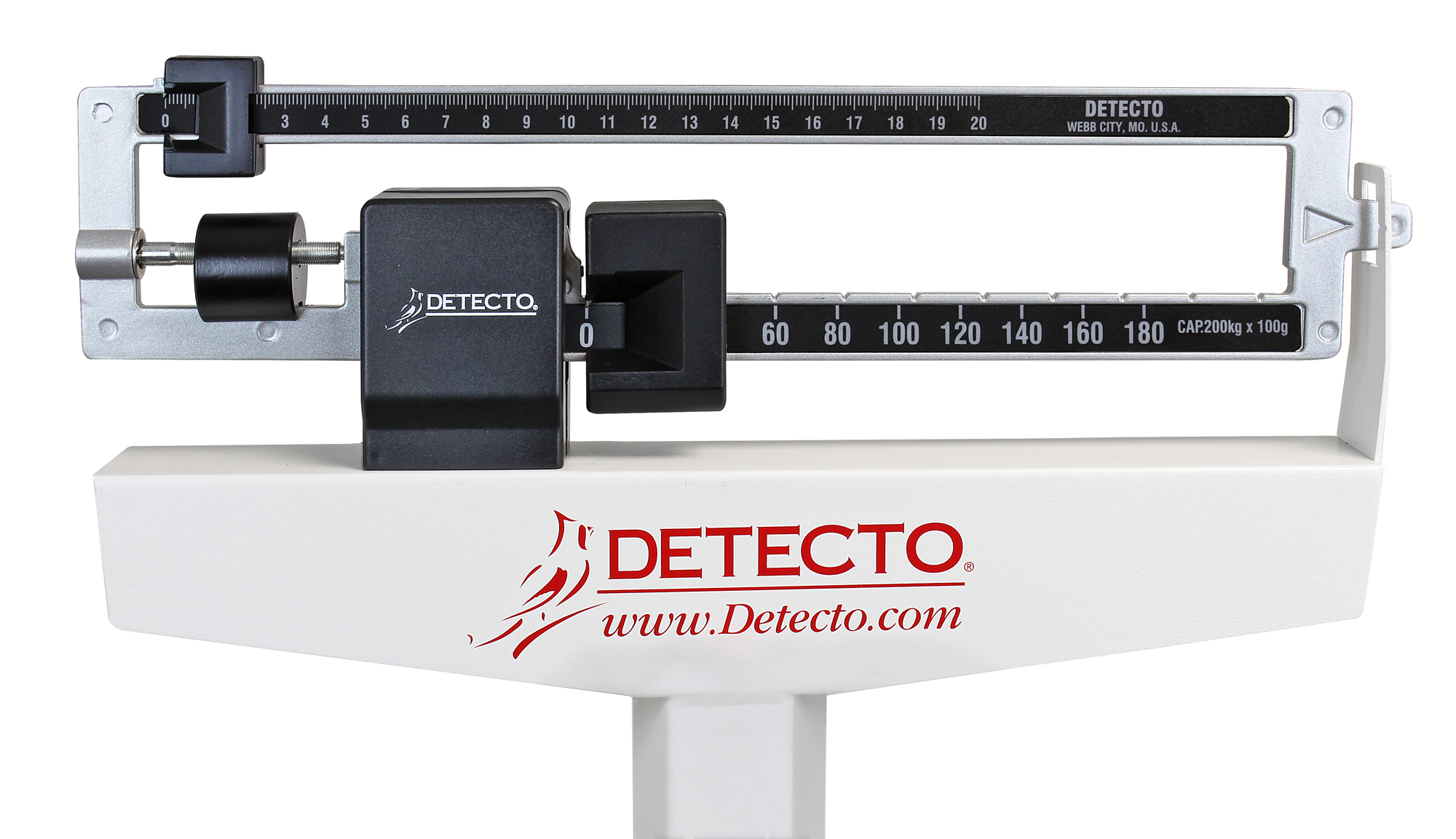
Once balanced, read both beams and add the values together for the final measurement. This is the critical step where many users make mistakes.
Bottom Beam: Coarse Weight
Note the value where the notch or opening of the large poise aligns with the scale. Each mark represents 50 lb on pound models or 25 kg on kilogram models.
Example: Poise aligned at 150 lb.
Top Beam: Fine Increments
Read the small poise position on the upper beam carefully. On pound models, major lines represent 1 lb while smaller ticks represent ¼ lb. So between 7 and 8 lb, the first tick equals 7.25 lb, the second equals 7.50 lb, and the third equals 7.75 lb. On kilogram models, increments are in 100 g or 0.1 kg.
Example: Small poise at 7.25 lb.
Add for Final Weight
Total weight equals bottom beam plus top beam. Using the examples above, 150 lb plus 7.25 lb equals 157.25 lb. Record as 157.25 lb or round to 157 lb depending on institutional protocol.
In fluid-sensitive cases such as heart failure, always record fractional pounds for precision.
Handle Dual-Unit Models Correctly
Some Detecto scales display both lb and kg on the same beam. Understanding the color coding prevents costly reading errors.
Identify Unit Markings
Silver bars or numbers indicate pounds. Black bars or numbers indicate kilograms. Only one unit is active at a time, determined by model configuration. Some units are dual-read, meaning both scales are visible but used separately.
Never mix readings. If your facility uses kg, ignore the silver lb markings entirely. Misreading units is a common source of data entry errors.
Avoid Cross-Reading Errors
A poise at 70 kg may align near 154 lb. Do not assume they are interchangeable without proper conversion. Always confirm which unit your facility uses before recording.
Measure Height with the Stadiometer
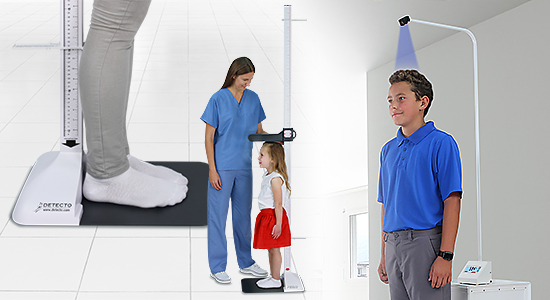
Many Detecto scales include a built-in height rod for full patient assessment. This integrated stadiometer provides simultaneous height and weight measurements.
Prepare the Patient
Have the patient remove shoes and stand barefoot. Position them with heels together, back flat against the column, eyes forward, and shoulders relaxed. Arms should hang at sides.
Ensure they are standing straight without leaning or slouching, as this affects height accuracy.
Adjust the Headpiece Properly
Lift the movable headpiece above the patient head. Slowly lower it until it lightly touches the crown of the head. Do not press down, as this compresses the spine and can overestimate height by up to 1 inch.
Hold the headpiece in place while the patient steps off to prevent it from dropping and potentially damaging the mechanism.
Read Height in Inches or Centimeters
Choose the correct side of the rod for your measurement. The right side displays inches, marked in 1/8 in increments. The left side displays centimeters, in 0.1 cm increments.
Read the measurement at eye level to prevent parallax error. Looking up or down creates distortion leading to incorrect values.
For example, at the 5 ft plus 1 in mark, the reading is 5 ft 1 in. Midway between 5 ft 8 in and 5 ft 9 in equals 5 ft 8.5 in. In metric, aligned at 172.3 cm.
Use Optional Features for Better Accuracy
Detecto scales offer optional features that improve patient safety and measurement accuracy in specific clinical situations.
Hand Post for Stability
The hand post provides grip support for elderly individuals, pediatric patients, and those with balance disorders. It reduces swaying and improves both weight accuracy and patient safety.
Patients should not lean heavily on the post. Light touch only is recommended, as excessive pressure affects readings.
Upgrade Capacity with Counterweight
Standard Detecto scales support up to 400 lb. For bariatric patients, add the optional counterweight to increase capacity to 500 lb. No tools are required for installation, and it maintains mechanical accuracy.
This upgrade is ideal for clinics serving high-weight populations.
Calibrate and Maintain Your Scale
Proper care extends the life of your Detecto scale, often 20 years or more. Regular maintenance prevents accuracy drift and mechanical problems.
Daily Cleaning Routine
Clean the platform by removing the slip-resistant cover and washing with mild soap and water. Wipe the base and column with a damp cloth and disinfectant, avoiding bleach or abrasives.
Blow out dust or lint from the beam and tracks using compressed air, then wipe with a dry cloth.
Lubricate Sparingly
Apply manufacturer-recommended lubricant only when needed, such as on poise tracks if sliding becomes stiff or on the height rod mechanism if movement is rough.
Too much lubricant attracts dirt and causes buildup that interferes with smooth operation.
Recalibrate After Movement or Impact
Relocating or bumping the scale can throw off calibration. Recheck calibration using certified test weights any time the scale is moved between rooms, subjected to impact, or giving inconsistent readings.
Adjust the calibration screw until balance is restored with the known test weight.
Troubleshoot Common Detecto Scale Problems
Even well-maintained scales can develop problems. Here is how to fix them quickly and get back to accurate measurements.
Indicator Not Centered at Zero
This is usually caused by an unlevel surface or calibration drift. Level the floor or adjust the zero knob, then recalibrate with test weights.
Poise Sticks or Binds
Debris in the track or a dry mechanism typically causes this issue. Clean with a dry cloth and apply light lubricant if recommended by the manufacturer.
Inconsistent Readings
Patient movement, an unlevel floor, or calibration drift commonly cause this problem. Ensure the patient remains still, verify the surface is level, and recalibrate if necessary.
Beam Will Not Balance
The large poise is likely not fully seated in the notch. Lift and re-seat the poise into the correct groove properly.
Height Rod Stiff or Seized
Dirt buildup or lack of use usually causes this. Clean with a damp cloth and work the mechanism gently. Contact support if the mechanism is locked.
Prevent Reading Errors
Human error is more common than mechanical failure. Following proper technique eliminates most measurement mistakes.
Avoid Parallax Mistakes
Always read the beam and stadiometer at eye level. Angled viewing distorts the pointer position and height alignment significantly.
Train All Staff Properly
New users often misread fractional lines or fail to seat the large poise correctly. A brief five-minute training session prevents recurring mistakes.
Post a quick-reference guide near the scale that reads: Zero, Estimate, Set Large Poise, Fine-Tune, Read, Reset.
Choose the Right Detecto Model for Your Needs
Detecto offers 13 mechanical scale models with various configurations. Selecting the right one ensures optimal performance for your patient population.
Match Capacity to Patient Population
Standard 400 lb models work well for general clinics and pediatric practices. Extended 440 to 450 lb models suit larger adult populations. The 500 lb configuration with counterweight is ideal for bariatric or specialty clinics.
Select Unit Configuration
Pound-only models work best for U.S. primary care settings. Kilogram-only suits international or pediatric units. Dual lb/kg provides flexibility for multi-user environments.
Trust Mechanical Accuracy Over Digital
Detecto mechanical design offers distinct advantages in clinical environments where reliability matters most.
Why Mechanical Beats Digital
These scales require no batteries or power, making them immune to electronic drift. They deliver consistent performance over decades and remain unaffected by humidity or temperature swings.
In environments like dialysis or long-term monitoring where precision is critical, mechanical scales outperform digital alternatives every time.
Record Measurements and Reset the Scale
After each use, follow these final steps to ensure the scale is ready for the next patient.
First, record weight and height in the EHR or chart immediately. Next, instruct the patient to step off carefully. Then return both poises to zero position. Wipe the platform if needed. Finally, store in a dry, climate-controlled area.
End each day with a zero check to ensure readiness for tomorrow.
Key Takeaways for Reading a Detecto Scale
Reading a Detecto scale is a skill that combines proper technique, attention to detail, and routine maintenance. By preparing the scale correctly, positioning poises accurately, interpreting markings precisely, and caring for the device, you ensure every measurement is accurate, repeatable, and clinically meaningful.
The three most important points to remember are: always seat the large poise fully in the notch, achieve true beam equilibrium before reading, and perform daily zero checks. Whether you are a nurse, medical assistant, or home caregiver, mastering this tool empowers better patient outcomes through reliable data.
Frequently Asked Questions About Detecto Scales
How do I know if my Detecto scale is properly calibrated?
Perform a daily zero check by ensuring both poises are at zero and the indicator arrow is centered when no weight is on the platform. For complete verification, use certified test weights to confirm the beam balances at known values.
What does it mean if the balance indicator swings side to side?
This indicates the scale is nearly balanced but not quite settled. Wait for the beam to stop moving completely. True equilibrium occurs when the arrow holds steady at center without oscillation.
Can I convert pounds to kilograms on a dual-unit Detecto scale?
No, you should not convert between units on the same reading. Use only the unit marked for your facility protocol. If your scale is configured for kg, ignore the lb markings entirely.
How often should I lubricate my Detecto scale?
Lubrication is needed only when sliding becomes stiff or rough. Apply manufacturer-recommended lubricant sparingly to poise tracks or height rod mechanisms. Over-lubrication attracts dirt and causes buildup.
What causes inconsistent weight readings on a Detecto scale?
Inconsistent readings typically result from patient movement, an unlevel surface, or calibration drift. Ensure the patient stands still, verify the floor is level, and recalibrate with test weights if needed.
What is the maximum weight capacity of a standard Detecto scale?
Standard models support up to 400 lb or 180 kg. With the optional counterweight, capacity increases to 500 lb or 220 kg for bariatric patients.



