
If your Vitafit scale shows inconsistent readings or fails to reset to zero, the solution may be simple: calibration. Most Vitafit digital and smart scales use automatic calibration to ensure accuracy every time you step on. Whether you’ve just unboxed your scale, replaced the batteries, or moved it to a new room, recalibrating is essential for reliable weight and body composition tracking.
The good news? You don’t need special tools or technical skills. With the right surface and a quick step-on, step-off motion, your Vitafit scale can recalibrate in seconds. In this guide, you’ll learn exactly how to calibrate any Vitafit model, including bathroom, smart body fat, and pocket scales, and troubleshoot common issues like “Err” displays or fluctuating results.
Place Your Vitafit Scale on a Flat, Hard Surface
Avoid Carpet and Uneven Flooring
Vitafit scales rely on sensitive load cells that measure weight distribution. If the scale sits on carpet, a rug, or an uneven floor, the sensors cannot balance properly, leading to inaccurate readings or failed calibration. Always place your scale on a hard, flat, level surface such as tile, hardwood, concrete, or stone.
Do not use your scale on bath mats, thick vinyl with padding, sloped bathroom floors, or surfaces with debris or moisture. Even a slight tilt or compression underfoot disrupts the auto-calibration process. For best results, test the floor with a level app or roll a coin across it. If the coin veers off, the surface is not level.
Ensure All Four Feet Make Full Contact
Check that all four corners or rubber feet of the scale make full contact with the floor. If one corner is slightly lifted, such as when placed near a baseboard or edge, the scale will not calibrate correctly. Move it to an open area where nothing interferes with stability.
Pro Tip: Wipe the bottom of the scale and the floor before placing it to remove dust or grit that could affect balance.
Activate Auto-Calibration Mode on Your Vitafit Scale
Step On, Then Step Off
Most Vitafit bathroom and smart scales, including the VT726, VT730, VT705, VT1703U, and VT7196, use a step-on/step-off method to trigger auto-calibration. Here is how it works.
Step 1: Stand on the scale with one foot, just enough to power it on. Step 2: Wait for a number to appear. It might flash randomly. Step 3: Immediately step off. The display will then cycle through values and typically show “CAL” followed by “0.0”, “0.00”, or “0.0 lb/kg”. Once the screen stabilizes at zero, your scale is calibrated and ready to use.
Warning: Never skip this step after moving the scale. Even a few inches can throw off sensor alignment.
Wait for the Zero Display
After stepping off, do not step back on immediately. Let the scale complete its sequence. This usually takes 3 to 5 seconds. If you interrupt the process, it may not reset to zero, leading to inaccurate measurements.
Some models flash “CAL” briefly before settling at “0.00”. Others may blink or cycle numbers silently. Regardless of behavior, wait for “0” before weighing.
Calibrate After Battery Replacement

Replace Batteries Correctly
Low power affects sensor performance and can prevent proper calibration. Most Vitafit bathroom and smart scales use 3x AAA batteries, while smaller models like the VT737U pocket scale use 2x AAA.
When you see “Lo” on the display, a dim or flickering screen, or the scale fails to turn on or hold zero, it is time for new batteries.
Steps for battery replacement:
• Turn the scale over
• Open the battery compartment using a coin or screwdriver
• Remove old batteries
• Insert fresh ones, matching the + and – polarity
• Close the compartment securely
Recalibrate Immediately After Battery Change
Never assume the scale is ready after a battery swap. Always recalibrate using the step-on/step-off method, even if the scale was already in place. Power interruption resets the internal sensor calibration. Skipping this step leads to erratic or incorrect readings.
Troubleshoot Common Calibration Issues
Scale Will Not Return to Zero
If your Vitafit scale shows “0.2”, “-0.5”, or stays blank after stepping off, try these fixes:
• Relocate to a harder surface. Soft flooring prevents proper calibration
• Clean the base and floor. Dust or grime can tilt the scale
• Remove and reinsert batteries. Perform a full reset and wait 10 seconds
• Repeat the step-on/step-off sequence. Do it 2 to 3 times to force a reset
For models like the VT7058, if it still will not zero, hold the “UNIT” button for 5 seconds to restart the system.
Fluctuating Readings Between Weigh-Ins
Getting different numbers each time? Common causes include inconsistent stance, floor movement, weak batteries, and hydration changes. Stand centered with feet apart and stay still until the reading locks. Even slight shifts, like placing the scale near a door, affect sensors. Replace batteries every 6 to 12 months, even if “Lo” has not appeared.
Smart scales like the VT730 and VT719 also require bare, dry feet for accurate bioelectrical impedance readings. Moisture or socks disrupt the signal.
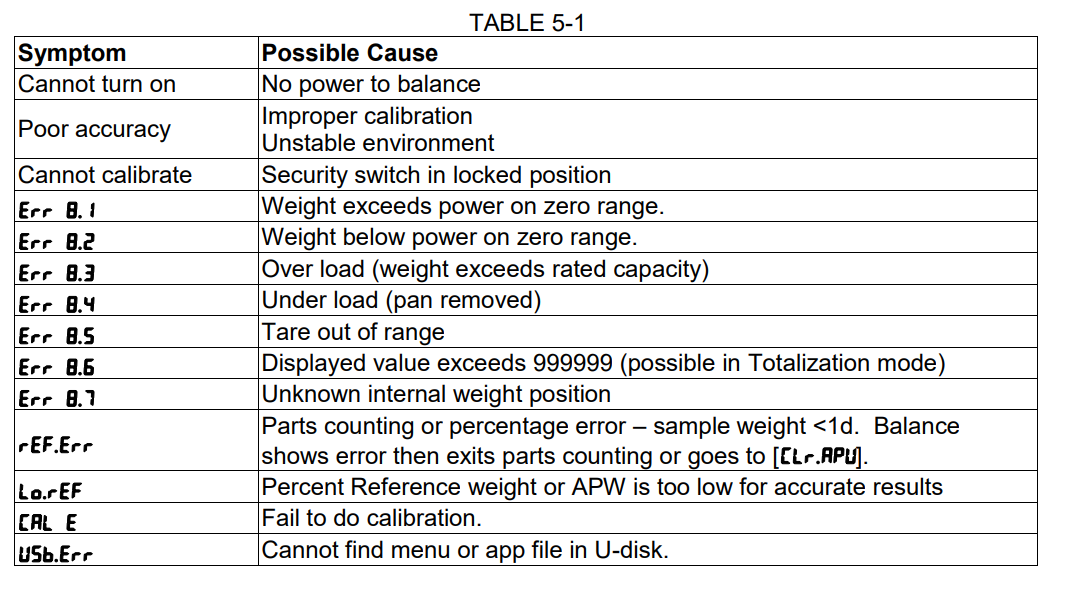
“Err” or “OL” Error Display
“Err” indicates a sensor error or overload, while “OL” means you exceeded the maximum weight capacity, usually 400 lb or 180 kg.
Action steps when you see these errors:
1. Step off immediately
2. Wait 10 seconds
3. Recalibrate using the step-on/step-off method
4. Weigh again, standing still
If “Err” persists, try new batteries, test on a different hard surface, or contact Vitafit support at 1-800-998-7974.
Use Manual Calibration for Vitafit Pocket Scales
Access CAL Mode on VT737U
Unlike bathroom models, the Vitafit VT737U pocket scale supports manual calibration using a known weight. This ensures lab-grade accuracy for small items like jewelry, herbs, or supplements.
Steps for manual calibration:
1. Place scale on a flat, stable surface
2. Turn on the scale
3. Press and hold “MODE” or “CAL” until “CAL” appears
4. Place a calibration weight, such as 100g, gently on the center
5. Wait for “PASS”, “CAL OK”, or a return to “0.00g”
6. Remove the weight. The scale is now calibrated
Use certified calibration weights only. Do not use coins or random objects, as they are often inaccurate.
Handle Precision with Care
The VT737U measures down to 0.01g, so even breath or vibration can affect readings. Use on a solid countertop away from fans or foot traffic. Close nearby windows to avoid air currents.
Optimize Smart Scale Performance With the Vitafit App
Pair Your Scale With the Vitafit App
Smart models like the VT730 and VT7196 track BMI, body fat, muscle mass, and more, but only when linked to the Vitafit App, available on iOS and Android.
To sync your scale:
1. Download “Vitafit” from the App Store or Google Play
2. Enable Bluetooth on your phone
3. Open the app and follow the setup instructions
4. Step on the scale when prompted
The app auto-detects users by weight and stores trends over time. For best results, open the app before weighing.
Enable Auto-Recognition for Multiple Users
Vitafit smart scales support multiple user profiles. Once set up in the app, the scale identifies you based on your typical weight range.
Tips for accurate multi-user detection:
• Weigh at the same time daily, preferably in the morning
• Stand on electrodes with bare feet
• Do not swap positions with other users
• Let the scale fully power off between uses
This ensures consistent data and prevents mix-ups.
Maintain Accuracy Over Time
Clean and Store Your Scale Properly
Keep your Vitafit scale accurate with simple maintenance. Wipe the platform with a dry or slightly damp cloth after use. Never immerse the scale in water or use harsh cleaners. Store in a cool, dry place if not used for weeks. Avoid direct sunlight or humid areas like near showers.
For smart scales, keep the electrode surfaces clean and dry to ensure good conductivity.
Recalibrate After Every Move
Even a small relocation, like shifting the scale from one side of the bathroom to another, requires recalibration. The floor may have a different density, level, or support.
Always move the scale carefully without dropping or tilting it sharply. Wait 10 minutes if moving from a cold to a warm area to avoid condensation. Recalibrate using the step-on/step-off method. This simple habit prevents 90% of accuracy complaints.
Replace Batteries Proactively
Do not wait for “Lo” to appear. Weak batteries cause slow response, failed calibrations, and incomplete data sync for smart models. Replace every 6 to 12 months depending on use. Use alkaline batteries for longer life. Avoid rechargeables, which often do not provide stable voltage.
Frequently Asked Questions About Calibrating a Vitafit Scale
How Do I Know If My Vitafit Scale Needs Calibration?
Your scale needs calibration if it shows inconsistent readings, fails to return to zero after stepping off, displays “Err” or “OL”, or has been moved or had its batteries replaced. Any of these situations warrants recalibration using the step-on/step-off method.
Can I Calibrate My Vitafit Bathroom Scale Manually?
Most Vitafit bathroom and smart scales do not support manual calibration. They use automatic calibration triggered by the step-on/step-off method. Only pocket scales like the VT737U have a manual calibration option using certified weights.
Why Does My Vitafit Scale Show “Lo” After New Batteries?
“Lo” indicates low battery power. If it appears after installing new batteries, check that the batteries are inserted with correct polarity. If the problem continues, try a different set of fresh batteries, as some may have lower charge than others.
How Often Should I Recalibrate My Vitafit Scale?
Recalibrate your scale every time you move it, after replacing batteries, and whenever you notice inaccurate readings. For consistent accuracy, recalibrating before each weigh-in after movement is recommended.
What Surfaces Should I Avoid Placing My Vitafit Scale On?
Avoid carpet, rugs, thick vinyl flooring, bath mats, and uneven or sloped floors. These surfaces prevent the load cells from measuring correctly and cause calibration failures. Always use a hard, flat, level surface like tile or hardwood.
Key Takeaways for Calibrating Your Vitafit Scale
Calibrating your Vitafit scale is quick, easy, and essential for trustworthy results. Remember these three core steps: place the scale on a flat, hard surface, perform the step-on/step-off method, and wait for the display to show zero before weighing.
Recalibrate after every move and after battery replacement to maintain accuracy. For smart scales, keep the electrode surfaces clean and dry, and pair with the Vitafit App for full body composition tracking.
With these habits, your Vitafit scale will deliver reliable data for years. If you encounter persistent issues, contact Vitafit support at 1-800-998-7974 for assistance.



