
If you have ever stepped on a Fitbit scale and watched your weight appear instantly on your phone, you have experienced the convenience of connected health tracking. But how does a Fitbit scale work behind the scenes? These smart scales combine precision sensors, wireless connectivity, and intelligent software to measure weight, identify users, and sync data automatically to your Fitbit app. Whether you own the Aria Air, Aria 2, or original Aria, each model uses different technologies to deliver health insights.
In this guide, you will learn exactly how Fitbit scales function from the moment you step on the platform to when your data appears in the app. We will cover measurement technology, user identification, syncing methods, safety considerations, and troubleshooting tips to help you get the most out of your scale.
Weight Measurement Technology
Fitbit scales use high precision sensors to capture your body weight accurately every time you step on the platform.
Strain Gauge Sensors
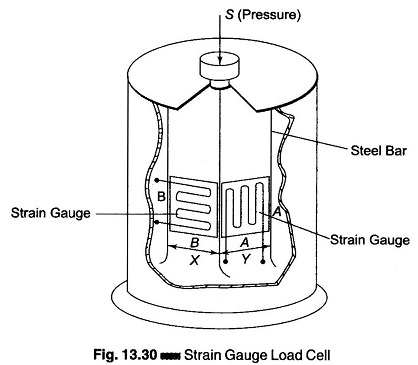
All Fitbit scales use strain gauge sensors, also called load cells, to measure weight. When you step onto the tempered glass surface, your weight causes a slight flex in the platform. This mechanical deformation changes the electrical resistance within the sensors, generating a signal proportional to the force applied. That signal is converted into a digital reading displayed in pounds or kilograms based on your app settings.
The reported accuracy is within ±0.2 lb (±0.1 kg) under optimal conditions. Third party tests show consistency within ±2 oz (±56 grams) compared to clinical grade scales.
Accuracy and Calibration
Accuracy depends heavily on proper usage and placement:
- Place the scale on a hard, flat surface like tile, wood, or laminate
- Avoid carpet, rugs, or uneven flooring which causes drift
- Stand still with feet centered on the electrodes
The scale automatically recalibrates each time it powers on, especially after being moved or stored vertically. After repositioning, you may need two consecutive weigh ins for stable results.
Body Fat Measurement Using BIA
Only the Fitbit Aria and Aria 2 can measure body fat percentage using bioelectrical impedance analysis.
How Bioelectrical Impedance Analysis Works
When you step on the scale, a low level electrical current (under 500 µA at 50 kHz) passes from electrodes through your feet and lower body. Lean tissue, rich in water and electrolytes, conducts electricity easily. Fat tissue resists the current due to lower water content. The scale measures the impedance in ohms and combines it with your profile data to estimate body fat percentage using Fitbit’s proprietary algorithm.
Note: The Aria Air does NOT use BIA and cannot measure body fat. Any body fat data shown in the app for Aria Air users comes from historical trends or placeholder values, not actual measurement.
Factors Affecting BIA Accuracy
Several variables can influence your body fat readings:
- Hydration levels: Dehydration increases resistance, leading to overestimated body fat
- Time of day: Morning readings after an overnight fast are most consistent
- Foot contact: Bare feet are required; socks or dry skin reduce conductivity
- Recent exercise or meals: Can shift fluid distribution and skew results
Weigh yourself at the same time daily under similar conditions for the best trend tracking.
User Identification Methods
:max_bytes(150000):strip_icc()/FitbitAria2header-5ae7d579c5542e003912a2ed-721c5368b47c4c1697b280636eb31f62.jpg)
Fitbit scales support up to 8 users, but identification methods differ by model.
Aria and Aria 2: AI Powered Recognition
These models use on device artificial intelligence to identify users automatically. The system analyzes your measured weight, body composition profile, and usage patterns like time of day and frequency. When you step on, the scale compares your data to stored profiles.
If identification is uncertain, the scale shows a prompt with two user icons. A bird icon displays X (left) and checkmark (right). Tap the left side with your foot if the user is incorrect, or right side if correct. No input within seconds logs the reading as Guest.
Aria Air: App Based Assignment
The Aria Air lacks on scale recognition. Instead, it syncs via Bluetooth to the active Fitbit account on your smartphone. The reading is assigned to whoever is logged into the app on the connected phone. This works well in single user homes but can cause misattribution in multi user households if different people use the same phone.
Wireless Syncing Methods
Fitbit scales use different connectivity options to transmit data to your app.
Aria and Aria 2: Wi-Fi Syncing
These models connect directly to your 2.4 GHz Wi-Fi network (802.11b only). Once set up, data syncs automatically after each weigh in without opening the app. Data appears in your Fitbit dashboard within seconds.
Your Wi-Fi must support the 2.4 GHz band (no 5 GHz compatibility). The scale requires an active internet connection and does not work with public networks requiring login. Keep the scale within 10 feet of your router for reliable syncing.
Aria Air: Bluetooth Syncing
The Aria Air uses Bluetooth 4.0 (BLE) and requires the Fitbit app to be open and running in the foreground during weigh in. Your phone must be within 3 to 20 feet during measurement. If the app is closed or out of range, sync fails and data may be lost since the scale stores no history.
Pro Tip: Keep your phone nearby, powered on, and Bluetooth active for reliable syncing with Aria Air.
Setup Process for All Models
Setting up your Fitbit scale takes just a few minutes following these steps.
Universal Setup Steps
- Insert batteries: Aria/Aria 2 uses 4× AA, Aria Air uses 3× AAA
- Remove the protective battery tab (Aria Air only)
- Place the scale on a hard, flat surface
- Open the Fitbit app → Today tab → + Add Device
- Select your model and follow the on screen prompts
Model Specific Setup
Aria and Aria 2 require entering setup mode by removing one battery, waiting 10 seconds, and reinserting. Press down firmly on the lower two corners with your palms to activate Wi-Fi pairing. Connect via the Fitbit app (Aria 2) or web browser at fitbit.com/scale/setup/start (original Aria).
Aria Air is simpler: install batteries, enable Bluetooth, open Fitbit app, tap Add Device, select Aria Air, and step on the scale. Data appears instantly.
Managing Data in the Fitbit App
The Fitbit app provides tools to view, edit, and manage your weigh in data.
Viewing Weight and BMI Trends
To access your data, open the Fitbit app and navigate to the Today tab. Tap the Weight tile to view daily, weekly, and monthly trends with visual graphs. On Android, tap the BMI button under the graph. On iPhone, swipe left on the graph to view BMI.
Reassigning Incorrect Weigh Ins
If a reading is logged under the wrong user or as Guest:
- Go to Today tab → Devices icon → Scale tile
- Tap Recent Weigh Ins
- Select the entry and choose the correct user
You can also edit or delete entries by tapping a specific date in the Weight tile.
Lean Mode vs Regular Mode
Fitbit offers two body fat calculation modes for different body types.
When to Use Lean Mode
Regular Mode uses the standard BIA algorithm designed for the general population. Lean Mode uses an adjusted algorithm for athletes, bodybuilders, and individuals with high muscle mass who may see inaccurately high body fat readings with the standard algorithm.
How to Enable Lean Mode
In the Fitbit app, go to Today → Devices → Your scale → Users → Your name and toggle Lean Mode on or off. Changes apply at your next weigh in. On fitbit.com, navigate to Settings → Devices → Scale → People → Edit profile to select your mode.
Note: Aria Air does not support body fat measurement and has no Lean Mode option.
Safety Guidelines and Restrictions
Certain users should avoid using BIA enabled scales due to the electrical current.
Who Should Avoid Aria and Aria 2
Do not use Aria or Aria 2 if you are pregnant, have a pacemaker, defibrillator, or insulin pump, or are under 13 years old. The electrical current may interfere with medical devices or affect fetal development.
The Aria Air is safe for these users since it uses no BIA current.
General Safety Tips
Always stand still with feet centered on the electrodes. Use bare feet for best conductivity, especially on BIA models. Never use the scale on wet floors. Consult your doctor before starting any weight monitoring program.
Maintenance and Cleaning Tips
Proper care ensures your scale stays accurate and functional.
Storage and Cleaning
Store the scale flat, not upright. Storing vertically may require two consecutive weigh ins to recalibrate. Wipe the surface with a dry or slightly damp cloth. Do not immerse the scale in water. If the scale gets wet, wipe it dry immediately and remove batteries if soaked, allowing it to air dry fully before reuse.
Battery Management
Replace batteries when low. Aria Air uses 3× AAA and shows battery status on the display. Aria and Aria 2 use 4× AA, with battery level visible in the Fitbit app under Devices → Scale. Remove batteries if storing the scale long term.
Troubleshooting Common Issues
Scale Won’t Sync
For Aria/Aria 2: Check that your Wi-Fi router is on and the password has not changed. Move the scale closer to the router (within 10 feet). Reconnect via the Fitbit app or fitbit.com/scale/setup/start.
For Aria Air: Ensure Bluetooth is enabled and the Fitbit app is open during weigh in. Restart your phone Bluetooth or app if needed.
Getting Guest Readings
Guest readings occur when the user is not linked to the scale, profile information is incorrect, or similar user profiles cause confusion. Confirm your account is linked, verify your height and weight in Personal Stats, and tap the correct side when prompted. You can reassign past guest entries manually in the app.
Interpreting Error Messages
| Model | Display | Meaning | Fix |
|---|---|---|---|
| Aria Air | Battery icon | Low battery | Replace AAA batteries |
| Aria Air | C | Reset needed | Step off and retry |
| Aria/Aria 2 | WIFI ERR | Wi-Fi failure | Check password and router |
| Aria/Aria 2 | SENSING ERR | Measurement issue | Recalibrate, ensure flat surface |
| All | GUEST | Unrecognized user | Reassign in app, tap correct side |
Persistent errors can often be resolved by removing batteries for 30 seconds, reinserting them, and retrying.
Technical Specifications Summary
Fitbit Aria Air
- Measures: Weight, BMI
- Connectivity: Bluetooth 4.0
- Battery: 3× AAA
- Max Weight: 400 lb (181.4 kg)
- Display: Backlit LCD
- No BIA, No Wi-Fi
Fitbit Aria 2
- Measures: Weight, Body Fat %, BMI
- Connectivity: 2.4 GHz Wi-Fi
- Battery: 4× AA
- Max Weight: 400 lb (180 kg)
- Display: LED with on-screen BMI
- Features: AI recognition, Lean Mode, guest handling
Original Fitbit Aria
- Measures: Weight, Body Fat %, BMI
- Connectivity: 2.4 GHz Wi-Fi
- Battery: 4× AA
- Max Weight: 397 lb (180 kg)
- Status: Discontinued, limited support
Frequently Asked Questions About Fitbit Scales
Does the Fitbit Aria Air measure body fat?
No, the Aria Air does not have bioelectrical impedance analysis capability. It measures only weight and BMI. Any body fat data shown in the app for Aria Air users is either estimated from historical trends or placeholder content, not actual measurement.
How accurate is a Fitbit scale for weight?
Fitbit scales are accurate within ±0.2 lb (±0.1 kg) under optimal conditions. Third party tests show consistency within ±2 oz (±56 grams) compared to clinical grade scales. Accuracy depends on using a hard, flat surface and standing still with feet centered.
Can multiple people use the same Fitbit scale?
Yes, all Fitbit scales support up to 8 users. Aria and Aria 2 use AI powered recognition to identify users automatically. Aria Air assigns readings to the active Fitbit account on the connected smartphone.
Why does my Fitbit scale show Guest?
Guest mode appears when the scale cannot identify the user. This happens if the user is not linked to the scale, profile information is incorrect, or two users have similar weights. You can reassign guest entries in the Fitbit app or tap the correct side when prompted on Aria/Aria 2.
Is Fitbit scale safe for pregnant users?
Aria and Aria 2 are not recommended for pregnant users due to the BIA electrical current. However, the Aria Air is safe because it does not use BIA technology.
Do Fitbit scales work without Wi-Fi or Bluetooth?
Aria and Aria 2 require Wi-Fi for automatic syncing. Aria Air requires Bluetooth and the Fitbit app to be open during weigh in. All models need some form of wireless connectivity to transfer data to your app.
Key Takeaways for Understanding Your Fitbit Scale
A Fitbit scale works by combining precision weight sensors, wireless connectivity, and smart user recognition to deliver automatic, app integrated health tracking. The scale measures your weight using strain gauge sensors, identifies you through AI (Aria/Aria 2) or app assignment (Aria Air), and transmits data via Wi-Fi or Bluetooth to your Fitbit account. Models with BIA capability send a safe electrical current to estimate body fat percentage, while the Aria Air focuses solely on weight and BMI tracking.
For the best experience, use your scale on a hard, flat surface, weigh yourself at the same time daily under consistent conditions, and keep your profile information updated. Remember that Aria Air is the budget friendly option lacking body fat measurement, while Aria 2 offers the most features including Wi-Fi syncing, on scale user recognition, and Lean Mode for athletes.
If you are already invested in the Fitbit ecosystem, these scales offer seamless integration with your tracker or smartwatch. However, if you need detailed body composition metrics or third party app compatibility, you may want to explore alternatives like Withings or Garmin scales.



