
You step on a scale expecting just a weight number, but the Abyon Bluetooth bathroom scale delivers much more. It measures body fat percentage, muscle mass, and BMI using bioelectrical impedance technology, then instantly sends all that data to your phone. If you’ve been wondering how does Abyon scale work, the answer combines advanced body composition analysis with seamless wireless connectivity to help you track real health progress over time.
This guide walks you through exactly how the technology works, what data it provides, and how to get the most accurate results from your device.
How Abyon Uses BIA Technology to Measure Body Composition
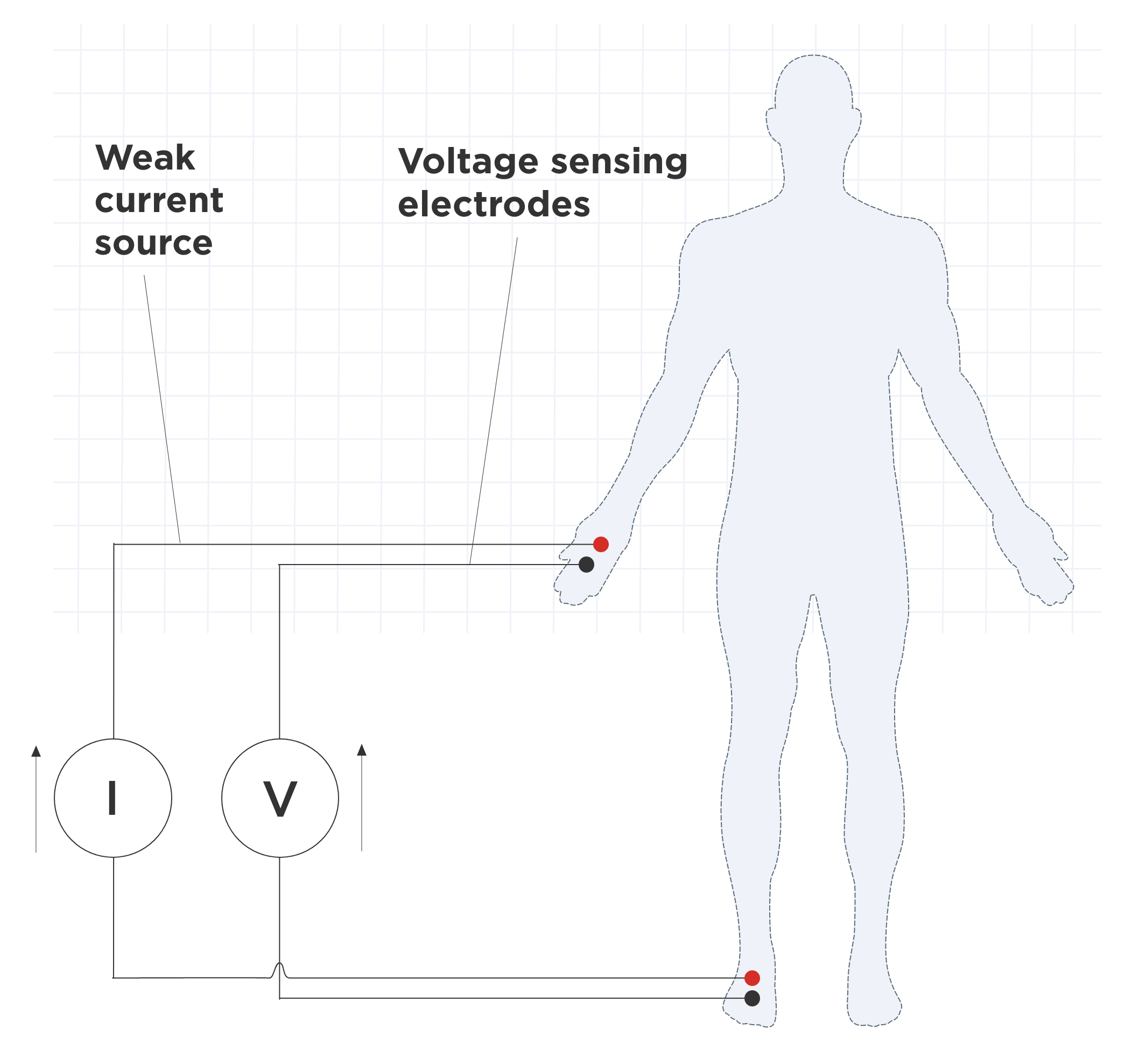
The core of how the Abyon scale works lies in bioelectrical impedance analysis, commonly called BIA. This technology sends a safe, low-level electrical signal through your body when you stand barefoot on the scale’s tempered glass surface.
The electrical signal travels differently through various tissue types. Muscle contains more water and conducts electricity efficiently, creating low resistance. Fat tissue resists electrical flow, creating high resistance. The scale measures this resistance and uses built-in algorithms to calculate body composition metrics.
This entire process happens in under five seconds. You simply step on, and the reading appears instantly on the LED display. No buttons to press, no waiting, no manual input required.
How BIA Translates Into Your Body Metrics
When the electrical current passes through your body, the scale interprets the data based on your personal profile. The algorithm considers your height, age, and gender to generate accurate percentages.
High resistance indicates more fat tissue in your body. Low resistance signals more muscle mass and water content. These readings, while not medical-grade, provide consistent data suitable for tracking trends over weeks and months.
For best accuracy, weigh yourself at the same time each morning, use the scale barefoot with dry feet, and avoid measuring right after exercise or eating large meals.
What Metrics the Abyon Scale Tracks
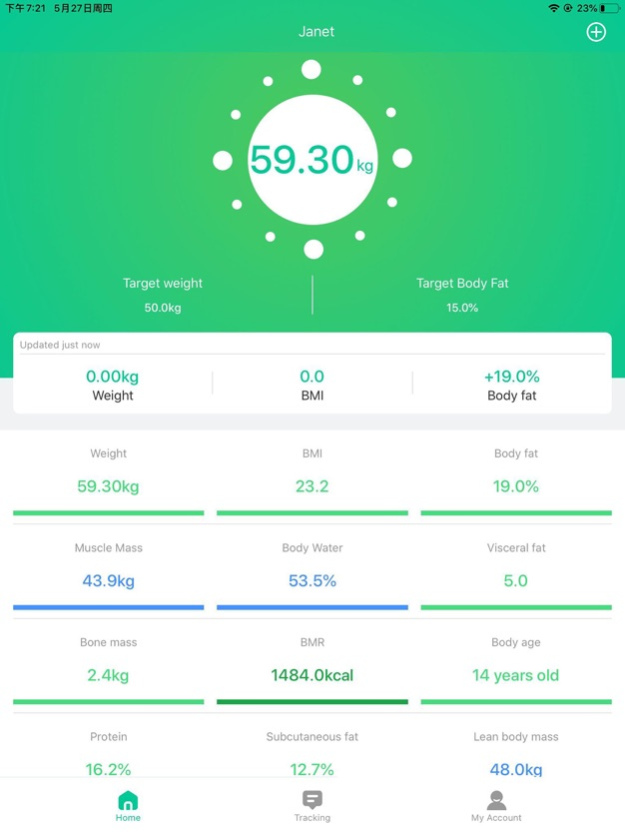
The Abyon scale displays and stores multiple health indicators beyond simple weight. These metrics give you a complete picture of your body composition changes over time.
The scale tracks weight in pounds or kilograms, body fat percentage, muscle mass, and Body Mass Index. Each measurement appears on the scale’s LED screen and automatically transfers to the companion app after each reading.
This multi-metric approach transforms a simple weigh-in into meaningful health feedback. You can see how strength training affects muscle mass or how dietary changes impact body fat percentages over weeks and months.
Why Multiple Measurements Matter for Health Goals
Weight alone doesn’t tell the full story. Two people at the same weight can have dramatically different body compositions. One might carry more muscle mass while another has higher body fat percentage.
The Abyon scale helps you understand these differences. If you’re strength training, you’ll see muscle mass increase even during weight loss phases. If you’re focusing on fat loss, body fat percentage drops while muscle is maintained or built.
This detailed tracking prevents discouragement during plateaus and provides motivation when visible changes occur in body composition even if scale weight stays the same.
Setting Up Your Abyon Scale for First Use
Getting started with your Abyon scale takes only minutes. The setup process is designed to be straightforward with no technical expertise required.
First, download the free companion app from the App Store. Open the app and create your user profile by entering your height, age, and gender. These details are essential for accurate body composition calculations.
Next, insert batteries into the compartment beneath the scale. The scale uses standard batteries that typically last months to years under daily use. Place the scale on a hard, flat surface like tile or hardwood flooring.
Step onto the scale barefoot. The scale activates instantly when it detects weight. Your reading appears within seconds and automatically syncs to your phone via Bluetooth.
Profile Settings That Affect Accuracy
Your entered profile data directly impacts the accuracy of body composition readings. Take time to input correct information during setup.
Gender matters because men and women have different body composition patterns. Age affects how the algorithm interprets impedance readings. Height is used to calculate BMI accurately.
If your profile details change, update them in the app settings. Significant weight changes over time may also warrant profile adjustments for better accuracy.
Connecting Abyon to Your Phone via Bluetooth
The Abyon scale uses low-energy Bluetooth to communicate wirelessly with your smartphone. This connection enables automatic data syncing without any manual action from you.
During initial setup, the app prompts you to pair the scale with your phone. This one-time pairing process creates a persistent connection. Each time you step on the scale afterward, it automatically reconnects if your phone is within approximately ten feet with Bluetooth enabled.
If your phone isn’t nearby when you weigh, the scale stores one reading locally. The next time your phone connects to the scale, all stored data syncs automatically.
Users report reliable connections across various iPhone models, even after years of daily use. The connection remains stable without requiring re-pairing or troubleshooting.
Troubleshooting Bluetooth Connection Issues
If your scale fails to connect, first ensure Bluetooth is enabled on your phone. Check that your phone is within range of the scale during weighing.
Make sure the app has permission to access Bluetooth on your device. Sometimes phone settings restrict app permissions, preventing connection.
Close and reopen the app if connection fails. Restarting the app often resolves temporary communication issues between the scale and your phone.
Using the App for Trend Tracking and Progress
The companion app transforms raw data into visual progress tracking. Every measurement syncs automatically, creating a chronological history of your health journey.
The app displays graphs showing weight, body fat percentage, and BMI trends over time. These visual representations make it easy to see patterns that daily numbers alone might hide.
You can set target weights within the app and monitor progress toward your goals. Weekly averages help smooth out daily fluctuations, giving you a clearer picture of actual progress.
The app integrates with Apple Health, consolidating all your fitness data in one place. Your step count, workout data, and body composition metrics from Abyon all appear together in Apple’s health ecosystem.
Understanding Weekly and Monthly Trends
Daily weight naturally fluctuates by several pounds due to hydration, food intake, and digestion. These variations are normal and shouldn’t cause concern.
The real value emerges when you look at weekly and monthly trends. Many users notice that weekend indulgences cause temporary spikes, but weekday consistency produces downward trajectories over time.
One user documented progress from 227 pounds to approximately 198 pounds over several months. Despite weekend weight spikes from relaxed eating, the overall trend remained clearly downward.
This trend-based thinking prevents discouragement from normal daily variations and keeps you focused on long-term goals.
Why Daily Consistency Matters for Accurate Readings
The Abyon scale rewards routine. Daily use, even with minor variations, builds a more reliable dataset than sporadic perfect measurements.
Weigh yourself at the same time each day for the most consistent results. Morning weigh-ins after using the restroom provide the cleanest baseline, free from food and water intake variations.
Dry feet matter for accurate body composition readings. Wet skin conducts electricity differently, potentially skewing impedance measurements and affecting body fat calculations.
Place the scale on a hard, flat surface. Carpets and uneven floors can affect balance and accuracy during measurement.
Building a Sustainable Weighing Routine
Establish a simple morning routine that includes stepping on the scale. This habit takes seconds but provides invaluable long-term data.
Don’t stress about daily numbers. Focus on the overall trend across weeks and months. Small daily inputs accumulate into meaningful insights about your health journey.
The scale becomes a daily accountability checkpoint, not a judgment of your worth. It’s simply data to help you make informed decisions about diet and exercise.
Maintaining Your Abyon Scale for Long-Term Accuracy
Keeping your Abyon scale working well requires minimal effort. A few simple habits preserve accuracy and extend the device’s lifespan.
Wipe the glass surface weekly with a damp cloth to remove dust and foot oils. Avoid harsh cleaners that could damage the electrodes embedded in the glass.
Keep your feet dry before stepping on the scale. Moisture on your skin alters the electrical impedance and can produce inaccurate body fat readings.
Check battery status periodically. When the display dims or fails to turn on, replace the batteries. Most users report going over a year between battery changes.
Ensuring Long-Term Durability
The tempered glass construction resists scratches and withstands regular daily use. Users report minimal wear even after years of continuous use.
No firmware updates or recalibration are required. Once set up, the scale runs indefinitely without maintenance beyond occasional battery replacement.
Store the scale in a dry location away from excessive humidity. Standard bathroom environments pose no problems, but extreme moisture could affect electronic components over time.
Who Should Use the Abyon Smart Scale
The Abyon scale serves specific types of users best. Understanding your needs helps determine if this device fits your health goals.
Ideal users include individuals pursuing long-term weight management who want more than just scale weight. Home fitness enthusiasts benefit from biometric feedback showing how workouts affect body composition. Budget-conscious buyers appreciate avoiding subscription fees while getting full feature access.
The scale works particularly well for those following flexible eating patterns, such as strict weekdays with relaxed weekends. Users can see that weekend spikes don’t ruin overall progress when trends remain downward.
iPhone users already in the Apple Health ecosystem gain seamless integration, consolidating all fitness data in one convenient location.
Who Might Want Different Features
The Abyon scale isn’t designed for medical-grade body composition analysis. If you need clinical precision, consult healthcare professionals for professional testing.
Users seeking advanced metrics like bone density, visceral fat, or protein percentage might need a more advanced (and expensive) smart scale model.
Those unwilling to use a smartphone app should consider basic digital scales without connectivity features.
Abyon Scale vs Basic Digital Scales: Key Differences
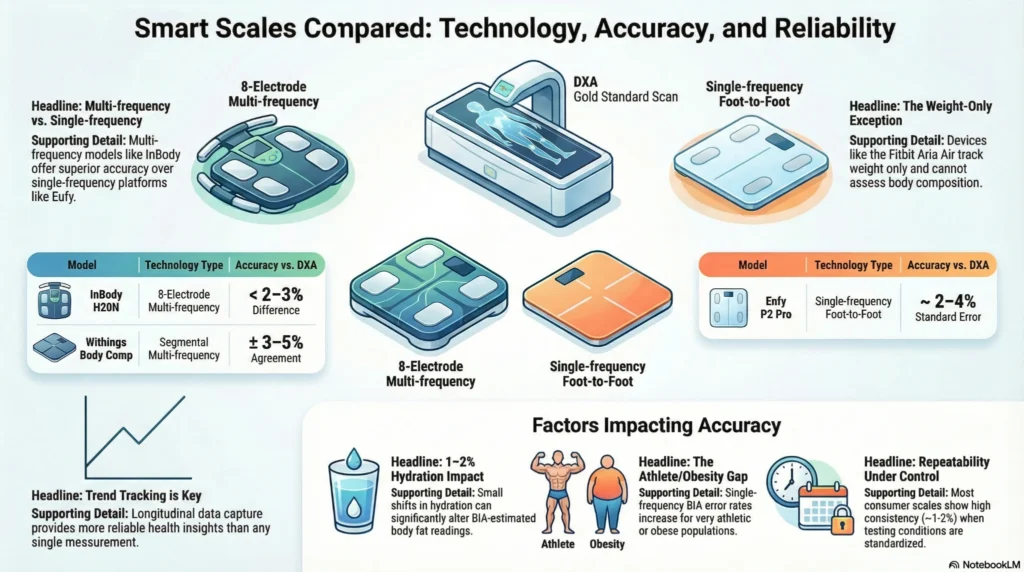
Comparing the Abyon to standard digital scales reveals significant functional differences. Understanding these distinctions helps justify the price difference.
| Feature | Basic Scale | Abyon Smart Scale |
|---|---|---|
| Measurements | Weight only | Weight, body fat, muscle, BMI |
| Data Sync | Manual logging | Automatic Bluetooth |
| Trend Tracking | None | Visual graphs in app |
| App Integration | None | Apple Health compatible |
| Cost | Lower upfront | No subscription required |
The Abyon provides comprehensive health data without recurring fees. Many competing smart scales lock advanced features behind monthly subscriptions, while Abyon offers everything free.
User feedback consistently highlights reliability, simplicity, and consistency as standout qualities. The scale simply works, day after day, without glitches or connectivity problems.
Key Takeaways for Understanding Your Abyon Scale
The Abyon Bluetooth scale works by combining bioelectrical impedance analysis with automatic Bluetooth syncing to deliver comprehensive body composition data. It measures weight, body fat percentage, muscle mass, and BMI through safe electrical signals, then instantly transfers all readings to your phone via the free companion app.
The real value lies in long-term trend tracking rather than daily readings. Daily fluctuations are normal, but consistent measurement over weeks and months reveals meaningful progress patterns. This data helps you make informed decisions about diet and exercise without requiring medical expertise.
The scale excels in durability, simplicity, and integration with Apple Health. No subscription fees, no complicated setup, no connectivity hassles. It simply works, providing reliable data for real health goals.
Frequently Asked Questions About Abyon Scale
Does the Abyon scale measure body fat accurately?
The Abyon uses bioelectrical impedance analysis to estimate body fat percentage. While not as precise as clinical methods like DEXA scans, it provides consistent readings suitable for tracking changes over time. Accuracy improves when you weigh under consistent conditions daily.
Do I need Wi-Fi for the Abyon scale to work?
No Wi-Fi is required for basic operation. The scale connects via Bluetooth to your phone. Data syncs automatically when your phone is nearby. Without a connection, the scale stores one reading locally until syncing occurs.
How long do batteries last in the Abyon scale?
Battery life varies with usage but typically lasts months to years under daily use. Most users report going over a year between battery replacements. When the display dims or fails to activate, simply replace the batteries.
Can I use the Abyon scale without the app?
The scale displays weight and basic metrics on its LED screen without the app. However, the app is required for trend tracking, historical data viewing, and Apple Health integration. The app is free with no subscription required.
Does the Abyon scale work with Android phones?
The available information indicates iOS and iPhone compatibility. Android compatibility should be confirmed with the manufacturer before purchase if you use an Android device.
How do I clean my Abyon scale properly?
Wipe the tempered glass surface weekly with a damp cloth. Avoid harsh chemicals or abrasive cleaners that could damage the electrodes. Ensure your feet are dry before stepping on to maintain accurate readings.



