
You’re baking a cake and need exactly 250 grams of flour. Instead of dumping flour directly onto the scale, you place a mixing bowl on it first, only to see the display jump to 450 grams. What now? Do you subtract 450 from every measurement? That’s where the tare function saves the day. By pressing Tare, the scale resets to zero, automatically subtracting the bowl’s weight so you can measure just the flour. This simple feature is used daily in kitchens, labs, factories, and shipping centers to ensure accurate net weight readings without manual math.
In this guide, you’ll learn exactly how tare works, the difference between tare and zero, common mistakes to avoid, and why this feature is essential across industries from home cooking to global logistics.
What Is Tare Weight and Why It Matters
Understanding how tare works starts with knowing the basic weight terms used in measurement.
Tare Weight vs Net Weight
Tare weight is the mass of an empty container or vessel, like a bowl, beaker, shipping box, or truck chassis, before any product is added. It’s also known as unladen weight or empty weight.
Gross weight equals tare weight plus the contents inside the container.
Net weight equals gross weight minus tare weight, representing only the actual product being measured.
For example, a glass jar weighs 200 grams. When you add 300 grams of honey, the gross weight shows 500 grams. Without tare, you’d need to manually subtract 200 every time. With tare, the scale does this instantly.
Why Tare Function Matters
The tare function electronically subtracts the weight of any container placed on the platform, allowing only the contents to be measured. This eliminates math errors, speeds up workflows, reduces cross-contamination, and ensures regulatory compliance in industries like pharmaceuticals and shipping.
Step-by-Step Guide: How to Use the Tare Function
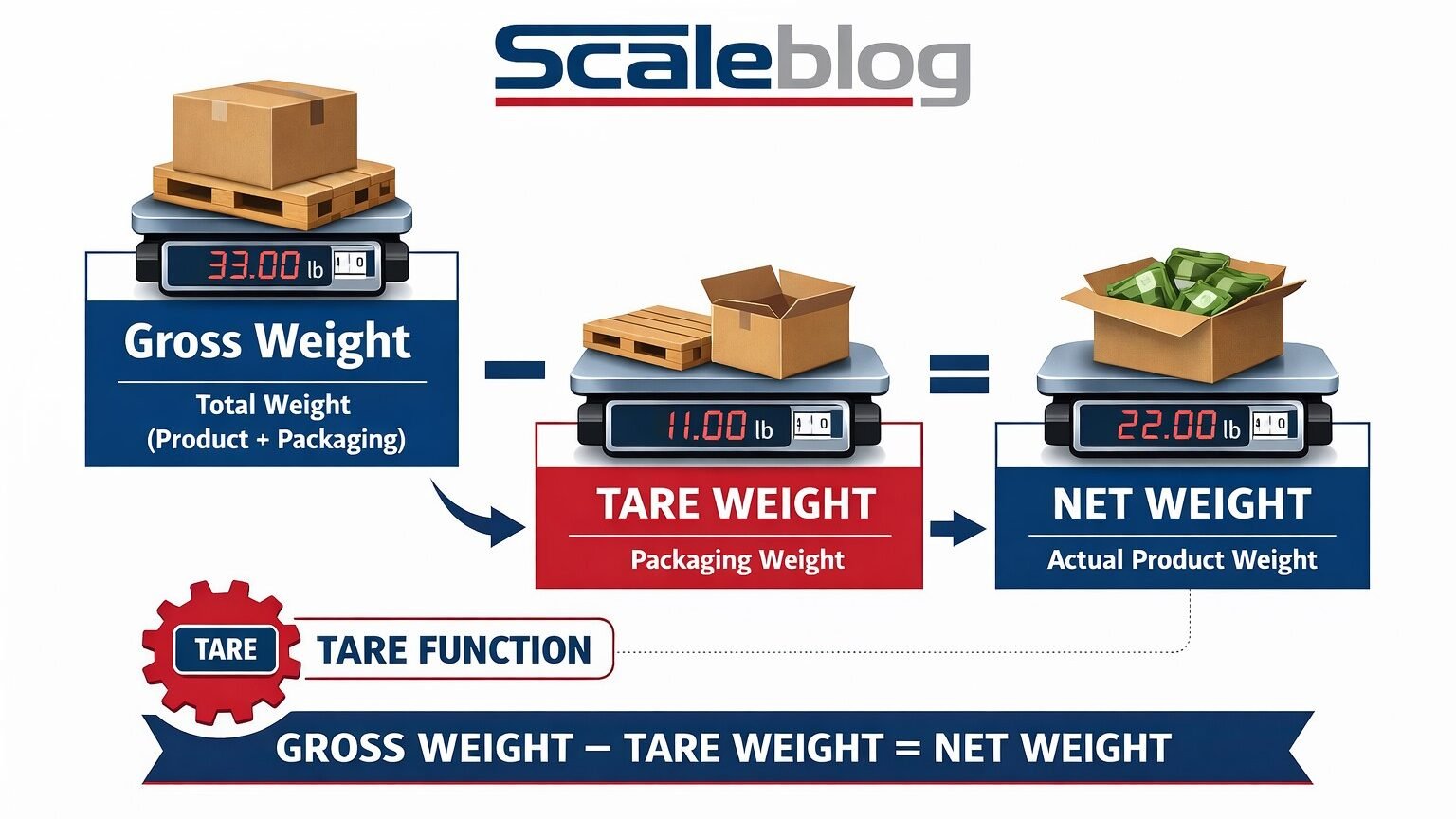
The tare function operates through electronic offset subtraction, a core feature of digital scales.
The Taring Process
Follow these steps for accurate tare operation:
- Turn on the scale and wait for the reading to stabilize. Look for a stability indicator like “g” or a circle symbol.
- Place your container in the center of the weighing platform.
- Press the TARE button. The scale stores the container’s weight in memory and resets the display to 0.00.
- Add your ingredients or material into the container.
- Read the net weight directly from the display. The number shown reflects only what you added.
- Remove everything when finished. If the display shows a negative value, press Tare or Zero to return to baseline.
Pro Tip: Always wait for the stability indicator before pressing TARE to prevent inaccurate offsets.
This method enables sequential weighing, where you can add multiple ingredients one after another in the same bowl while tracking each addition precisely.
Tare vs Zero: Understanding the Critical Difference
Though both make the display read zero, tare and zero serve fundamentally different purposes.
When to Use Tare
Use tare when a container is on the scale and you want to ignore its weight. The scale remembers the current load and subtracts it from all future readings. This is ideal when measuring contents only, like flour in a bowl.
When to Use Zero
Use zero when the scale is empty but displays a slight drift, like 0.1 grams. Pressing Zero resets the baseline without storing any weight value.
Critical Mistake: Pressing Zero with a container on the scale does not remove its weight. Only Tare does that.
Simple Rule: Use Tare when there’s weight on the scale. Use Zero when it’s empty.
Digital Scale Technology Behind Tare Function

Modern digital scales use advanced electronics to make taring fast, accurate, and reliable.
How Load Cells Enable Taring
Digital scales rely on strain gauge load cells that convert physical weight into electrical signals. When you press Tare, the scale captures the current signal representing the container weight, stores it as a reference offset, and displays all future changes relative to that point.
As you add material, the load cell detects increased force, and the processor shows only the difference, which is the net weight.
Digital vs Mechanical Scales
Digital scales offer superior tare performance compared to mechanical models. Digital scales provide one-touch button operation, high accuracy with 0.1 gram resolution, flexibility to work with any container, and support for memory and remote tare features. Mechanical scales require manual knob or slider adjustment, have lower precision due to parallax error, and lack smart features.
Common Applications Across Industries
Tare isn’t just for bakers. It’s critical across many fields.
Culinary and Baking
Professional bakers add flour, sugar, and eggs to one bowl, taring between each ingredient. This saves time, reduces dishes, and improves recipe accuracy.
Chemistry and Pharmaceuticals
Labs weigh active ingredients in vials without contamination. This is essential for cGMP compliance and precise dosing in medication preparation.
Shipping and Logistics
Shipping containers have stamped tare weights. Net cargo weight equals gross minus tare, which is required for SOLAS VGM regulations and accurate freight billing.
Manufacturing and Parts Counting
Factories weigh a tray of screws, tare the tray, then count pieces by total weight. This ensures inventory accuracy and reduces counting errors.
Medical and Veterinary
Veterinarians weigh small animals in carriers or infants in blankets, taring the carrier first for safe and accurate readings without direct handling.
How to Handle Negative Readings After Taring
After pressing Tare and removing the container, the scale often shows a negative number.
For example, if your bowl weighs 150 grams and you press Tare, the display shows 0.0 grams. When you remove the bowl, the display reads negative 150 grams.
This negative reading confirms the tare function is working correctly. It shows the stored offset is still active and the scale is using electronic subtraction rather than physical recalibration.
To reset the scale, remove all items and press Tare or Zero. The display returns to 0.00.
Common Mistakes to Avoid When Using Tare
Even simple functions can go wrong if misused. Here are the most frequent errors.
Exceeding Scale Capacity
Taring does not increase available capacity. The total weight of container plus contents must stay within the scale’s limit. A 3 kilogram bowl plus 4 kilograms of material equals 7 kilograms total, but if maximum capacity is 5 kilograms, the scale will overload.
Always check that container weight plus expected load is less than or equal to max capacity.
Shock Loading
Dropping a heavy container onto the scale, even within capacity limits, can damage load cells due to impact force. Always place containers gently and evenly on the platform.
Forgetting to Tare
Skipping the tare step means all readings include the container weight. You might think you’re adding 500 grams of flour when it’s actually 500 grams of flour plus the bowl.
Double-check that the display reads 0.00 after pressing TARE before adding anything.
Using Dirty or Wet Containers
Moisture, grease, or residue adds unmeasured weight and affects accuracy. Always use clean, dry, stable containers for reliable results.
Advanced Tare Features in Professional Scales
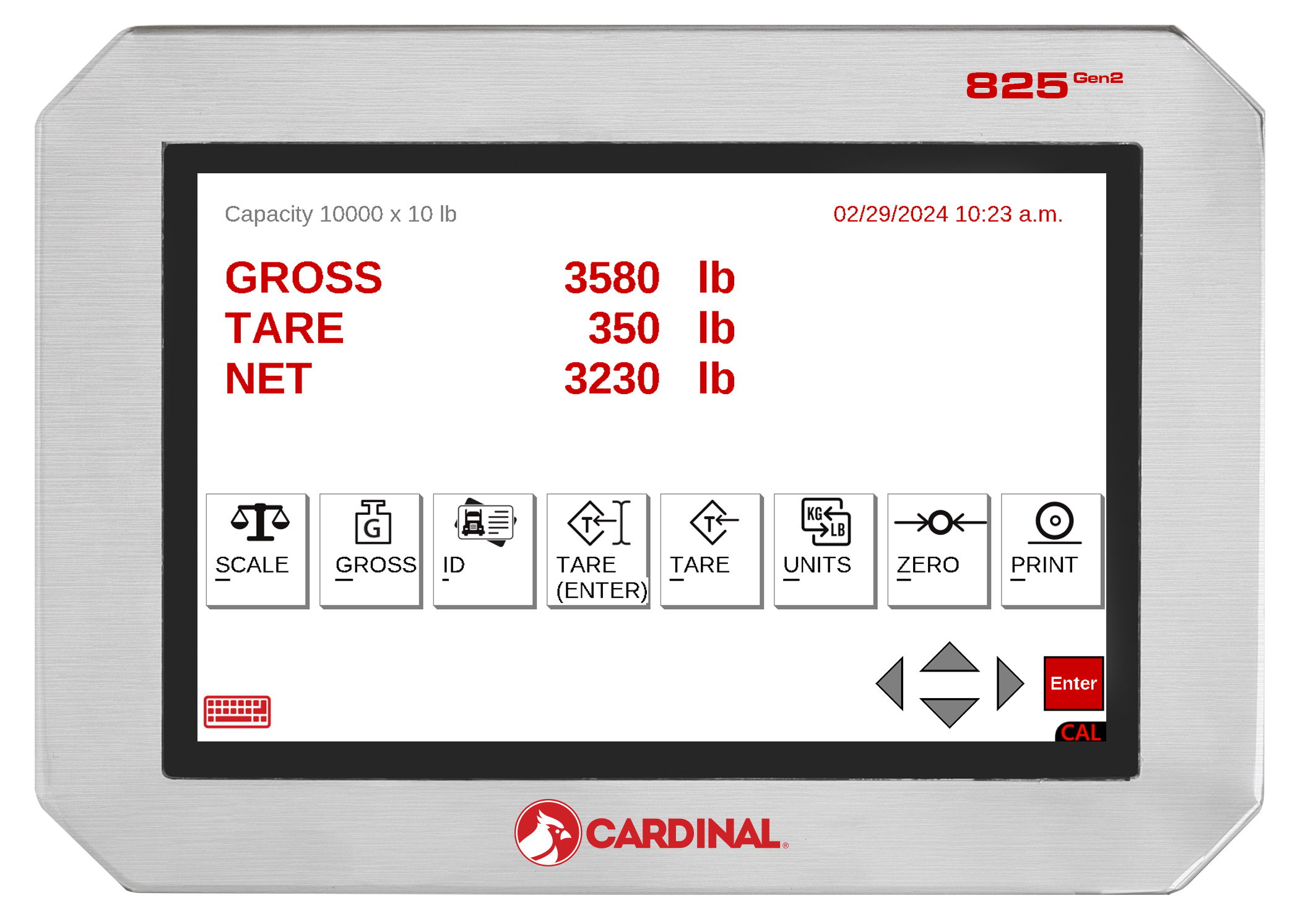
High-end industrial scales offer powerful tare capabilities beyond basic operation.
Programmable Tare Memory
Industrial scales let you save tare weights for frequently used containers. Recall specific containers like Bowl A or Tray B with one button press, boosting efficiency in repetitive tasks.
Sequential Taring
Add ingredient after ingredient while tracking cumulative net weight. This is perfect for batching recipes or chemical mixtures where multiple components must be added precisely.
Remote Tare via API or Network
In automated factories, tare commands come from software systems via Ethernet or PLC integration. This enables synchronization with ERP, MES, or SCADA systems for smart manufacturing.
Auto-Stabilization Detection
Advanced scales wait until weight is stable before allowing tare activation, preventing false readings from drifting or unstable loads.
Maintenance Tips for Accurate Tare Function
For long-term accuracy, maintain your scale properly.
Regular Calibration
Use certified test weights to verify accuracy monthly, or more frequently in heavy-use environments. Legal-for-trade scales used in commerce must be calibrated by state-certified technicians.
Proper Cleaning and Care
Wipe the platform after each use. Avoid liquids entering the housing. Store the scale on a level, vibration-free surface away from drafts.
Avoid Overloading
Never exceed the scale’s total capacity, even temporarily. Overloading can permanently damage load cells and void warranties.
Historical Origins of the Term Tare
The word tare has deep historical roots in global trade.
The term comes from Arabic tarh, meaning thing deducted. It entered European commerce through Italian tara and French tare during the 15th century. Merchants used tare to deduct packaging weight like barrels and sacks from goods, ensuring buyers paid only for net products, not containers.
This practice evolved into standardized tare markings on trucks, railcars, and shipping containers used today.
Legal and Regulatory Importance of Tare Weight
Tare weight is legally significant in trade and transportation.
SOLAS VGM Rule
Ships require Verified Gross Mass of containers before loading. VGM equals tare plus net cargo. Carriers must know tare to ensure safe stacking and stability.
Bridge Laws and Trucking
U.S. bridge weight limits are based on gross vehicle weight. Tare is essential to calculate legal payload capacity and avoid fines.
Commercial Trade
In grocery stores and freight operations, legal-for-trade scales must meet metrological standards. Tare operations in these environments must comply with regulatory requirements.
Key Takeaways for Mastering Tare Function
The tare function is more than a convenience. It’s a cornerstone of accurate, efficient, and compliant weighing across countless applications.
Remember these essential points:
- Tare weight equals the container only, while net weight equals contents only
- Press Tare after placing the container but before adding material
- Tare differs from Zero: use Tare with a load, use Zero when empty
- Never exceed total capacity including container weight
- Handle containers gently to protect load cells
- Negative readings after removing containers confirm tare is working
- Digital scales offer superior tare performance over mechanical models
- Use programmable memory for repetitive tasks
- Calibrate regularly for ongoing accuracy
- Tare matters in kitchens, labs, logistics, and manufacturing
Frequently Asked Questions About Tare Function
What does tare mean on a scale?
Tare is a function that subtracts the weight of a container from the total reading, allowing you to measure only the contents inside. When you press Tare, the scale resets to zero with the container still on the platform.
How do I use the tare function on a digital scale?
Place your empty container on the scale, wait for stabilization, then press the TARE button. The display resets to zero. Add your ingredient and read the net weight directly from the display.
What is the difference between tare and zero on a scale?
Tare subtracts the weight of an object currently on the scale. Zero resets the baseline when the scale is empty but showing slight drift. Use Tare when there’s a container present, use Zero when the scale is empty.
Why does my scale show a negative number after taring?
This happens when you remove the container after taring. The negative value, like negative 150 grams, equals the tare weight stored in memory. It confirms the tare function is working correctly. Press Tare or Zero to restore the display to zero.
Can tare be used multiple times on the same scale?
Yes, you can press Tare again to set a new zero point. This is useful for sequential adding, where you add one ingredient, press Tare, then add another while tracking cumulative weight.
Does pressing Tare affect the scale’s maximum capacity?
No, taring does not increase capacity. The total weight of container plus contents must still stay within the scale’s rated maximum. Exceeding capacity can damage the load cells.



