
Weigh scale integration transforms raw weight measurements into trusted, context-rich data points that drive accuracy, compliance, and efficiency across industries. Instead of manually typing numbers from a digital display, true integration automatically captures weight values directly from the scale and binds them to critical operational context: batch, operator, material lot, time, and process step. This ensures every weigh event becomes a verifiable record, not just a number on a screen.
In regulated environments like pharmaceuticals or food manufacturing, unrecorded tare values or out-of-calibration scales can invalidate entire batches. In retail and logistics, manual entry slows transactions and leads to billing inaccuracies. This guide walks you through technical methods, compliance requirements, and implementation strategies for industrial-grade weigh scale integration.
Connect Scales to Software Systems
/New_07_2023/New_ENG_mScales_factory_automation_system_terminal.png?width=940&height=653&name=New_ENG_mScales_factory_automation_system_terminal.png)
Integrating a weigh scale with business software is not about seeing weight on a screen. It is about ensuring that weight is captured correctly, securely, and within context. True integration links the physical act of weighing to digital workflows in ERP, MES, POS, or inventory systems.
Choose the Right Interface
Each interface serves different environments and integration goals. The most common options include:
- USB: Direct PC connection and Android tablets. Offers plug-and-play functionality with bidirectional command support.
- RS-232: Printers, PLCs, and legacy systems. Supports custom output formats with time and date stamping.
- RS-485: Multi-scale factory networks. Connects up to 10 scales over 4,000 feet.
- Ethernet: Fixed installations. Provides stable, high-speed local network access.
- WiFi: Mobile supervision. Enables wireless remote monitoring without cabling.
- Bluetooth: Retail POS and portable setups. Offers low-cost wireless connectivity with auto-reconnect after power loss.
- Cloud platforms: Multi-site analytics. Provides global access and predictive maintenance capabilities.
Enable Time and Date Stamping
For auditability, RS-232 outputs can include timestamps. The internal real-time clock is powered by a lithium battery that lasts up to 10 years. This adds date, time, and day of week to each weight transmission. Set once via scale menu, it maintains time during power outages. This feature is required for FDA-compliant batch records where timing of material addition matters.
Support Multiple Scales Over Long Distances
Use RS-485 when you need to connect up to 10 scales on one network and transmit data over 4,000 feet. An RS-485-to-USB adapter allows direct control and logging from a single PC. This is ideal for production floors with multiple batching stations.
Automate Data Flow to Business Systems
Automatic data capture replaces error-prone manual entry with trusted, real-time transfer of weight values into enterprise systems. This ensures consistency, traceability, and faster processing across operations.
Capture Weight Without Manual Entry
Manual input is the weakest link in data integrity. Integrated systems read weight directly from scale via USB, serial, or network. They auto-populate fields in POS, ERP, or MES and eliminate typos, transposed digits, and rounded entries. In retail, the workflow is simple: select item, place on scale, weight auto-fills, and price calculates instantly.
Use Cloud Platforms for Remote Access
Cloud integration offers no local servers required. Secure global login provides access to live weight data from multiple sites. Dashboards aggregate data across warehouses, farms, or distribution centers. Alerts notify you of anomalies or upcoming calibration due dates.
Buffer Data During Downtime
If SAP or Odoo is unreachable, local applications store readings temporarily. Sync resumes when connection restores. This prevents data loss during network outages and is critical for compliance. No gaps in recordkeeping are acceptable in regulated environments.
Enforce Context-Bound Weighing
/New_07_2023/New_mScales_materialflows.png?width=611&height=424&name=New_mScales_materialflows.png)
True integration does not just capture weight. It ensures that weight belongs to the correct process context. Without this, data lacks credibility and cannot be used for regulatory submissions or quality decisions.
Lock to Active Batch or Order
Context locking prevents weights from being assigned to the wrong batch. The system ties scale session to open work order in MES or ERP. Attempting to weigh under a different batch is blocked. The audit trail logs all denied attempts. Test this by trying to capture weight while viewing Batch B. The system should reject it if weighing was initiated under Batch A.
Require Identity Confirmation Before Weighing
Prevent wrong-material errors with barcode or RFID scanning of ingredient containers. The system validates against recipe BOM and blocks use of incorrect, substituted, or expired lots. In pharmaceutical applications, scanning a vial of Lactose USP before dispensing ensures the correct excipient is used.
Control Tare and Container Swaps
Most undetected errors come from unverified tare. Implement mandatory tare verification before net weight capture. The system stores known tare values for approved containers and detects swaps even if the new container looks identical. The workflow requires placing an empty container on the scale, confirming tare weight, and allowing the system to lock tare. Any change triggers an alert or blocks proceeding.
Prevent Errors With Real-Time Validation
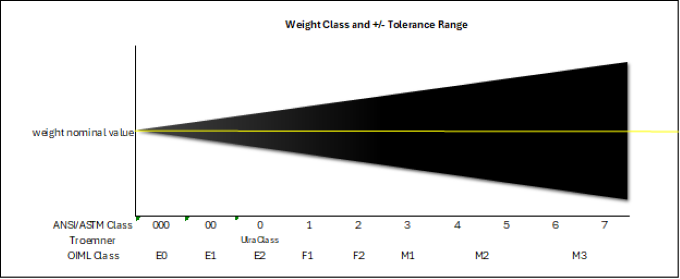
Integrated systems do not just record. They validate every weigh event against predefined rules before acceptance.
Set Target Weights and Tolerances
Define acceptable ranges such as target weight plus or minus tolerance. The system alerts or blocks if the weight falls outside the window. This supports Tolerable Negative Error principles for legal-for-trade accuracy. In food packaging, this ensures bags are never underfilled, avoiding regulatory penalties.
Track Cumulative Consumption
Prevent overdraw from raw material lots. The system tracks total grams used per lot and alerts when nearing depletion. It blocks further use if the limit is exceeded. This is crucial for allergen control and prevents accidental cross-contamination from reused containers.
Gate Use by Calibration Status
Only calibrated scales should be used in production. The integration system checks calibration due date in real time and blocks weigh steps if the scale is overdue. This requires documented override with electronic signature. Comply with ISO/IEC 17025 and GAMP 5 metrology standards by implementing this control.
| Scale Status | System Behavior |
|---|---|
| In-calibration | Normal operation |
| Due in less than 7 days | Visual warning |
| Overdue | Block unless exception approved |
Meet Compliance and Audit Requirements
Regulated industries demand defensible records. Integration must support data integrity, audit trails, and electronic signatures.
Maintain Immutable Audit Trail
Every action must be recorded. Track who weighed, what material, which batch, when, whether it was within tolerance, and if they reweighed. This is required for FDA 21 CFR Part 11, EU Annex 11, and GAMP 5 compliance.
Support Electronic Signatures
Critical actions require authorization including release of blocked batch, override of tolerance, and manual entry exception. Each requires unique user login, password or biometric confirmation, and timestamped entry in audit log. No shared logins, no blank fields, and no silent edits are permitted.
Restrict Manual Entry to Exception Path
Manual input should not be the default. Make it available only through governed exception workflow. Require reason code such as scale malfunction and supervisor approval. Ensure it is fully traceable in the audit trail. If manual entry is easy, it becomes the norm during peak hours.
Integrate With SAP Without PI or NetWeaver
SAP does not natively read RS-232 data, but you can still integrate using external tools.
Use PCO for SAP Communication
PCO bridges serial devices and SAP. Install PCO on a PC connected to the scale via RS-232. It reads weight data from the COM port and sends to SAP using RFC calls. This is supported by SAP with sample programs. It works best for QM or MM modules where PI sheets require automatic weight input.
Build a .NET Application With RFC Call
Develop a lightweight Windows application that uses System.IO.Ports.SerialPort to read data. Parse the ASCII stream, stripping units and converting to float. Call an SAP RFC function module to push data. This approach provides full control over error handling, local logging if SAP is down, and the ability to wait for stable weight reading before sending. Avoid ABAP programs reading COM ports because the SAP application server has no access to local hardware.
Integrate With Odoo Without IoT Box
Odoo users do not need expensive IoT hardware to capture weight data.
Use PV-COM App Plus Browser JavaScript
PV-COM runs on the local PC and reads from USB or virtual COM port. It exposes weight via localhost API. Custom JavaScript in Odoo form polls the endpoint every 500ms and injects the value into the active field. No server-side coding is required. This works on any Odoo version tested v14 and above.
Deploy Custom Widget With Client-Side JS
EBITS TechCon developed a reusable solution where JavaScript communicates with a background service. It detects focus on the weight field and pushes the latest stable reading. Packaged as an Odoo module, this enables small businesses to skip IoT Box costs while maintaining full functionality.
Optimize Retail and Logistics Workflows
In fast-paced environments, integration improves speed and accuracy significantly.
Speed Up Checkout With Auto-Fill
In retail environments using Lightspeed X-Series, the workflow is straightforward. Select loose item such as apples. The cursor focuses on quantity field. Place item on scale and weight auto-populates. Price calculates instantly. Press Weight button to confirm. Supported models include Star Micronics mG-S8200, mG-S322, and mG-T60.
Automate Shipping and Freight Billing
With ShipConsole, a package placed on the scale sends weight to shipping software. Labels auto-generate with correct carrier rates. Supported scales include Fairbanks, Mettler Toledo, and NCI Weightronix models. This eliminates manual reweighing and reduces disputes over freight charges.
Validate and Test Integration Correctly
Do not trust demos that only show connectivity. Test for enforcement.
Run Critical Demo Scripts
Test context locking by attempting wrong batch weigh. The expected result is block capture and log denial. Test identity enforcement by scanning wrong lot. The expected result is block and require correction. Test tare control by swapping containers after tare. The expected result is detect or prevent. Test deviation handling by entering out-of-tolerance weight. The expected result is start NC workflow and block completion. Test calibration gating by simulating overdue calibration. The expected result is block use unless exception approved.
Monitor Serial Output for Stability
Use tools like Tera Term, Putty, or Arduino Serial Monitor. Check data format such as 123.45 with carriage return. Check transmission stability whether it waits for settled weight. Check inter-character delay to avoid partial reads. This prevents ghost values from unstable connections.
Follow Best Practices for Long-Term Success
Avoid common failures that undermine integration value.
Train Staff on Tare Discipline
Reinforce these habits: always zero before taring, never assume tare value, and reset after removing container. High-volume environments benefit most from enforced tare steps.
Schedule Regular Calibration
Best practices include leveling scale on flat surface, using bubble level to adjust feet, performing zero calibration daily, and recalibrating after moving. Non-compliant scales may lead to fines in legal-for-trade applications.
Choose Approved Models for Trade Use
Check NTEP certification for U.S. commercial sales. This is required in most states and subjects the scale to annual inspection and sealing. Only certified models are allowed. Consult local weights and measures authority before deployment.
Frequently Asked Questions About Weigh Scale Integration
What is the difference between scale connectivity and true integration?
Connectivity allows a system to read a number from a scale. True integration ensures that number is trustworthy by binding it to context, enforcing identity and status rules, gating calibration, and governing exceptions. Connectivity moves a number. Integration makes the number credible.
Should manual entry ever be allowed as a normal option?
Manual entry should only be available as a governed exception path. If it is a normal option, it becomes the default under pressure. Require reason codes, supervisor approval, and full traceability. The goal is zero manual entry percentage.
What are the three most critical controls for weigh scale integration?
The top three controls are context locking to prevent wrong batch assignment, lot-specific enforcement with identity confirmation, and calibration gating to ensure only qualified instruments are used. These three controls prevent most weigh-related quality issues.
How do I integrate a scale with SAP without using PI or NetWeaver?
Use a .NET application that reads from the RS-232 port using System.IO.Ports.SerialPort. Parse the ASCII stream and call an SAP RFC function module to push the data. Alternatively, use PCO software to bridge the serial device and SAP via RFC. Both methods avoid ABAP programs that cannot access local hardware.
What is the biggest red flag to watch for in vendor demonstrations?
If the system allows a weight to be captured while viewing the wrong batch or lets operators override critical checks without approval, it is not truly integrated. Red flag behavior includes manual entry as normal path, no context locking, no tare verification, and calibration being ignored.
Key Takeaways for Successful Weigh Scale Integration
True weigh scale integration is enforcement-grade data capture, not just connectivity. Your system must capture weight automatically from the device, bind each measurement to execution context, enforce material identity and lot at point of use, verify tare weight and prevent container swaps, compare weight to recipe targets and tolerances, check calibration status before allowing use, trigger governed exception workflows for deviations, record all events in immutable audit trail, support electronic signatures and role-based access, and be validated under GAMP or CSV principles.
Choose methods based on your infrastructure. Use .NET app plus RFC for SAP without PI. Use PV-COM plus browser JavaScript for Odoo without IoT Box. Use Star Micronics plus Lightspeed for retail POS. Use cloud-based monitoring with AxChange for multi-site logistics.
When done right, weigh scale integration reduces errors, speeds operations, and builds defensible quality systems. Every weigh event becomes a trusted digital signature of process control.



