If your Taylor scale isn’t giving consistent readings or you’re unsure how to switch units, you’re not alone. Thousands of home cooks and health-conscious users rely on Taylor digital kitchen and bathroom scales for precision, but only when used correctly. Whether you’re measuring flour for a cake or tracking daily weight, knowing how to use a Taylor scale properly ensures accuracy every time. This guide covers everything from setup and tare function to calibration and troubleshooting based on official specifications and verified user procedures.
Set Up Your Taylor Scale Correctly
Before weighing anything, proper setup is essential. A poorly placed or unpowered scale leads to incorrect readings that can ruin recipes or throw off your health tracking.
Install AAA Batteries
Most Taylor kitchen scales require three AAA batteries. Flip the scale over and open the battery compartment. Insert the batteries matching the (+) and (-) symbols inside. Use alkaline batteries for longer life. If the display doesn’t light up, check for corrosion or reversed polarity. Replace old batteries promptly if the screen appears dim or flickers.
Place on a Hard, Level Surface
Set the scale on a flat, solid surface like a kitchen counter or bathroom tile. Never use it on carpet, rugs, or soft flooring. Uneven or cushioned surfaces distort weight distribution and damage accuracy. For best results, test the surface by placing a small level on it or rolling a coin across it. If it tilts, choose another spot.
Power On and Check Zero Reading
Press any button, usually the unit or power key, to turn on the display. Wait for the screen to stabilize. It should show 0.0 or dashes (—-). If it doesn’t, press tare to reset. If the scale still won’t zero, perform a recalibration. Avoid touching the platform during startup because your hand’s pressure can interfere with the reading.
Switch Between Weighing Units
Taylor scales support multiple measurement systems, so choosing the correct unit matters especially in baking or nutrition tracking. The wrong unit can completely throw off your recipe.
Cycle Through Available Units
Press the unit button to toggle between different measurements. The available options typically include grams (g), kilograms (kg), ounces (oz), pounds (lb), fluid ounces (fl oz), and milliliters (mL). The selected unit appears beside the number on the display. For dry ingredients, use grams or ounces. For liquids, milliliters or fluid ounces estimate volume assuming water-like density.
Choose Unit Before Weighing
Always set your preferred unit before placing items on the scale. Changing units mid-weighing resets the display and may cause confusion. For example, 100 grams equals about 3.5 ounces. Switching after adding flour will change the number instantly, risking measurement errors. Make your selection first, then place your ingredients.
Use the Tare Function Effectively
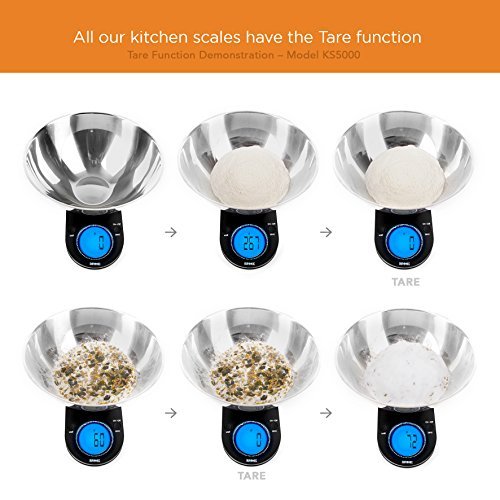
The tare function is the most powerful feature for accurate cooking and portion control. It subtracts the weight of containers so you measure only your ingredients.
Zero Out Container Weight
Place a bowl or plate on the scale. Wait 2-3 seconds for the weight to stabilize. Press tare. The display resets to 0.0. Add your ingredients and the new weight shown is the net weight only. This removes the container’s mass from the reading. Without tare, you’d have to subtract manually, which is a common source of error in baking.
Add Multiple Ingredients in One Bowl
To combine several ingredients in one bowl, follow this sequence. Place your bowl on the scale and press tare. Add your first ingredient, such as 150 grams of flour. Press tare again. Add your second ingredient, such as 50 grams of sugar. Repeat as needed. Each time you tare, the scale resets to zero, showing only the latest addition. This method ensures precise ratios and eliminates guesswork.
Common mistake to avoid: Forgetting to wait for stabilization before pressing tare. If the weight is still fluctuating, the reset will be inaccurate.
Weigh Food and Ingredients Step by Step
Now that your scale is set up and tared, it’s time to measure accurately. Follow these steps whether you’re weighing a single item or combining multiple ingredients.
Weigh a Single Item
Turn on the scale and ensure it reads 0.0. Place your item directly on the platform and wait for the number to stop changing. Read the weight displayed. Remove the item and the scale auto-turns off in 1-2 minutes. No container is needed, just make sure the scale starts at zero first.
Combine Items Using Sequential Tare
Place your mixing bowl on the scale and press tare. The display reads 0.0. Add 100 grams of oats and press tare. Add 50 grams of nuts and press tare. Add 30 grams of dried fruit. The final total reads 180 grams. This technique works perfectly for trail mix, batters, or meal prep containers.
Pro tip: Use the tare function even with parchment paper or silicone mats. Their weight may be small, but in precision baking, every gram counts.
Calibrate Your Taylor Scale
After replacing batteries or moving the scale, calibration ensures sensor accuracy. This is especially important for bathroom scales that can drift over time.
Perform Foot-Tap Reset for Bathroom Models
If your Taylor bathroom scale shows erratic numbers or won’t turn on, try this calibration method. Remove the battery, usually a CR2032. Place the scale on a hard floor, not carpet. Stand on it with both feet for 10 seconds even though it’s off. Step off and reinsert the battery. With one foot, tap the scale lightly until the display lights up. Immediately lift your foot. Wait for it to show 0.0 or —-. Let it power off automatically. Step on normally with both feet for a reading.
When to calibrate: After battery replacement, relocation, or when you notice inconsistent readings.
Use Bathroom Scales Properly
Taylor digital bath scales measure body weight and sometimes body composition. Proper technique ensures accurate results for tracking your health progress.
Step On with Bare Feet
For accurate results, weigh yourself barefoot, standing centered on the electrodes. Keep feet still until the reading stabilizes, which takes 2-5 seconds. Use the same time daily, preferably morning, after using the bathroom, before eating. Clothing, socks, or shifting weight affects results. Consistency is key for tracking progress accurately.
Ensure Stable Startup
Before stepping on, confirm the display shows 0.0 or —-. If it shows an old weight or error code, turn it off and wait 10 seconds. On some models, tapping the scale lightly activates it. Never jump or step heavily because that can damage the sensors permanently.
Fix Common Taylor Scale Problems

Even reliable Taylor scales can act up. Here’s how to fix frequent problems quickly so you can get back to accurate measuring.
Scale Won’t Turn On
Possible causes include dead or loose batteries, incorrect polarity, or dirty battery contacts. Fix this by replacing with fresh AAA batteries for kitchen models or CR2032 for bathroom models. Clean metal contacts with a cotton swab and rubbing alcohol. Ensure the positive and negative ends match the diagram inside the compartment.
Display Shows Error Code
Common codes include Err, E, or flashing units. Overload is the most common issue. Remove the item, wait 10 seconds, and retry. For sensor faults, perform a full recalibration using the foot-tap method. If the code persists, contact Taylor support with your model number.
Tare Button Isn’t Working
Check whether the weight is stable. Wait for the display to stop fluctuating before pressing tare. Also verify the scale isn’t already at zero because tare won’t work if the reading is already 0.0. If the device seems frozen, power cycle by removing batteries for 30 seconds and try again.
Inconsistent Weight Readings
Causes include soft or uneven surfaces, static electricity common in dry climates, or the scale not being recalibrated after movement. Fix this by moving to a hard, level floor. Recalibrate using the foot-tap method. Avoid using the scale near appliances that generate vibration like washing machines.
Maintain and Clean Your Taylor Scale
Proper care keeps your Taylor scale accurate and functional for years. Regular maintenance prevents drift and extends the life of your device.
Clean After Each Use
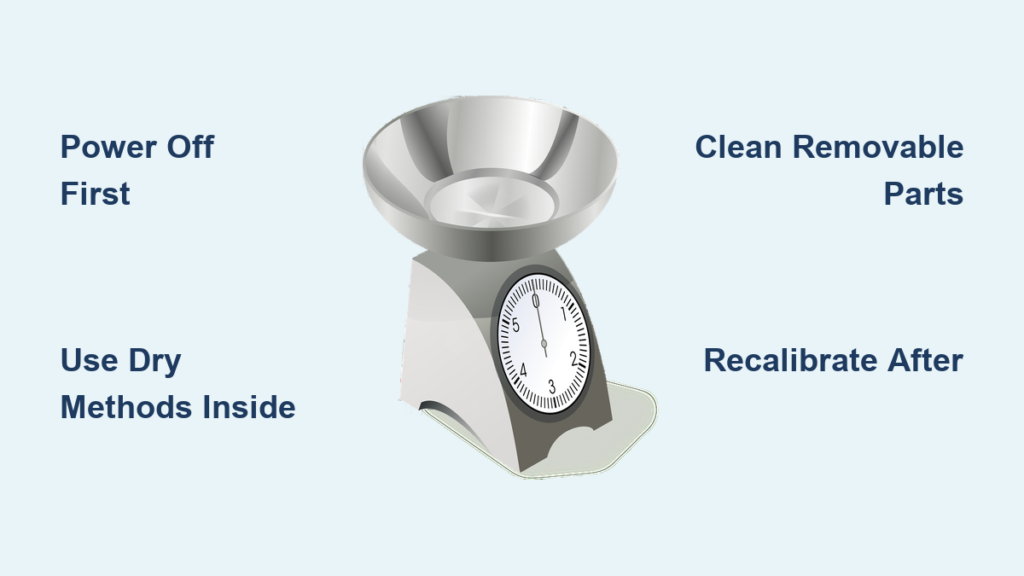
For kitchen scales, dampen a soft cloth with water or mild soap. Wipe the glass platform and edges. Do not immerse or rinse under water because even waterproof-labeled surfaces have sensitive internal components. For bathroom scales, use a dry or slightly damp cloth. Avoid harsh cleaners that scratch the surface. Always remove batteries before cleaning.
Store in a Dry Place
Keep the scale away from sinks, showers, or stovetops. Moisture and heat warp components and corrode circuits. Store flat in a cabinet or shelf, not stacked under heavy items. Remove batteries during long storage to prevent leakage, which can ruin the compartment and void warranties.
Replace Batteries Proactively
Change batteries at the first sign of a dim display, slow response, or auto-off happening too quickly. Proactive replacement prevents corrosion damage and ensures consistent accuracy.
Get Support When You Need Help
Many users can’t find model-specific manuals online even with the number. Taylor provides direct support for these situations.
Contact Taylor Directly
Call 1-866-843-3905 Monday through Friday, 8 AM to 5 PM MST. You can also email through the Taylor USA website. Have your model number ready, found on the bottom of the scale. They’ll send instructions, warranty details, or troubleshooting steps tailored to your specific unit. For food service or commercial models, contact an authorized distributor instead.
Maximize Accuracy and Longevity
To get the most from your Taylor scale, follow these best practices that verified users recommend for reliable performance.
Always Start at Zero
Never assume the scale is ready. If it shows a number other than 0.0 or —-, press tare or restart. A drifting baseline ruins every measurement. Taking this simple step before each use ensures accurate results.
Use the Same Scale Daily
If tracking weight loss or recipe consistency, use the same scale, same time, and same conditions. Small variations between devices add up over time. Your Taylor scale becomes more predictable with consistent usage patterns.
Avoid Sudden Impacts
Don’t drop items onto the scale or step on it heavily. Taylor’s load cells are precise but delicate. Dropping a heavy pot or jumping on a bathroom scale can permanently damage sensors, requiring expensive repairs or replacement.
Know Your Model’s Limits
Most kitchen models have a maximum capacity of 30 pounds or 13.6 kilograms. The minimum weight is around 1-2 grams, and anything lighter may not register. These are consumer-grade tools not designed for industrial or lab use.
Frequently Asked Questions About Using a Taylor Scale
How do I change units on my Taylor scale?
Press the unit button to cycle through available measurements like grams, ounces, pounds, and milliliters. Choose your desired unit before placing items on the scale for accurate interpretation.
Why does my Taylor scale show inaccurate readings?
Inaccurate readings usually stem from placing the scale on soft or uneven surfaces. Move to a hard, level surface and recalibrate using the foot-tap method for bathroom scales or the reset procedure for kitchen models.
Can I use my Taylor scale for baking?
Yes, Taylor kitchen scales are excellent for baking. Use the tare function to zero out bowls, switch to grams for precision European recipes, and combine multiple ingredients sequentially for accurate measurements.
How do I calibrate a Taylor bathroom scale?
Remove the battery, stand on the scale for 10 seconds while it’s off, reinstall the battery, tap with one foot to activate, and wait for 0.0 to appear. This foot-tap method resets the internal sensors.
What should I do if my Taylor scale won’t turn on?
Replace the batteries, ensuring correct polarity. Clean the metal contacts with a cotton swab and rubbing alcohol. If it still won’t turn on, try the calibration procedure even with a blank screen.
Key Takeaways for Using Your Taylor Scale
Using a Taylor scale effectively comes down to five key actions. First, set up right by installing batteries and placing on a hard, level surface. Second, start at zero by powering on and confirming 0.0 before weighing. Third, choose units first by switching between grams, ounces, pounds, or milliliters before adding items. Fourth, tare between ingredients to reset after each addition for precise layering. Fifth, recalibrate when needed, especially after battery changes or moving the scale.
For bathroom models, stand barefoot on a hard floor, ensure startup stability shows 0.0 or —-, and recalibrate using the foot-tap method if readings drift. With proper use, your Taylor scale delivers years of reliable performance in the kitchen and bathroom. When in doubt, reach out to Taylor’s customer service at 1-866-843-3905 for model-specific guidance. Keep this guide handy and you’ll never second-guess a measurement again.