
If your digital scale has failed or you need a reliable, battery-free way to measure weight, a mechanical scale offers a durable and accurate alternative. Unlike electronic models that depend on sensors and power sources, how to use a mechanical scale relies on physical balance and precise calibration. These scales are commonly found in doctor’s offices, labs, and homes, valued for their long-term consistency and simplicity.
Using a mechanical scale correctly is essential for accurate readings. A small error in setup or adjustment can lead to misleading results, sometimes off by 5 to 10 pounds. This guide walks you through every step, from setup and zeroing to reading and maintaining your scale, with clear and actionable instructions.
Set Up on a Level Surface
Proper placement is the foundation of accurate measurement with any mechanical scale.
Use a Hard, Flat Floor
Place your mechanical scale on a solid, level surface like tile, wood, or concrete. Avoid carpets, rugs, or uneven flooring because these absorb weight and shift the platform, leading to inaccurate readings. A wobbly base disrupts the internal balance mechanism, making it impossible to achieve true equilibrium.
Check for Stability
Ensure the scale does not rock or tilt when you press lightly on each corner. If it does, move it to a more stable location. Even a slight incline can affect beam alignment and cause incorrect weight indications.
Avoid Environmental Interference
Keep the scale away from high traffic areas, doors that slam, or appliances that vibrate. Air currents from fans or open windows can also disturb sensitive models like triple beam balances. For best results, use the scale in a calm, dry environment with consistent temperature.
Zero the Scale Before Use
Zeroing ensures the scale starts from a true baseline before any measurement begins.
Return Sliders to Starting Position
Before stepping on the scale, slide all weights fully to the left, which is the zero position. This includes both the large primary slider and the smaller secondary rider. If either remains offset, your reading will start with an error.
Inspect the Pointer Alignment
Look at the vertical pointer or balance indicator. With no weight on the platform, it should rest exactly between the two marks on the balance dial, which is the balanced or zero point. If it is above or below, the scale needs adjustment.
Adjust Using Calibration Knob
If the pointer is not centered, locate the calibration knob, usually at the bottom or side of the scale. Turn it slowly clockwise or counterclockwise until the pointer aligns perfectly. Some models have sealed enclosures, so only adjust if access is allowed. Never force the knob.
Pro Tip: Re-zero the scale before each use. Mechanical components can shift slightly over time or after movement.
Step On and Distribute Weight Evenly
How you stand on the scale directly affects measurement accuracy.
Stand Centered and Still
Step onto the platform with both feet flat and centered. Avoid leaning forward, holding onto walls, or shifting your weight. Movement disrupts the balance process and delays accurate pointer stabilization.
Wear Minimal Clothing
For consistent health tracking, weigh yourself in light clothing or barefoot. Heavy shoes, jackets, or water bottles can add 3 to 8 pounds, skewing results over time.
Wait for Pointer to Stabilize
After stepping on, allow 5 to 10 seconds for the internal mechanism to settle. The pointer will swing up or down before settling into its final position. Only proceed once it stops moving.
Adjust the Large Slider First
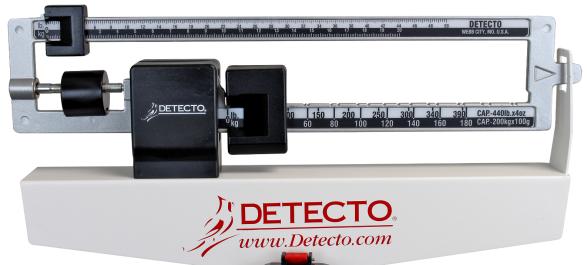
The large slider provides the foundation for your weight reading.
Estimate Your Weight Range
Move the large slider to the nearest hundred-pound increment based on your estimate. For example, under 150 pounds means set to 100 pounds, while around 160 to 200 pounds means set to 150 or 200 pounds. This coarse adjustment gets the scale close to balance.
Watch the Pointer Response
Observe how the pointer reacts after setting the base weight. If it swings up high, too much weight was added, so reduce the large slider. If it drops below range, not enough weight was added, so increase the slider. Adjust incrementally until the pointer enters the readable zone, ideally near the center mark.
Expert Note: The large slider typically moves in 100-pound steps, forming the foundation of your total weight calculation.
Fine-Tune with the Small Slider
The small slider provides the precision needed for an accurate final reading.
Slide Slowly Along the Beam
Once the pointer is within range, use the small slider for precision. This moves in smaller units, often 1-pound or 0.5-pound increments, and allows fine control over the balance.
Aim for Perfect Balance
Gradually shift the small slider right or left while watching the pointer. Your goal is to center the pointer exactly between the two balance marks, which indicates mechanical equilibrium.
If the pointer rises, the slider is too far right, so move it left. If the pointer drops, the slider is too far left, so move it right. Make micro-adjustments because even a millimeter can change the reading.
Read the Final Weight Accurately
Calculating the final weight requires adding two values together.
Add Base and Slider Values
When balanced, calculate total weight by adding the large slider value to the small slider position. For example, if the large slider is set to 150 pounds and the small slider aligns at 14.5 pounds, the total weight equals 164.5 pounds.
Estimate Between Marks if Needed
If the pointer balances between two numbers, such as between 14 and 15, use the midpoint, which is 14.5. Most beams are calibrated for half-pound or quarter-pound precision.
Confirm Stability Before Recording
Double-check that the pointer has not drifted. If it shifts after you think it is balanced, recheck the sliders before recording your result.
Return to Zero After Weighing
Properly resetting the scale prepares it for the next use.
Step Off Carefully
Remove your weight gently. Avoid jumping or stepping off abruptly because this can jolt the mechanism.
Reset All Sliders
Slide both the large and small weights back to the far left, which is the zero position. Leaving them in place may cause calibration drift over time.
Recheck Zero Point
After resetting, verify the pointer returns to center. If it does not, recalibrate before the next use.
Calibrate for Long-Term Accuracy
Regular calibration ensures your scale remains reliable over years of use.
Test with Known Weights
Periodically verify accuracy using a calibrated object, like a 25-pound dumbbell or 50-pound weight plate. Place it on the scale and adjust sliders until balanced. The reading should match the known weight.
Frequency of Calibration
For home use, calibrate every 1 to 2 months. For medical or lab use, calibrate weekly or before critical measurements. Recalibrate immediately if you notice inconsistent results.
Address Persistent Errors
If the scale consistently reads high or low despite zeroing, clean moving parts and check for bent beams or worn sliders. Contact the manufacturer or consider professional servicing if problems persist.
Warning: Never attempt to disassemble internal components unless instructed by the manual.
Prevent Common User Mistakes
Avoiding these errors will significantly improve your measurement accuracy.
Avoid Soft or Uneven Surfaces
Using the scale on carpet or sloped floors is the number one cause of inaccurate readings. Always use on hard, level flooring.
Do Not Skip Zeroing
Failing to zero the scale introduces offset errors. Even a 5-pound offset leads to misleading trends in weight tracking over time.
Do Not Rush Adjustments
Moving sliders too quickly makes it easy to overshoot the balance point. Work slowly and observe the pointer carefully with each adjustment.
Ignore Close Enough Readings
The pointer must be exactly centered, not just close. Misalignment of just a few millimeters can mean a 1 to 2 pound error in your final reading.
Never Exceed Weight Limit
Most mechanical scales max out at 300 to 400 pounds. Overloading damages the fulcrum, beam, or springs, potentially ruining the scale entirely.
Maintain Your Scale Properly
Regular maintenance extends the life of your mechanical scale.
Clean Regularly
Wipe the platform and beam with a dry or slightly damp cloth. Remove dust, dirt, or footprints that could interfere with slider movement.
Keep It Dry
Avoid moisture exposure. Water can corrode metal parts, especially on older models. Never wash the scale under running water.
Store in a Safe Place
If storing long-term, choose a dry, climate-controlled area. Cover the scale to prevent dust buildup on the beam and platform.
Handle With Care
Mechanical scales contain delicate levers and pivots. Dropping or bumping the scale can misalign internal components and affect accuracy.
Recognize Different Scale Types

Understanding different mechanical scale designs helps you choose the right tool.
Physician Scales for Medical Use
Common in clinics, these freestanding or wall-mounted scales include a height rod and sliding weights. Used for patient monitoring, they require high accuracy and regular calibration.
Triple Beam Balances for Labs
Used in science classrooms and labs, these have three beams, 100 grams, 10 grams, and 1 gram, and can measure to 0.1 gram. Objects go on a pan, and riders are moved to balance mass.
Hanging and Spring Scales
Though sometimes grouped with mechanical scales, these operate differently, using spring tension rather than balance beams. They are less precise but portable and simple for luggage or produce weighing.
Note: True mechanical balance scales rely on counterweights, not springs.
Troubleshoot Common Issues
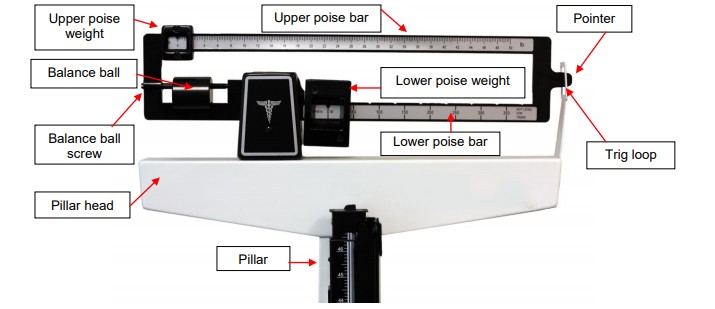
Knowing how to diagnose problems saves time and prevents frustration.
Pointer Does Not Move
Check for debris under the platform or jammed sliders. Ensure nothing is blocking the beam movement. Clean gently with compressed air or a dry brush.
Inconsistent Readings
Recheck surface stability and re-zero the scale. Test with a known weight. If inconsistency continues, internal wear may require professional servicing.
Slider Sticks or Will Not Glide
Dirt or corrosion may be the cause. Wipe the beam with a dry cloth. If recommended by the manufacturer, apply a tiny amount of lubricant designed for precision instruments.
Scale Will Not Balance at Any Setting
Possible causes include being overloaded beyond capacity, a bent beam or damaged fulcrum, or severe calibration drift. Stop use and inspect for damage. Consider professional repair.
Follow Safety Best Practices
Safety protects both you and your scale.
Stand Securely
Use the scale on non-slip flooring. Hold onto a stable surface if balance is a concern, but avoid putting weight on it during measurement.
Supervise Children
Children should only use the scale under adult supervision. Teach proper technique to prevent damage or injury.
Avoid Sudden Force
Do not jump, hop, or drop objects onto the platform. Sudden impacts can bend internal components.
Keep Away From Water
Store and use in dry areas. Moisture causes rust and mechanical failure over time.
Frequently Asked Questions About Using a Mechanical Scale
How do I know if my mechanical scale is accurate?
Test the scale with a known weight, like a dumbbell or calibrated weight plate. If the reading matches the known weight, your scale is accurate. Repeat this test periodically to confirm continued accuracy.
Why does my mechanical scale give different readings each time?
Inconsistent readings usually stem from placing the scale on an uneven surface, failing to zero before use, or not waiting for the pointer to stabilize. Check your setup and repeat the measurement process carefully.
Can I use a mechanical scale on carpet?
No, you should never use a mechanical scale on carpet or any soft surface. Carpets absorb force and shift the platform, leading to inaccurate readings. Always place the scale on hard, level flooring.
How often should I calibrate my mechanical scale?
For home use, calibrate every 1 to 2 months. For medical or lab settings, calibrate weekly or before any critical measurements. Calibrate immediately if you notice consistent errors.
What should I do if the pointer will not move?
Check for debris blocking the beam or sliders. Ensure the scale is on a stable surface. Clean any dust or obstructions gently. If the problem persists, the scale may need professional repair.
What is the maximum weight a mechanical scale can handle?
Most mechanical scales max out at 300 to 400 pounds. Check your model specifications and never exceed the weight limit to prevent damaging the internal mechanism.
Key Takeaways for Using a Mechanical Scale
Knowing how to use a mechanical scale correctly ensures accurate, repeatable measurements without relying on batteries or electronics. By setting it on a level surface, zeroing before each use, adjusting sliders in sequence, and reading the pointer precisely, you will get reliable results every time. Always start with the large slider for coarse adjustment, then fine-tune with the small slider until the pointer centers exactly between the marks.
Regular calibration, gentle handling, and proper maintenance extend the life of your scale for years of dependable service. Avoid common mistakes like using on soft surfaces, skipping zeroing, or rushing slider adjustments. Whether you use the scale for personal health tracking, medical checks, or scientific work, following these procedures ensures consistent and accurate weight measurements.



