
You just unboxed your new digital pocket scale and want to start weighing small items with precision, but where do you begin? Whether you’re measuring gemstones, spices, coins, or tiny hardware components, knowing how to use a digital pocket scale correctly ensures accurate, repeatable results every time. These compact devices pack professional-grade accuracy into a portable design, but misuse can lead to errors, inconsistent readings, or even damage.
In this guide, you’ll learn step-by-step how to power on, calibrate, tare, switch units, and weigh like a pro, plus avoid common mistakes most beginners make. By the end, you’ll be confidently using your scale for everything from jewelry work to kitchen experiments.
Prepare Your Scale for First Use
Before turning on your digital pocket scale, inspect the packaging and remove all protective covers. Many models ship with two plastic covers, one on the bottom and one over the weighing platform. Leaving either in place will prevent proper operation and give you inaccurate readings.
Flip the scale over and remove the bottom cover. Lift off the top cover from the weighing pan. Insert two AAA batteries as indicated by the polarity symbols inside the compartment. Place the scale on a flat, level, vibration-free surface such as a stone desk or solid table, not on a couch, bed, or wobbly surface.
Let the scale sit for 30 seconds after battery insertion to stabilize internal sensors before powering on.
Power On and Zero the Display
Press the Power or Tare button lightly to turn on the scale. The display should light up and cycle through numbers before settling at 0.0 g or the equivalent in your current unit.
If the display shows OL or Err, the scale may be overloaded or damaged. If it flickers or won’t turn on, check battery orientation and charge.
Wait one to two seconds for the reading to stabilize. The display must show 0.0 g before placing any object. If it reads 0.2 g or similar, press Tare to reset to zero. If it fluctuates wildly, reposition on a sturdier surface away from fans, vents, or movement.
Never zero the scale while an item is on it, as this skews all future measurements.
Calibrate Your Scale for Precision Accuracy

Even slight bumps during shipping can throw off sensor accuracy. Calibration resets the internal reference point so your readings stay within plus or minus 0.01 g.
Place the scale on a level, stable surface. Turn it on and wait for 0.0 g to appear. Press MODE until CAL appears on the display. Press MODE again, and the display may show 1000, meaning 100.0 g multiplied by 10.
Gently place the 100 g calibration weight in the center of the platform. Wait five to ten seconds. The screen will flash the weight, then return to 0.0 g. Remove the weight, and calibration is complete.
Calibrate once after unboxing and recheck every few months or after drops. Do not move or disturb the scale during calibration. Use only the included or certified weight.
Switch Between Measurement Units
Digital pocket scales support multiple units depending on your needs. Grams work best for general use, cooking, and science. Ounces suit bulk items and U.S. customary measurements. Troy ounces are essential for gold, silver, and platinum. Carats are the go-to unit for diamonds and gemstones. Grains are used for ammunition and bullet powders.
Press the MODE button repeatedly to cycle through options. Stop when your desired unit appears, such as CT for carats. Always double-check the unit before placing an item on the scale.
Avoid switching units mid-weighing, as it can confuse some models.
Use Tare to Subtract Container Weight
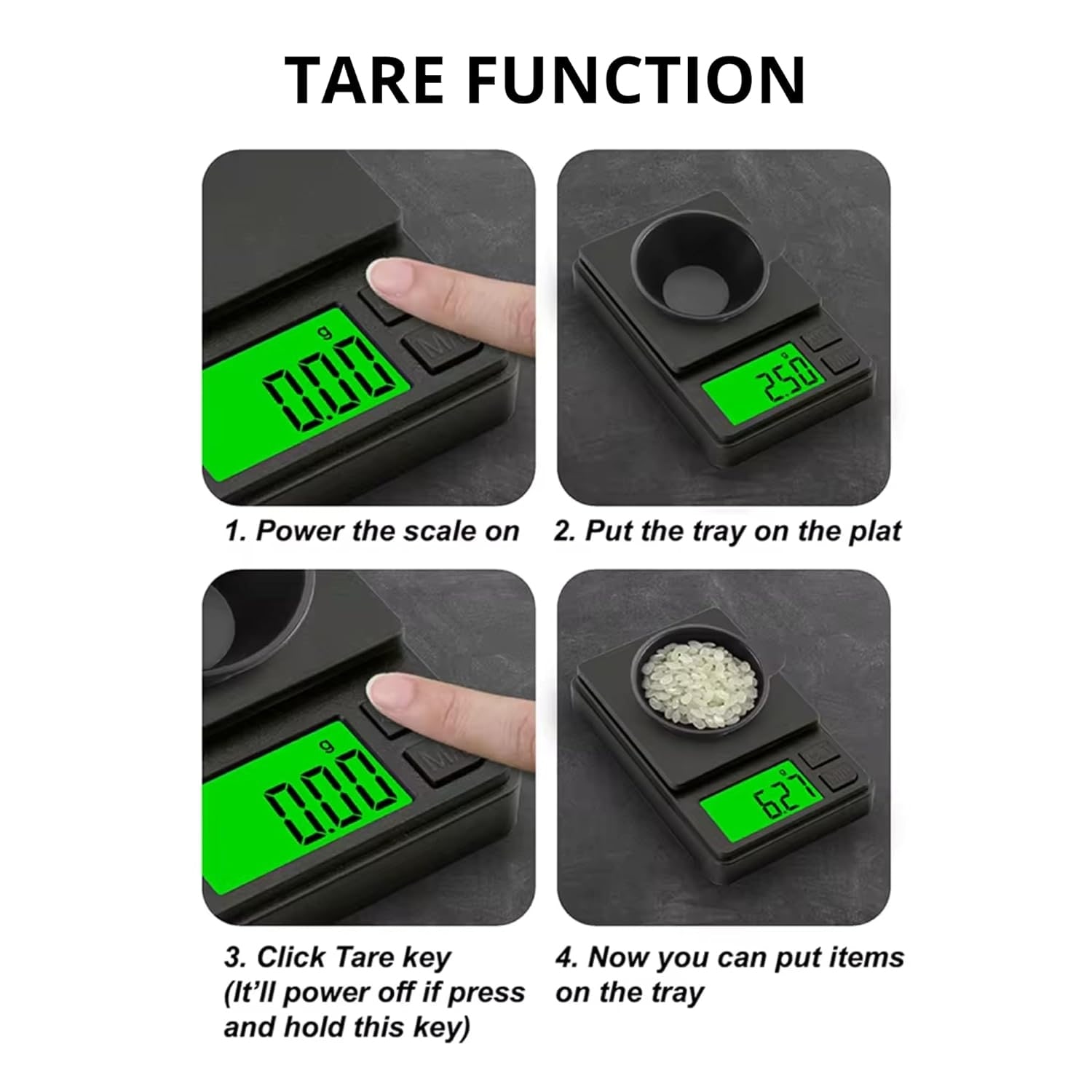
The Tare function lets you subtract the weight of a bowl, paper, or envelope so only the contents are measured. This is essential for accurate net weight measurements.
Place your empty container on the scale. Press Tare, and the display resets to 0.0 g. Add your material, whether spice, powder, or other substance. Read the net weight directly from the display.
Tare a small dish before adding cinnamon, and you’ll see only the spice weight, not the dish. On some models, pressing Tare again turns the scale off, so check your manual for model-specific behavior.
Weigh Small Items Under 1 Gram
Ensure your model reads down to 0.01 g or better. Scales with 0.1 g resolution aren’t precise enough for sub-gram tasks like measuring powders, chemicals, or tiny components.
Tare a lightweight weighing boat or paper first. Use tweezers or a spoon to add substance slowly. Wait three to five seconds for the reading to stabilize. Record the final value.
Avoid breathing directly onto the scale, as airflow affects tiny weights. A U.S. nickel weighs exactly 5.00 g, so weigh five together to verify accuracy; they should total 25.00 g.
Use Count Mode for Multiple Identical Items
The Count function is perfect for counting screws, pills, beads, or small parts without manual tallying. This feature saves time during inventory checks and batch verification.
Press PCS or Count to enter counting mode. Place a known number of identical items, such as 10 washers, on the scale. Press PCS again, and the scale calculates the average weight per piece. Add more items, and the display shows the estimated total count.
Items must be nearly identical in weight for accurate counting. Mixed sizes reduce accuracy significantly.
Handle Large or Awkward Objects
Some objects won’t fit on the built-in pan. Use a clear plastic extension platform, which is often included with your scale.
Place the extension platform on the scale. It typically weighs about 430 g, so press Tare to zero it out. Use a pen or pencil through the access hole to press Tare without lifting the platform. Place the large item on the extended surface. Read the weight through the viewing window.
This method maintains accuracy while expanding usability for bigger items.
Understand Display Indicators and Error Messages
A dot in the bottom-left corner of the display indicates the scale is calibrated. The reading 0.0 g means the scale is ready to weigh. The message OL or Err signals overload, so remove the item immediately. Flashing numbers mean unstable reading, so check the surface or wind exposure.
If the number jumps between 30.3, 31.0, and 30.7 g, wait five to ten seconds for stabilization. Record the average if it doesn’t settle. Move away from AC units, open windows, or foot traffic.
Re-tare and re-weigh if fluctuations persist.
Maintain Accuracy Over Time
Wipe the scale clean with a dry microfiber cloth after each use. Avoid moisture, and don’t wash or wipe with wet cloths unless specified. Store in a protective case with covers replaced. Keep away from magnets, heat, and direct sunlight.
Replace AAA batteries when the display dims, readings drift, or auto-off fails. Remove batteries if storing the scale long-term.
Never drop the scale, expose it to liquids, or place hot items directly on the pan.
Optimize for Specific Applications
For jewelers and gemologists, use carats for diamonds, calibrate before each session, and tare a velvet tray to weigh stones safely. For coin collectors, switch to troy ounces for silver and gold coins, and verify weight of known bullion such as a one-ounce silver round that should read 31.10 g. For culinary use, measure yeast, saffron, or baking extracts in grams, tare small bowls before adding ingredients, and keep the scale away from steam and oil splatter. For lab and hobby work, use grains for reloading ammunition, weigh resin mixes precisely for casting, and check zero before each experiment.
Troubleshoot Common Issues
If the scale has no power or dim display, check battery insertion matching the plus and minus signs, replace with fresh AAA batteries, and avoid using rechargeables unless specified.
For inconsistent readings, re-tare and re-weigh, move to a solid surface such as stone or wood desk, and avoid air currents.
If the scale won’t calibrate, ensure the platform is empty before starting, use the correct calibration weight such as 100 g, and don’t touch the scale during the process.
If the Tare button turns off the device, press once gently and don’t hold the button down. Consult your manual for model-specific behavior.
Key Takeaways for Using Your Digital Pocket Scale
A digital pocket scale delivers lab-quality precision in your pocket when used correctly. Always calibrate before first use, tare containers for net weight measurements, and verify accuracy with known weights such as nickels or calibration masses.
Store your scale properly by replacing covers and using the protective case. Choose high-resolution models at 0.01 g for fine work involving sub-gram measurements.
With proper calibration, taring, and handling, your digital pocket scale will provide reliable, repeatable results for years to come.
Frequently Asked Questions About Digital Pocket Scales
How do I calibrate my digital pocket scale?
Press the MODE button until CAL appears, ensure the platform is empty, press MODE again, then place the 100 g calibration weight in the center of the platform. Wait for the display to flash and return to zero.
What units can a digital pocket scale measure?
Most models measure in grams, ounces, troy ounces, carats, and grains. Some specialized models include diamond weight measurements.
How does the Tare function work?
Place an empty container on the scale and press Tare. The display resets to zero, subtracting the container’s weight so you see only the net weight of the contents.
Can I weigh items less than one gram on a pocket scale?
Yes, if your model has 0.01 g or better resolution. Use a lightweight container, tare it first, and add substance slowly while waiting for stabilization.
Why does my scale show fluctuating readings?
Air currents, vibration, unstable surfaces, or proximity to fans and HVAC vents cause fluctuations. Move to a solid, draft-free location and wait for stabilization.
How accurate is a digital pocket scale?
Quality models provide accuracy within plus or minus 0.01 g when properly calibrated. Regular verification with known weights helps maintain precision over time.



