
If your WW Scale isn’t syncing properly, shows incorrect user data, or won’t connect to the app, a reset may be exactly what you need. The WW Scale by Conair is a smart body composition scale used by Weight Watchers members to track weight, body fat, muscle mass, and more. But like any smart device, it can sometimes need troubleshooting. In this guide, you’ll learn how to perform both a full factory reset and a single-user reset, fix common connection issues, and maintain your scale for long-term accuracy.
Full Factory Reset: Erase All Data

A full factory reset clears all user profiles and returns your WW Scale to its default state. Use this method when selling the device, starting fresh, or if the scale behaves erratically.
Press the Reset Button Under the Scale
- Turn the scale over carefully.
- Locate the small Reset button near the battery compartment.
- Insert a paperclip or pin into the hole and press firmly.
- Hold for 2 to 3 seconds until the display shows “Clr”.
This confirms all data has been erased. The scale is now blank and ready for new setup.
What Happens After “Clr” Appears
The display will show “Clr” briefly, then return to normal. Here’s what you need to know:
- All 9 user slots are freed for new users
- Bluetooth pairings are disconnected
- No body composition data remains on the device
- Next use requires full reconfiguration via the WW Scales by Conair app
Once “Clr” appears, the data cannot be recovered. Make sure to back up any important measurements before proceeding.
Clear One User: Individual Profile Reset
You don’t always need to wipe the entire scale. If only one person wants to delete their data, use this method instead.
Hold User Button to Start
- Ensure the scale is off and the display reads “0.0”.
- Press and hold the User button for 3 to 5 seconds.
- The current user number will begin to flash on the screen.
Select and Confirm User to Clear
- Tap the Down button to scroll through user numbers.
- Stop when the desired user number flashes.
- Press the User button again to confirm selection.
- The display will show “Clear” briefly.
The selected user’s data is now deleted from the scale. Other users remain unaffected.
Note that the cleared slot cannot be reused unless you perform a full factory reset.
Fix Bluetooth Connection Problems
Even after resetting, some users struggle to connect the WW Scale to their phone. These steps will resolve most Bluetooth issues.
Scale Won’t Connect to App
The app must guide the pairing process. Do not manually pair the scale in your phone’s Bluetooth settings.
- Go to your phone’s Settings and ensure Bluetooth is enabled.
- Launch the WW Scales by Conair app.
- Tap “Connect to Scale” in the app.
- Step on the scale with bare feet to power it on.
- Watch for a blinking Bluetooth icon on the scale display.
- Look for spinning dots around the Bluetooth symbol in the app.
If connection fails, turn off the scale and try again.
Android Users: Enable Location Services
On Android devices, Location Services must be turned on, even though the app doesn’t track your location. The Bluetooth stack relies on GPS hardware functionality.
Go to Settings and toggle Location on. This is required for Bluetooth communication to work properly.
Clear Bluetooth Cache on Android
If the scale still won’t connect:
- Open Settings and tap Apps.
- Tap the three-dot menu and select Show System Apps.
- Find and select Bluetooth Share.
- Tap Storage, then choose Clear Data and Clear Cache.
This removes all Bluetooth pairings on your phone. You’ll need to reconnect headphones, speakers, and other devices afterward.
Why Body Composition Metrics Don’t Appear
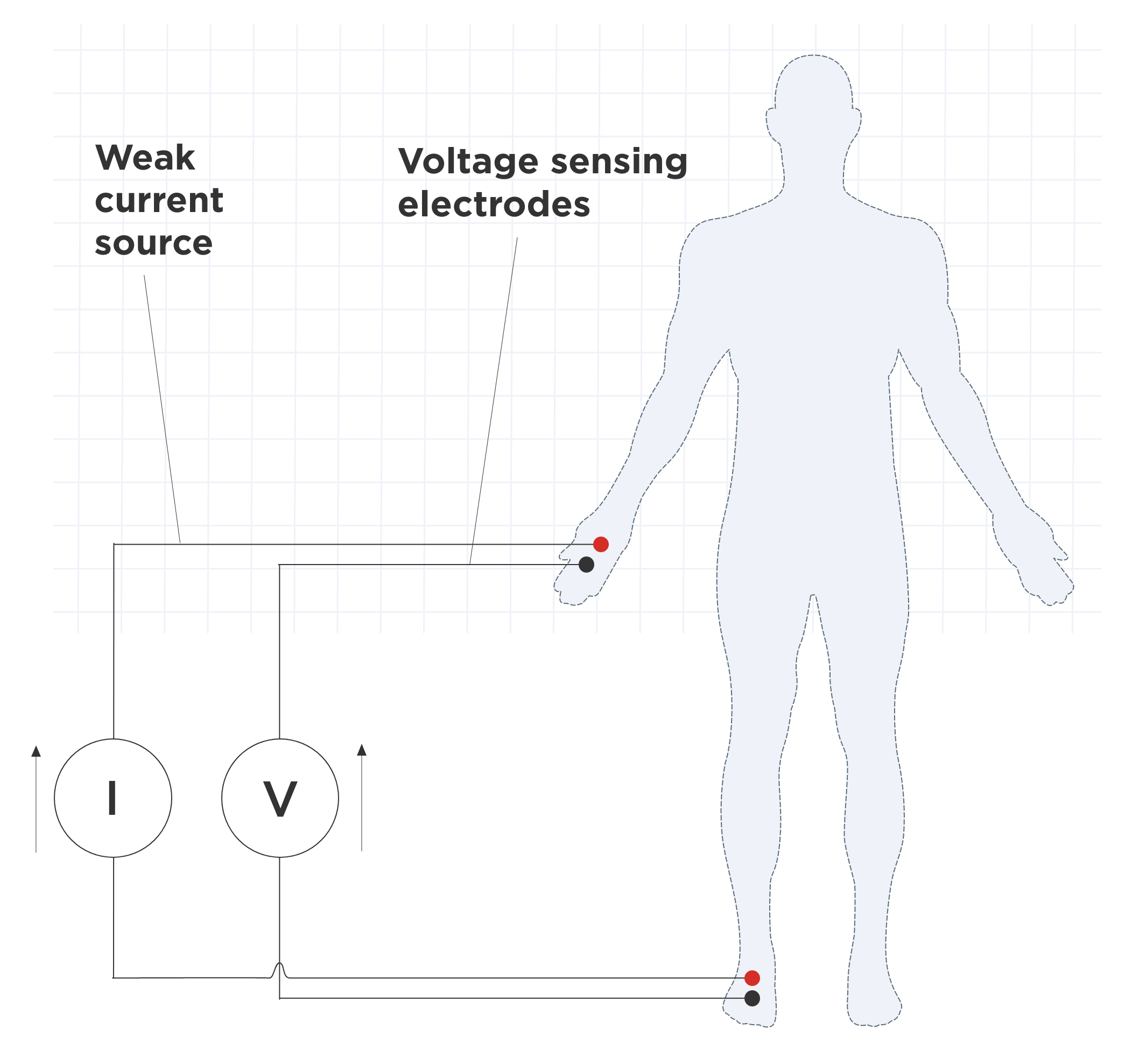
After stepping on the scale, you may see only weight and BMI, but no body fat, muscle, or water percentages. Here’s why this happens and how to fix it.
Feet Not Touching Electrodes Properly
The WW Scale uses Bioelectrical Impedance Analysis, also called BIA. A safe, low-level electrical current passes through your body via metal electrodes on the scale surface. To ensure proper readings:
- Stand with bare feet directly on the metal strips
- Avoid wearing socks, tights, or shoes
- Rub a small amount of water or lotion on your soles if feet are dry
- Place feet fully on the scale, covering as much electrode surface as possible
Dry skin increases resistance and blocks the signal from transmitting properly.
Stay Still Until Readings Sync
Remain motionless until all metrics appear in the app. The scale takes 2 to 3 seconds to send data via Bluetooth. Walking off too soon interrupts the process and you’ll only get weight and BMI.
Replace Batteries Correctly
Weak batteries cause erratic behavior, including failure to reset or connect properly.
Use Philips Screwdriver
- Flip the scale and remove the battery door screw using a small Philips screwdriver.
- Take out old batteries.
- Insert 3 new AAA alkaline batteries, matching the plus and minus symbols inside.
- Replace the door and tighten the screw.
Always use alkaline batteries. Rechargeable types may not provide stable voltage.
Remove Battery Isolator Tab
Some scales come with a plastic pull-tab under the batteries. If the display doesn’t light up, check that this tab is fully removed.
Also, peel off the blue static cling sticker on the display before first use. Leaving it on can cause backlight issues.
Ensure Accurate Daily Readings
Consistency matters when tracking your progress. Follow these best practices for reliable results.
Weigh at Same Time Daily
Body weight fluctuates throughout the day. The ideal time is first thing in the morning, after using the bathroom, before eating or drinking anything.
Use Hard, Level Surface
Place the scale on tile, hardwood, or concrete. Avoid carpet, rugs, or uneven floors, as they affect calibration and accuracy.
Let Scale Auto-Calibrate
After stepping on, wait for the display to show “0.0” before stepping off. The scale recalibrates each time for precision, with 0.1 lb or 50 g increments.
Maximum capacity is 400 lbs or 182 kg. Exceeding this limit triggers an ERROR message.
Safety: Who Should Avoid Body Analysis?
While the WW Scale is safe for most people, certain individuals should skip the body composition feature.
Pacemaker or Implanted Device Users
Do not use the BIA functions. The electrical signal may interfere with medical devices like pacemakers. You can still use weight-only mode without setting up a user profile.
Always consult your doctor before using any smart scale if you have an implant.
Pregnant Individuals
BIA is not accurate during pregnancy due to increased body water. Use the scale for weight tracking only.
Metal Implants or Prosthetics
These are safe to use with no health risk. You may see slightly lower body fat percentages due to altered conductivity. The scale is still useful for tracking trends over time.
Technical Specifications at a Glance
| Feature | Detail |
|---|---|
| Model | WW Scale by Conair |
| Max Weight | 400 lbs / 182 kg |
| Increments | 0.1 lb / 50 g |
| Users Supported | 9 |
| Power | 3 x AAA batteries |
| Connectivity | Bluetooth |
| Measured Metrics | Weight, BMI, Body Fat, Body Water, Muscle Mass, Bone Mass |
| Measurement Method | Bioelectrical Impedance Analysis |
| Surface | Tempered glass |
| Auto-On | Yes |
Frequently Asked Questions About WW Scale Reset
How Do I Perform a Full Factory Reset?
Turn the scale over and locate the small Reset button near the battery compartment. Insert a paperclip and hold for 2 to 3 seconds until “Clr” appears on the display. This erases all user data.
Can I Reset Just One User Without Clearing Everyone?
Yes. Press and hold the User button for 3 to 5 seconds, use the Down button to select the user number, then press User again to confirm. The display will show “Clear” and remove that user’s data only.
Why Don’t My Body Percentages Add Up to 100%?
Body water exists in muscle, fat, and bone tissue, so it’s counted across multiple categories. Fat plus water plus muscle plus bone will naturally exceed 100%. Focus on trends over time rather than absolute totals.
What Should I Do If the Scale Won’t Connect via Bluetooth?
Ensure Bluetooth is turned on in your phone settings. Make sure you’ve tapped “Connect to Scale” in the app, then step on the scale with bare feet. For Android, also verify that Location Services is enabled.
How Often Should I Replace Batteries?
Replace batteries annually or when readings become inconsistent. Use 3 new AAA alkaline batteries and ensure correct polarity when inserting them.
What Is My App Username?
Your email address serves as your username. Use it to log in if you’re locked out of the app.
Key Takeaways for Resetting Your WW Scale
Knowing how to reset WW Scale properly ensures accurate readings and smooth Bluetooth pairing. A full factory reset erases all 9 user slots and disconnects Bluetooth pairings, while a single-user reset removes only one profile but keeps the slot occupied. For connection issues, ensure Bluetooth is on, use the app to initiate pairing, and enable Location Services on Android devices. For body composition metrics to appear, stand with bare feet on the metal electrodes and remain still until all readings sync. Choose the right reset method based on your situation, back up important data beforehand, and your WW Scale will continue delivering accurate health insights day after day.



