
Digi-Star scale problems are a common source of frustration for farmers, livestock operators, and industrial users who rely on accurate weighing for daily operations. When your Digi-Star scale fails, especially the widely used 2000EZ model, it can halt productivity, compromise data accuracy, and lead to costly downtime. The most frequent issues include the indicator not powering on, erratic weight readings, and the dreaded ±RANGE or -RANGE error that locks the display. While many assume the problem lies in the load cells, over 70% of failures stem from wiring damage, junction box faults, or incorrect power management.
This guide cuts through the confusion with a step-by-step, field-tested approach to diagnosing and fixing Digi-Star scale problems. You’ll learn how to isolate faulty components, avoid common misdiagnoses, and apply real-world repair techniques used by professional technicians. Whether you’re dealing with a scale that won’t zero, fluctuates randomly, or won’t turn on at all, this guide gives you the tools to restore reliable operation fast.
Verify Power Supply First
Before replacing expensive parts, confirm your Digi-Star scale is getting clean, stable power. Over half of all no-start issues trace back to voltage problems or improper charging practices.
Test Voltage at the Indicator
Low voltage is the top reason for failed startups. The Digi-Star indicator requires 11.5 to 14 V DC to operate. Anything below 11.5 V may prevent power-on or cause intermittent behavior.
Steps to test voltage:
• Set your multimeter to DC voltage
• Measure voltage at the battery terminals
• Re-measure at the indicator’s power connector
• Acceptable reading is 11.5 V or higher at the indicator
Warning: A difference of more than 0.5 V between battery and indicator suggests wiring resistance due to corrosion or undersized cables.
Prevent Charger Damage
Never leave the scale connected while charging the battery. Doing so can send voltage spikes through the system, permanently destroying the indicator. This type of damage is often worse than lightning strikes and is not covered under warranty.
Best practices for power management:
• Disconnect the scale before charging the battery
• Use a dedicated 12 V battery for the scale system
• Install a voltage regulator in electrically noisy environments
Diagnose Indicator Functionality
The indicator is the brain of your Digi-Star scale. If it fails, the entire system stops working.
Perform a No-Load Stability Test
This test determines if the indicator itself is faulty.
Steps to perform the test:
• Disconnect the junction-box cable from the load-cell port on the indicator
• Power on the unit
• Press Zero two to three times
• Wait 30 seconds
Results interpretation:
• Stable within ±5 lb: Indicator is functional
• Drift, +RANGE, or -RANGE: Indicator is likely defective
Action: Contact ScaleTech at 888-962-2344 with your test results for evaluation. Do not replace load cells yet. This error often points to the indicator or junction box, not the load cells.
Inspect Wiring and Cables

Up to 40% of scale problems are misdiagnosed as load cell failures when the real issue is damaged wiring.
Identify Common Damage Points
Cables are vulnerable in agricultural settings. Common damage sources include rodent chewing during seasonal storage, corrosion from manure urine or washdowns, abrasion from equipment traffic or poor routing, and poor splices using electrical tape.
Visual inspection checklist:
• Look for chew marks, cracked insulation, and kinks
• Check connectors for corrosion or looseness
• Ensure all plugs are fully seated
Repair with Marine-Grade Standards
If repair is needed, avoid temporary fixes that will fail in harsh conditions.
Proper repair method:
• Cut out the damaged section completely
• Splice with marine-grade butt connectors
• Seal with adhesive-lined heat-shrink tubing
• Apply dielectric grease to connectors before sealing
Never use electrical tape. It degrades under moisture and vibration, leading to repeat failures.
Test the Junction Box
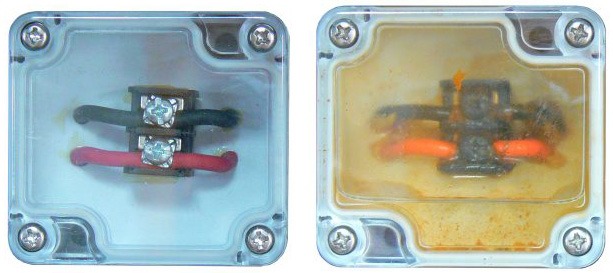
The junction box is a hidden failure point. Many technicians replace load cells unnecessarily when the real issue is a corroded or cracked junction board.
Isolate the Junction Box
Use this test to determine if the junction box is faulty.
Steps to isolate:
• Disconnect all load-cell cables from the junction box
• Keep the junction-box-to-indicator cable connected
• Power on and attempt to zero
Interpretation of results:
• If ±RANGE or drift persists, disconnect the junction-box cable from the box
• If indicator stabilizes, the junction box or its output cable is bad
• If indicator remains unstable, suspect the indicator itself
Pro Tip: Junction boxes with circuit boards are prone to moisture damage. Upgrade to sealed, weatherproof models for better reliability.
Troubleshoot Load Cells
Load cells are the most common failure source, accounting for approximately 70% of Digi-Star scale problems.
Test One Cell at a Time
Testing individually prevents misdiagnosis, especially with intermittent faults.
Testing procedure:
• Reconnect one load cell to the junction box
• Zero the indicator
• Observe for 30 seconds
Results interpretation:
• Stable within ±5 lb: Cell is good
• Drift or ±RANGE: Replace the cell
Repeat this process for each load cell to identify the defective unit.
Use the Tap Test for Hidden Faults
Some load cells fail only under stress or vibration, making them difficult to diagnose with static testing.
Tap test procedure:
• Apply a known weight (a 200-lb person on a four-cell system equals approximately 800 lb)
• Gently tap the scale frame near each load cell
• Do not tap the wire entry or shroud, as this can cause damage
Observation:
• If weight jumps during tapping, the load cell is defective
Note: Replace load cells in pairs or full sets in older systems to maintain signal balance and prevent repeat issues.
Fix Persistent -RANGE Error on 2000EZ
The -RANGE error is one of the most searched Digi-Star problems, especially on aging 2000EZ models.
Follow This Diagnostic Flow
Step 1: With power on, disconnect the junction-box cable from the indicator.
• If -RANGE continues: Replace the indicator
• If display stabilizes: Problem is downstream
Step 2: Reconnect junction cable. Disconnect all load-cell wires from the junction box.
• If -RANGE returns: Junction box is faulty, replace it
• If display stabilizes: Junction box is good, test load cells individually
Real-World Insight: This error often appears after winter storage due to moisture in the junction box or rodent-damaged cables. Always inspect storage conditions before reconnecting your scale after seasonal storage.
Prevent Scale Drift and Zero Failure
Unstable zero points and drifting readings reduce accuracy and trust in your scale system.
Address Moisture and Mechanical Binding
Common causes of drift include water in load cells or junction box, corroded terminals, and scale frame binding due to dirt, rust, or misalignment.
Fix steps:
• Dry all components with a clean cloth
• Use compressed air to remove debris from hinges and mounting points
• Ensure the scale platform moves freely with no scraping or resistance
Prevention measures:
• Seal connectors with dielectric grease
• Mount junction boxes off the ground and away from splash zones
Replace Load Cells Correctly
Improper replacement leads to imbalance and repeat failures.
Use OEM or Certified-Compatible Cells
Third-party load cells may have different mV/V output, causing instability and calibration issues.
Replacement guidelines:
• Replace in pairs or full sets for systems over 5 years old
• Match capacity and output (typically 2 to 3 mV/V)
• Never mix brands unless certified compatible
Pro Tip: Record baseline readings from each cell annually to detect early degradation before complete failure occurs.
Prevent Future Digi-Star Scale Problems
Prevention is cheaper and faster than repair.
Implement Monthly Maintenance
Regular maintenance checklist:
• Verify zero on an empty scale
• Inspect cables for damage
• Clean junction box and connectors
• Confirm stable battery voltage
Upgrade Aging Systems
The 2000EZ is reliable but starts failing after 8 to 10 years.
Recommended upgrades:
• Replace with modern indicators offering better diagnostics
• Install sealed junction boxes with corrosion-resistant terminals
• Use rodent-resistant conduit for cable protection
Warranty Note: Damage from rodents, moisture, or improper charging is not covered under the 1 to 3 year limited warranty.
When to Call ScaleTech
If troubleshooting fails, escalate to professional support.
Contact ScaleTech at 888-962-2344
Have ready before calling:
• Scale model and age
• Symptoms (for example, “-RANGE” or no power)
• Steps already performed
• Test results including voltage and stability measurements
Services offered include remote diagnostics, indicator repair, retrofit kits for obsolete models, and replacement parts and upgrades.
Expert Tip: Technicians can often diagnose your issue in minutes with the right information. Skip the guesswork by preparing your test results before calling.
Frequently Asked Questions About Digi-Star Scale Problems
Why won’t my Digi-Star 2000EZ indicator power on?
The most common cause is low voltage below 11.5 V DC. Test voltage at the battery and at the indicator. If voltage is good, check for corroded connectors or damaged wiring. Never connect the indicator directly to a battery charger, as this can permanently destroy the unit.
What causes the -RANGE error on my Digi-Star scale?
The -RANGE error indicates signal outside acceptable input range. This typically stems from a faulty indicator, bad junction box, or defective load cell. Follow the diagnostic flow: disconnect the junction-box cable first, then test each component systematically.
How do I know if my load cells are bad?
Perform the tap test by applying a known weight and gently tapping near each load cell. If the reading fluctuates during tapping, that cell is defective. You can also test each cell individually by connecting one at a time and checking for stability.
Can I use third-party load cells to replace my Digi-Star load cells?
Using third-party load cells is not recommended. They may have different mV/V output ratings, causing calibration drift and system instability. Always use OEM or certified-compatible cells to maintain accuracy and preserve your warranty.
How often should I replace load cells in my Digi-Star scale?
Replace load cells every 7 to 10 years, even if they appear functional. Material fatigue and environmental wear degrade performance over time. Replace in pairs or full sets in older systems to maintain signal balance.
Is rodent damage covered under the Digi-Star warranty?
No, rodent damage is not covered under the 1 to 3 year limited warranty. Use rodent-resistant conduit for cable protection and inspect wiring regularly, especially after seasonal storage.
Key Takeaways for Fixing Digi-Star Scale Problems
Digi-Star scale problems can be frustrating, but most issues stem from a few common causes that are easy to diagnose with the right approach. Always test from top to bottom, starting with power supply and the indicator before moving to wiring, junction boxes, and finally load cells. This systematic approach prevents unnecessary part replacements and saves both time and money.
The most critical maintenance practice is proper power management. Never connect your scale indicator to a battery charger while the system is connected. This causes irreversible damage that is more severe than lightning strikes and voids your warranty. Use a dedicated 12 V battery and always disconnect before charging.
Prevention beats repair every time. Implement monthly zero checks, inspect cables for rodent damage, seal all connectors with dielectric grease, and store your system properly during off-seasons. With regular maintenance, your Digi-Star 2000EZ can provide years of reliable service. When in doubt, call ScaleTech at 888-962-2344 with your test results for fast, expert diagnostics.



