
You step on your bathroom scale, and the number jumps before settling. You weigh flour for a recipe, but the reading drifts by 10 grams. If your digital scale keeps changing weight, you are not alone. This is one of the most common complaints across kitchen, bathroom, and precision scales. The root cause is not always a broken device. More often, it is a mix of environmental factors, power issues, or simple maintenance oversights that you can fix at home.
Fluctuating readings can ruin baking precision, skew health tracking, or compromise lab results. But in over 70% of cases, the problem is fixable without replacing the scale. This guide reveals the 10 most frequent causes backed by technical research and gives you a clear, step-by-step plan to stabilize your scale permanently.
Fix Power Supply Issues First
Battery problems are the number one cause of erratic digital scale behavior. When power is weak or unstable, the microprocessor and load cell cannot communicate properly, leading to drifting, jumping numbers, or failure to stabilize.
Replace Batteries Immediately
Most digital scales use AAA or AA batteries, which degrade over time even if they have not fully died. As voltage drops below optimal levels, the scale may display inconsistent readings, fail to reset to zero, turn off mid-measurement, or show flickering digits.
Action Step
Swap in fresh, high-quality alkaline batteries. Avoid rechargeable NiMH batteries unless your scale manual approves them. Many rechargeables output only 1.2V instead of the standard 1.5V, which can cause instability.
Pro Tip: Keep a spare set of batteries on hand. Replace them every 6 to 12 months, even if no low-battery icon appears.
Clean Corroded Battery Contacts
Over time, battery terminals can corrode, creating a poor connection. This mimics low-power symptoms and causes intermittent power delivery.
How to Clean
Remove batteries. Use a cotton swab dipped in white vinegar or isopropyl alcohol. Gently scrub the metal contacts. Dry completely before reinserting batteries.
Visual Cue: Look for white or greenish crust on the terminals. This is corrosion and must be removed.
Check AC Power and Adapters
If your scale plugs in, ensure the power adapter is fully seated and undamaged. Test the outlet with another device. A loose connection or failing adapter can cause the same fluctuation issues as weak batteries.
Ensure a Level, Stable Surface
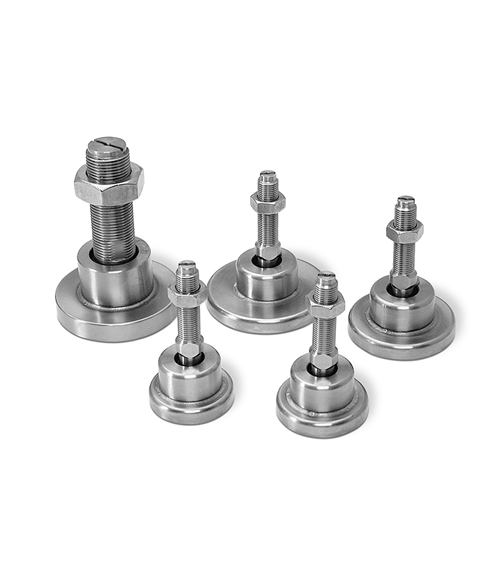
An uneven or soft surface is the second most common reason your digital scale keeps changing weight. Scales measure force in line with gravity. Any tilt or instability distorts that measurement.
Use a Hard, Flat Surface Only
Never place a digital scale on carpet, rugs, or cushioned flooring. These compress under weight, creating inconsistent support. The same goes for flexible countertops or vinyl flooring.
Best Surfaces
Ceramic tile, hardwood, stone or concrete, or solid laminate if not warped.
Avoid: Grout lines in tile floors. Position the scale so all feet land on solid tile, not across seams.
Level the Scale Properly
Even a slight tilt can throw off accuracy, especially in high-resolution models. Many digital scales have adjustable feet and a built-in leveling bubble.
Steps to Level
Place scale on hard surface. Turn it on and wait for zero. Check the bubble. If off-center, rotate the feet until it centers. Retest weight consistency.
Expert Note: A 1 to 2 degree tilt can cause up to 2% error in precision scales. For a 150-pound person, that is a 3-pound difference.
No Bubble: Use a smartphone level app placed on the scale platform to check alignment.
Recalibrate After Moving or Monthly
Calibration sets the scale internal reference point. If it is off, every reading will drift even if nothing else is wrong.
Calibrate After Any Movement
Picking up and relocating a digital scale, even just a few inches, can shift its gravitational alignment with the load cells. Always recalibrate after moving the scale, bumping or dropping it, or replacing batteries on some models.
Follow Manufacturer Calibration Steps
Most scales require a specific button sequence or calibration mode. Common methods include pressing and holding Unit or Mode until CAL appears, placing a certified test weight on the platform, and waiting for the scale to accept the weight and display PASS or END.
What If No Test Weight: Use a known object. A sealed 500ml water bottle weighs exactly 500g. Tare the bottle first. Never use coins or household items unless verified.
Warning: Skipping calibration is the top reason users think their scale is broken when it is not.
Auto-Calibrating Models
Some premium scales auto-calibrate on startup. But this does not replace manual calibration when accuracy is critical. If readings still fluctuate, force a manual recalibration.
Clean Under and Around the Scale

Debris, dust, or moisture under the platform can bind the load cells, preventing them from moving freely. This leads to inconsistent force transfer and unstable readings.
Remove and Inspect the Weighing Platform
If your scale has a removable top plate or pan, lift it off carefully. Check for crumbs, hair, or residue underneath. Look at the corners and edges where sensors sit.
Common Culprits
Flour or sugar buildup in kitchen scales, dead skin or carpet fibers in bathroom scales, or grease or oil residue.
Clean With Safe Tools
Use a soft-bristled brush, cotton swabs, compressed air in short bursts, or a damp cloth with isopropyl alcohol for surface wipe.
Do NOT: Submerge the scale in water, use abrasive cleaners, or spray liquids directly onto the device.
Pro Tip: Clean weekly if used daily, especially in kitchens or humid bathrooms.
Eliminate Environmental Interference
Even minor environmental factors can destabilize sensitive digital scales. Airflow, temperature swings, and vibrations are silent disruptors.
Block Air Currents and Drafts
High-precision scales with 0.1g or finer resolution are vulnerable to air movement. A breeze from a fan, vent, or open window can cause constant fluctuation.
Solutions
Close doors and windows during use. Turn off ceiling fans or HVAC vents nearby. Use a draft shield, a clear plastic enclosure that blocks airflow common in lab scales.
Kitchen Tip: Do not use your scale near a stove or microwave. Heat rises and creates convection currents.
Stop Vibrations and Movement
Foot traffic, appliance motors, or wobbly tables introduce micro-vibrations that prevent stabilization.
Fix It
Place the scale on a solid, immovable surface. Use anti-vibration pads like mouse pads or rubber mats only under the base, not under feet. Avoid countertops that flex when touched.
Critical for: Baking, lab work, or any task requiring 0.1g accuracy.
Prevent Overloading and Internal Damage
Exceeding your scale weight limit, even once, can permanently damage the load cell. This is the sensor that converts force into electrical signals.
Know Your Scale Max Capacity
Check the label or manual. Kitchen scales usually max at 5kg or 11 lbs. Bathroom scales often go up to 400 lbs. Precision scales are often 200g to 1kg.
Never exceed the listed maximum. Even temporary overloads can bend or crack the load cell.
Recognize Overload Damage
Signs your scale may be damaged include displaying OL, Err, or dashes, failing to zero out, giving wildly inconsistent readings, or showing negative numbers.
Can It Be Fixed: Sometimes. Contact the manufacturer. But repair is rarely cost-effective for consumer models.
Handle With Care
Dropping a scale can misalign internal components. Always lift, do not slide. Store in a safe place. Avoid bathroom floor drops common with wet hands.
Control Temperature and Humidity
Digital scales are designed for stable indoor environments. Extreme heat, cold, or moisture disrupts both electronics and mechanical parts.
Operate Within Safe Temperature Range
Ideal range is 15°C to 30°C or 59°F to 86°F.
Avoid
Cold bathrooms especially in winter, areas near ovens, radiators, or refrigerators, or garages or sheds with temperature swings.
Pro Tip: If you store your scale in a cold place, let it acclimate to room temperature for at least 30 minutes before use.
Protect From Moisture
Water is a top cause of drifting displays. Steam, wet feet, or spills can seep into circuits and corrode connections.
Prevention
Wipe scale dry after use. Do not step on bathroom scale with wet feet. Choose IP67-rated models for wet environments. These are waterproof up to 1m for 30 minutes. Use kitchen scales away from boiling pots or sinks.
Fact: Moisture damage accounts for over 25% of permanent scale failures.
Reduce Electromagnetic Interference
Wireless devices emit electromagnetic fields that can interfere with a scale sensitive electronics.
Keep Electronics Away
Sources of EMI include cell phones, microwaves, Wi-Fi routers, Bluetooth speakers, and laptops.
Rule of Thumb: Keep phones and devices at least 1 to 2 meters or 3 to 6 feet away during weighing.
Ground Yourself If Needed
In dry climates, static electricity can disrupt readings. Touch a grounded metal object like a faucet before stepping on the scale.
Best for: Precision scales used in labs or electronics work.
Improve User Technique and Habits
Even a perfectly functioning scale can give inconsistent results if used incorrectly.
Wait for Zero Before Weighing
Always wait until the display shows 0.0 or 0.00 before placing an item or stepping on. If it does not zero, power cycle the scale, clean under the platform, or recalibrate.
Stand Still and Centered
On bathroom scales, step on gently and stand motionless. Center your weight. Do not shift side to side. Use bare feet on a hard floor.
Why It Matters: Uneven foot placement can cause differences of 1 to 3 lbs between weigh-ins.
Weigh at the Same Time Daily
For health tracking, weigh yourself first thing in the morning, after using the bathroom, and before eating or drinking. This minimizes variables like food, fluid, and clothing weight.
Choose a Reliable Scale Design
If you are buying new or replacing a faulty model, pick one built to resist fluctuation.
Key Features to Look For
Feature: Auto-Calibration. Why It Matters: Maintains accuracy after movement.
Feature: Adjustable Feet plus Level Bubble. Why It Matters: Ensures proper alignment.
Feature: IP67 Rating. Why It Matters: Waterproof and dustproof.
Feature: Stable Base with Non-Slip Pads. Why It Matters: Prevents shifting.
Feature: Overload Protection. Why It Matters: Alerts before damage occurs.
Feature: Tare Function. Why It Matters: Allows container use without error.
Invest in Quality: For baking or health monitoring, spend more on a reputable brand. They use better load cells, shielding, and calibration systems.
Quick Diagnostic Checklist
Use this 8-step flow to fix a digital scale that keeps changing weight.
Step 1: Replace batteries or check power adapter.
Step 2: Move to a hard, level surface. No carpet.
Step 3: Wait for 0.0 before use.
Step 4: Clean under and around the scale.
Step 5: Recalibrate using correct method.
Step 6: Remove nearby electronics like phones and microwaves.
Step 7: Test with a known weight like a water bottle.
Step 8: Replace if all else fails. Internal damage is likely.
Pass the Test: Weigh a 500g object five times with full reset between. If readings vary by more than 1 to 2g, the scale may be faulty.
Frequently Asked Questions About Digital Scale Weight Fluctuations
Why does my digital scale give different weights each time I step on it?
This usually happens because the scale did not fully reset to zero between weigh-ins, the surface is uneven or soft, or the batteries are weak. Always wait for 0.0 to appear before stepping on, and ensure the scale sits on a hard, level floor.
Can a weak battery cause weight fluctuations?
Yes. Weak batteries reduce voltage to the scale electronics, causing erratic behavior including jumping numbers, failure to stabilize, and random resets. Replace batteries immediately when you notice any inconsistency.
Does moving my scale affect its accuracy?
Yes. Even moving a scale a few inches can shift its gravitational alignment with internal load cells. Always recalibrate after relocating the scale, bumping it, or replacing batteries.
How do I know if my scale needs calibration?
If your scale displays inaccurate weights even with fresh batteries on a level surface, it likely needs calibration. Use a known test weight or a sealed 500ml water bottle to verify accuracy.
Can environmental factors like drafts affect my scale?
Yes. Air currents from fans, vents, or open windows can cause constant fluctuation, especially on precision scales with 0.1g resolution. Close doors and windows during weighing, and consider using a draft shield.
Should I replace my scale if it keeps changing weight?
Not necessarily. Most fluctuation issues resolve with battery replacement, surface leveling, cleaning, or recalibration. Only replace if the scale fails all diagnostic steps or shows signs of internal damage like error codes or negative readings.
Key Takeaways for Fixing Fluctuating Digital Scale Readings
A digital scale that keeps changing weight is usually fixable. Start with power, surface, and calibration. These three factors solve most issues. Replace weak batteries with fresh alkaline ones, place the scale on a hard, level surface, and recalibrate after any movement or monthly for frequent use.
Clean regularly to prevent debris from binding load cells. Avoid environmental extremes like drafts, vibrations, and temperature swings. Use proper technique by waiting for zero, standing still, and centering your weight.
For critical tasks like baking or health monitoring, invest in a high-quality scale with auto-calibration, an IP67 rating, and stable base design. With these steps, you will get consistent, trustworthy readings every time.



