
Is your Fitbit scale completely dead, with no lights, no display, and nothing happening when you step on it? This is a frustratingly common issue that leaves users stranded without weight tracking. The good news is that most cases of a Fitbit scale won’t turn on are caused by simple power problems you can fix at home in under 20 minutes.
This comprehensive guide walks you through every troubleshooting step, from basic battery checks to advanced internal diagnostics. Whether you own a Fitbit Aria, Aria Air, or similar model, you’ll find proven solutions based on real user experiences and technical findings. Let’s get your scale back up and running.
Replace Batteries Correctly
The number one cause of a Fitbit scale won’t turn on is dead or improperly installed batteries. These scales require three AA alkaline batteries, and even one weak cell can stop power delivery entirely.
Use Fresh AA Alkaline Cells
Start by removing all batteries from your scale. Insert brand-new, high-quality AA alkaline cells such as Duracell or Energizer. Make sure the negative ends face the springs inside the compartment. Never mix old and new batteries, and avoid using rechargeable NiMH batteries unless verified as compatible.
Check Polarity and Orientation
Misaligned polarity is a silent killer that prevents power even when batteries appear seated. Double-check each battery orientation carefully. The positive end should connect to the flat terminal, while the negative end touches the spring. All three batteries must follow the exact same pattern.
Test Battery Voltage
Use a multimeter to verify each battery reads at least 1.5V. The combined voltage across terminals should read approximately 4.5V. If any battery shows lower voltage, replace all three immediately.
Clean Battery Contacts
Corroded or dirty battery contacts can block electrical flow even with fresh batteries installed. This is a common culprit when your Fitbit scale won’t turn on.
Inspect for Corrosion
Remove the batteries and examine the contact points inside the compartment. Look for white or green crusty deposits, pitting on the metal surfaces, or sticky residue. These are signs of corrosion that need attention.
Remove and Clean Safely
Dip a cotton swab in isopropyl alcohol at 70% concentration or higher. Gently scrub each contact point to remove corrosion and residue. Allow the compartment to dry completely for 5 to 10 minutes before reinserting batteries. Never use water or vinegar, as these can worsen corrosion.
Check Spring Tension
Press each spring to verify it rebounds firmly. Weak springs fail to hold batteries securely, causing intermittent contact. If springs feel loose or bent, the battery tray may need replacement.
Perform Hard Reset (Aria Air)
If your Fitbit scale won’t turn on despite fresh batteries and clean contacts, a hard reset can clear software locks that might be causing the issue.
Trigger Factory Reset
For Fitbit Aria Air models, insert working batteries and locate the pinhole reset button on the underside of the scale. Press and hold this button for approximately 5 seconds. Watch for the display to show “OT,” which indicates the reset has initiated. Release the button and wait 1 second, then press and hold again for 5 seconds. Look for “CLR” to appear, confirming the reset is complete.
Reset Fails? Power Issue Likely
If no display appears during the reset attempt, the problem is likely power-related rather than software-based. This means you need to investigate batteries, contacts, or internal wiring further.
Diagnose Internal Wiring Faults
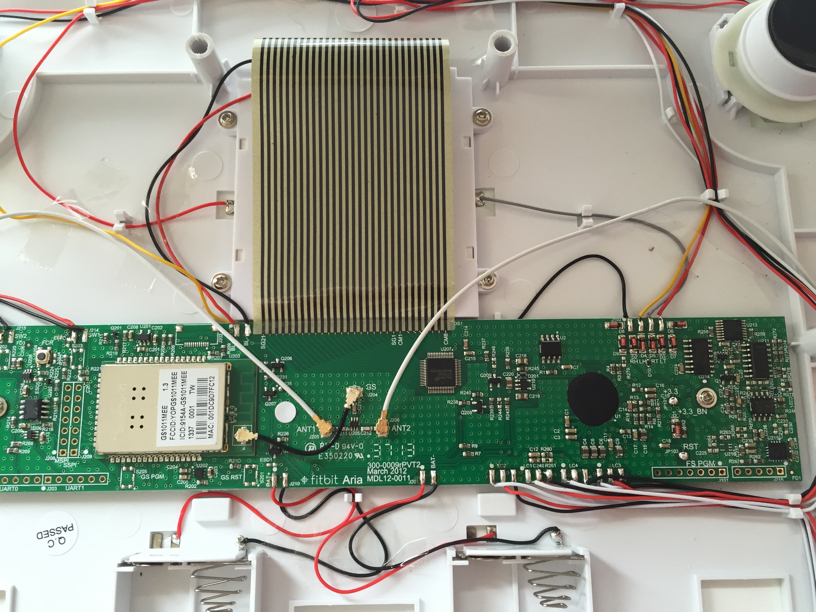
Some users have discovered hidden internal wiring issues that external inspection misses. This step requires opening your scale, which voids the warranty.
Open the Scale Safely
Gather a precision Phillips screwdriver and a plastic prying tool. Remove the screws from the bottom of the scale and gently separate the base from the glass top. Lift the cover carefully without pulling on any wires.
Inspect Battery Wires
User reports confirm that a red positive wire from the battery terminal can detach internally even when external connections look fine. Check that both battery terminal wires are securely attached with no fraying or broken solder joints. Gently tug each wire to ensure it doesn’t pull free.
Reattach Loose Wires
If you find a detached wire, strip 2mm of insulation and re-solder it to the terminal pad. Secure it with hot glue to prevent future strain. If you’re not comfortable with soldering, consider replacing the unit instead.
Test Setup Mode Manually
This indirect test checks whether your scale powers at all, even without a display.
Force Power Cycle
Go to fitbit.com/scale/setup/start in your web browser and begin the setup process. Remove one battery from the scale, wait 10 seconds, then reinsert it quickly. The scale should display “Wi-Fi is,” “Tap to change,” or “Step on” if it’s receiving power.
No Display? Hardware Failure Confirmed
A blank screen after this test confirms power delivery failure, a dead PCB, or damaged display. If batteries, contacts, and reset all check out but you still get no display, the internal hardware is likely faulty and requires replacement.
Fix Stuck Reset Button

A reset button that doesn’t click properly can prevent your Fitbit scale won’t turn on from resolving.
Locate the Reset Mechanism
The reset button is a small plastic plunger pressing against a membrane switch on the PCB. Common issues include the button not clicking, feeling spongy, or being stuck due to debris.
Clear Debris and Reseat
Remove the scale casing and inspect around the button for dust or glue residue. Clean the area with an alcohol swab and ensure the plunger aligns properly with the switch. Reassemble and test the button functionality.
Bypass Button Temporarily
If the switch is completely dead, use tweezers to briefly short the reset pads on the PCB. Watch for any display response to confirm whether the button itself is the failure point.
Prevent Future Power Failures
Taking preventive measures can stop your Fitbit scale won’t turn on from happening again.
Replace Batteries Proactively
Set a calendar reminder to replace AA batteries every 6 to 10 months, even if the scale seems functional. Preventive maintenance is far easier than troubleshooting a dead unit.
Store in Dry Environment
Humidity kills electronics. Never leave your scale in steamy bathrooms, on cold concrete floors, or near showers or sinks. Moisture causes corrosion and contact failure over time.
Avoid Physical Damage
Always lift the scale rather than dragging it across surfaces. Place it on flat, stable areas away from high traffic zones. One fall can crack internal circuit boards and cause permanent failure.
When to Replace the Scale
Sometimes repair isn’t worth the effort, and replacement makes more sense.
Check Warranty Status
Fitbit offers a 1-year limited warranty covering manufacturing defects. It does not cover battery wear, water damage, or drops. If under warranty with a non-functional scale, contact Fitbit support with proof of purchase.
Repair vs. Replace
DIY repair is possible but risky. Ask yourself whether the PCB is cracked, if display flex cables are damaged, and whether you have soldering tools and skills. If the answer is yes to any of these, replacement is the safer option.
Upgrade to a Reliable Alternative
If your scale is over 5 years old, consider upgrading. The Fitbit Aria Air costs $59.95, the Withings Body+ offers premium build at $89.95, and the Wyze Scale provides budget-friendly accuracy at $29.95.
Frequently Asked Questions About Fitbit Scale Won’t Turn On
Why does my Fitbit scale show no display at all?
The most common reason your Fitbit scale won’t turn on with no display is dead or improperly installed batteries. Check that all three AA batteries are fresh, correctly oriented with negative ends facing the springs, and making secure contact.
Can I fix a Fitbit scale that won’t turn on without opening it?
Start with battery replacement and cleaning battery contacts with isopropyl alcohol. Try the hard reset procedure for Aria Air models. If these steps fail, internal inspection may be necessary to find loose wiring or failed components.
How do I perform a hard reset on Fitbit Aria Air?
Press and hold the reset button on the underside for 5 seconds until “OT” appears. Release, wait 1 second, then press and hold again for 5 seconds until “CLR” appears. This two-stage reset clears software issues.
What causes internal wiring failures in Fitbit scales?
User reports indicate that red positive wires from battery terminals can detach internally due to poor crimping or weak solder joints at the factory. This happens even when external connections appear normal, making internal inspection necessary for diagnosis.
Should I replace or repair my Fitbit scale?
If your scale is over 5 years old and out of warranty, replacement is usually more cost-effective than repair. Consider upgrading to a newer model or a more reliable brand like Withings or Wyze if you’ve experienced repeated failures.
Key Takeaways for Fixing Your Fitbit Scale Won’t Turn On
When your Fitbit scale won’t turn on, start with the simplest solutions first. Replace all three AA batteries with fresh, high-quality alkaline cells, ensuring correct polarity with negative ends facing the springs. Clean battery contacts with isopropyl alcohol to remove corrosion that blocks electrical flow.
If basic steps fail, perform the two-stage hard reset on Aria Air models to clear software locks. For persistent issues, open the scale and inspect internally for loose red battery wires, a common failure point reported by multiple users. Test the setup mode by removing and reinserting a battery to force a power cycle.
When all troubleshooting fails, the internal circuit board is likely dead. At that point, replacement is the only option. Consider upgrading to a newer model if your scale is over 5 years old, as repeated failures indicate potential design耐久性 issues. Your time and sanity are better spent on a reliable replacement than endless repairs on a dying device.



