
If you’re working in a clinical setting and need to accurately measure patient weight and height, knowing how to use a Detecto scale is essential. Detecto scales are trusted in medical environments for their precision, durability, and ease of use. Whether you’re using a mechanical weigh-beam model or a digital APEX, icon®, or solo® series, this guide will walk you through every step from setup to measurement so you can ensure accurate results every time. You’ll learn how to zero the scale, position patients correctly, read weight and height, and maintain your device for long-term reliability.
Prepare the Detecto Scale for Use
Before taking any measurements, you need to ensure your Detecto scale is properly set up. This foundational step prevents inaccurate readings that could affect patient care and dosage calculations.
Ensure Level and Stable Placement
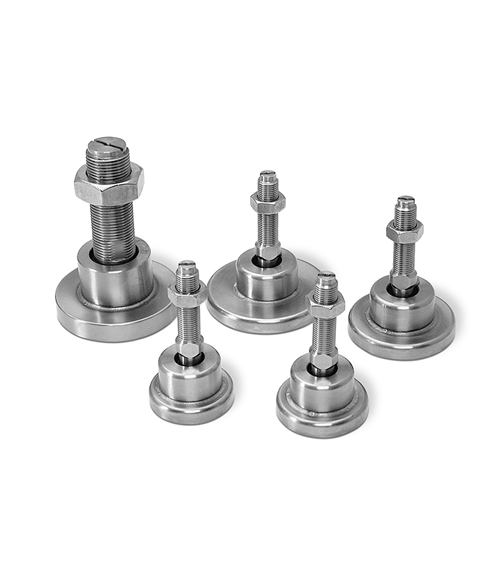
Place the Detecto scale on a hard, flat surface. Never place it on carpet or uneven flooring, as this causes significant measurement errors. Use the integrated bubble level on mechanical models to confirm the scale is perfectly balanced. If the bubble isn’t centered, adjust the feet or relocate the scale to a more stable area. An unlevel surface particularly affects NTEP-certified dosing accuracy, making this step critical for clinical applications.
Check Power and Calibration for Digital Models
For digital scales including APEX, icon®, and solo® models, follow these power setup steps. First, insert 6 or 12 AA batteries depending on your model, or connect the included AC adapter. Second, power on the unit and wait 5 to 10 seconds for the display to complete its self-calibration. Third, verify the display reads “0.0” before use. If it doesn’t, press the Tare/Zero button to reset. Finally, avoid moving the scale after zeroing, as relocation requires re-zeroing to maintain accuracy.
Zero Mechanical Scales Manually
Mechanical weigh-beam models require manual zeroing before each use. Start by confirming no one is standing on the platform. Next, check that the beam is level with the zero mark on the upright column. If the beam is unbalanced, turn the zero adjustment screw located beneath the beam until perfect alignment is achieved. For added confidence, test with a known weight to verify accuracy before measuring patients.
Position the Patient Correctly
Proper patient positioning directly impacts measurement accuracy. Taking a few extra seconds to position patients correctly prevents errors that could affect diagnosis and treatment decisions.
For Weight Measurement
Have the patient remove shoes and heavy outerwear before stepping on the scale. Instruct the patient to stand centered on the platform with feet flat, arms at their sides, and weight evenly distributed. The patient must remain still during measurement, avoiding any leaning or holding onto walls. For elderly or unsteady patients, use the hand post if available to prevent falls without affecting weight accuracy.
For Height Measurement
Ensure the patient stands with their back against the upright rod. The patient’s heels should be together, legs straight, and shoulders relaxed. Most importantly, verify the eyes are aligned in the Frankfort horizontal plane. This means the line from the bottom of the eye socket to the top of the ear canal should be parallel to the floor. Proper head positioning prevents under-reporting of height.
Use Mechanical Weigh-Beam Detecto Scales
Mechanical Detecto scales operate without electricity, making them ideal for environments where power access is unreliable. The eye-level beam system offers exceptional durability and long-term accuracy when properly maintained.
Slide the Poise Weights Accurately
Start by estimating the patient’s approximate weight. Move the large poise, which is the bottom weight, to the nearest 50 lb or 20 kg increment. Then slowly slide the small poise, the top weight, along the upper beam until the beam levels horizontally with the zero indicator. When balanced, the beam will be perfectly parallel to the guide mark. Take your time with this step, as rushing leads to inaccurate readings.
Read and Record the Weight
Add the values shown by both poises to get the total weight. For example, if the large poise is at 150 lb and the small poise is at 6.2 lb, the total weight is 156.2 lb. Confirm whether your model displays pounds, kilograms, or dual units. Record the measurement immediately to prevent dosage or documentation errors that could affect patient safety.
Operate Digital Detecto Scales
Digital Detecto scales offer automated functions, instant readings, and connectivity options for modern clinical workflows. Understanding their operation ensures you maximize these advanced features.
Wait for Stable Weight Reading
Once the patient is positioned on the platform, the digital display will stabilize within 3 to 5 seconds. Look for an audible beep or a lock icon indicating the reading is complete. Do not move the patient or touch the scale until measurement finalizes. Warning: stepping on and off repeatedly causes drift, so always let the scale return to zero between patients.
Use Mother/Baby Weighing Mode
For icon® and solo® models, the Mother/Baby mode simplifies infant weighing. First, enter this mode via the menu or dedicated button. Second, have the adult hold the infant and stand on the scale, then record the combined weight. Third, remove the infant and re-weigh the adult alone. The scale automatically subtracts the second weight and displays the baby’s exact weight. This feature eliminates the need for separate infant scales in many clinical settings.
Measure Height with Detecto Scales
Accurate height measurement supports BMI calculation, growth monitoring, and proper medication dosing. Detecto scales offer two measurement methods depending on your model.
Use Mechanical Height Rods
For solo® and weigh-beam models, raise the vertical rod above the patient’s head. Rotate the horizontal spoon outward until it is perpendicular to the rod. Gently lower the spoon until it rests firmly on the highest point of the skull. Read the height from the front-facing scale, which shows both inches and centimeters. The range on solo® models is 30 to 84.5 inches or 76 to 214.5 centimeters. Important: do not press down on the spoon, as this compresses hair and under-reports height.
Use Sonar Height Measurement
APEX and icon® models feature touchless ultrasonic height detection. Position the patient centered under the ultrasonic sensor at the top of the height rod. Press the Height or Measure button depending on your model. Wait just 1 second for the sensor to emit ultrasonic waves and calculate the distance to the top of the head. Height appears automatically on the screen alongside weight. This no-contact method reduces cross-contamination and speeds up workflow in high-volume clinics.
Confirm Sensor Accuracy
Keep the sensor clean and unobstructed for reliable readings. Avoid placing hats, head coverings, or thick hairstyles under the sensor. If an error occurs, reposition the patient and retry. Clean the sensor periodically with a soft cloth to maintain accuracy.
Switch Between Weight Units
Preventing unit confusion is critical for patient safety, particularly in pediatric and dosing applications where errors can be dangerous.
Lock in lb or kg Mode
On most digital models, press and hold the Units button for 2 seconds. Choose lb, kg, or locked mode to prevent changes during use. This prevents accidental unit switching that could lead to dosing errors. Best practice: standardize unit settings across all clinic scales to reduce confusion among staff.
Maintain and Calibrate Your Detecto Scale
Regular maintenance ensures your scale maintains clinical-grade accuracy throughout its lifespan. Proper care also protects your investment and extends the life of the device.
Clean After Each Use
Wipe the platform with a mild disinfectant such as 70% isopropyl alcohol. On mechanical models, remove the black platform cover for deeper cleaning when needed. Dry thoroughly to prevent moisture damage. Avoid harsh abrasives or bleach-based cleaners that can damage powder-coated surfaces.
Perform Daily Zero Checks
Turn on digital scales each morning and verify the “0.0” display. Re-zero if necessary before taking any measurements. For mechanical scales, inspect beam balance before first use each day. This quick check takes seconds but prevents inaccurate readings throughout the day.
Schedule Periodic Calibration
Use certified test weights to validate accuracy monthly or according to your facility protocol. NTEP-certified models require formal recalibration annually for legal-for-trade compliance. Document all calibration checks to maintain compliance records and ensure traceability.
Troubleshoot Common Detecto Scale Issues
Even with proper maintenance, issues can occasionally arise. Knowing how to diagnose and resolve common problems keeps your workflow smooth.
No Display on Digital Scale
If your digital scale won’t turn on, check the power source first. Replace batteries or test the AC adapter with another device. Inspect all connections to ensure cables are fully inserted. If problems persist, remove power for 30 seconds, then restart the scale.
Inconsistent Weight Readings
Inconsistent readings usually stem from three causes. First, an uneven floor can affect accuracy. Second, debris under the platform interferes with measurements. Third, the scale may not be properly zeroed. Fix these issues by re-leveling the scale, cleaning underneath the platform, and recalibrating. Also avoid placing scales in high-traffic areas where vibrations cause instability.
Height Rod Stiff or Stuck
For mechanical height rods, apply a small amount of silicone lubricant to the inner shaft. Never use oil-based lubricants. If the rod remains stuck, inspect for dents or bends that may require professional repair.
Sonar Height Error
Sonar errors occur when the sensor is obstructed or reflective surfaces interfere with ultrasonic waves. Patient movement also affects accuracy. Clear the area around the sensor, reposition the patient centered on the platform, and retry. Clean the sensor with a soft cloth if debris is visible.
Optimize for Clinical Workflow
Choosing the right Detecto model for your specific needs maximizes efficiency and patient satisfaction.
Choose the Right Model for Your Needs
Select a model based on your clinical requirements. Mechanical weigh-beam models work best when no power access is available and long-term reliability is priority. APEX or icon® models with Wi-Fi suit high-volume clinics needing EMR integration. The solo® series offers a budget-friendly digital option. Any model with rear wheels provides portability for mobile use between rooms.
Maximize Portability
All Detecto models feature dual rear wheels for easy transport. Tilt and roll the scale effortlessly between examination rooms. Low-profile platforms, some as low as 1.5 inches high, help patients with limited mobility step on safely.
Ensure Data Accuracy and Compliance
Detecto scales meet strict regulatory standards for clinical use. Understanding these certifications helps you use your scale appropriately.
Leverage NTEP Certification
All major Detecto scales are NTEP-certified, meaning they meet strict standards for medical dosing, billing, and legal accuracy. Always use certified scales for weight-based medication calculations. Avoid non-NTEP scales in clinical decision-making where accuracy directly impacts patient safety.
Integrate with EMR/EHR Systems
Digital models support multiple connectivity options for seamless documentation. APEX and icon® models offer Wi-Fi and Bluetooth on C versions, RS232 and USB for wired transfer, and HL7 and IEEE 11073 compliance for direct EHR uploads. Set up auto-transmit to reduce manual entry errors in Epic, Cerner, or other systems.
Key Takeaways for Using Detecto Scales
Using a Detecto scale correctly ensures every patient receives accurate, reliable measurements critical for diagnosis, treatment, and safety. Whether using a time-tested mechanical model or a high-tech digital unit, success depends on proper setup, correct patient positioning, regular maintenance, and understanding your model’s specific features. With capacities up to 800 lb, touchless height measurement, and full EMR integration, Detecto scales adapt to any clinical environment. By following this guide, you’ll maximize accuracy, efficiency, and patient comfort with every single use.
Frequently Asked Questions About Detecto Scales
How do I zero a mechanical Detecto weigh-beam scale?
Confirm no one is on the platform, then check that the beam is level with the zero mark on the upright column. If unbalanced, turn the zero adjustment screw beneath the beam until perfect alignment is achieved.
Can I use a Detecto scale on carpet?
No. Detecto scales must be placed on hard, flat surfaces for accurate readings. Carpet and uneven flooring cause significant measurement errors.
How do I switch between pounds and kilograms on a digital Detecto scale?
Press and hold the Units button for 2 seconds, then select lb, kg, or locked mode to prevent changes during use.
What is the weight capacity of Detecto scales?
Capacity varies by model. Mechanical scales range up to 500 lb, solo® models handle 550 lb, APEX models support 600 lb, and icon® models accommodate up to 800 lb.
How does the Mother/Baby weighing mode work?
Have the adult hold the infant and stand on the scale, record the combined weight, then remove the infant and re-weigh the adult alone. The scale automatically calculates and displays the baby’s weight.
How often should I calibrate my Detecto scale?
Perform daily zero checks before each use. Schedule formal calibration monthly using certified test weights, or according to your facility protocol. NTEP-certified models require annual recalibration for legal-for-trade compliance.



