
Your scale won’t turn on, shows erratic readings, or displays nothing at all. This frustrating problem disrupts fitness tracking, cooking precision, and work operations. The good news: over 80% of scale failures stem from simple issues like dead batteries, moisture exposure, or calibration drift—problems you can fix at home. This guide walks you through every diagnostic step and repair method, from battery replacement to load cell assessment, so you can restore function or know when it’s time for a replacement.
Whether you have a bathroom scale, kitchen model, or industrial unit, the troubleshooting here applies. You’ll learn exactly what to check, how to fix it, and when to stop repairing. By the end, you’ll have a clear action plan to get your scale working again or choose the right replacement.
Fix Power Issues First

Power failure causes more scale failures than any other issue. Before assuming hardware damage, verify your power source is working properly.
Replace the CR2032 Battery
Most digital scales run on a CR2032 3V lithium coin cell. Even if the battery looks fine, it may be drained or corroded inside.
Steps to replace the battery:
- Flip the scale and locate the battery compartment on the underside.
- Remove the old battery and inspect it for leakage, swelling, or greenish corrosion.
- Insert a fresh brand-name CR2032 (Panasonic, Energizer) with the positive side facing up.
- Close the compartment securely and test the scale.
Pro Tip: Keep spare CR2032 batteries on hand. This standard battery powers 99% of home digital scales.
Reset the Circuit After Battery Change
Replacing the battery alone often fails to fix the problem. Residual power stored in the microcontroller can block startup.
Follow this reset sequence:
- Remove the old battery from the compartment.
- Wait 5 to 30 minutes before inserting the new battery. Smart scales may need the longer wait.
- Clean the battery contacts with a cotton swab dipped in rubbing alcohol.
- Insert the fresh battery with correct polarity.
- Step on the scale barefoot or press the power button to activate.
Why wait?: This drains stored charge, resets memory, and clears error states that block normal operation.
Test AC Power and Adapters
Industrial or commercial scales often use AC power adapters instead of batteries.
Check these power components:
- Test the wall outlet with another device to confirm it works.
- Inspect the power cord for fraying, bent prongs, or exposed wires.
- Verify the adapter voltage matches the scale specifications (such as 12V DC).
- Try a known-working adapter of the same voltage and current rating if available.
Warning: Using a mismatched adapter can permanently damage the printed circuit board inside the scale.
Dry Out Moisture Damage
Moisture silently destroys scale electronics. Bathroom scales exposed to steam and humidity are especially vulnerable.
Identify Water Damage Signs
Watch for these indicators of moisture damage:
- Scale won’t power on even after battery replacement
- Display appears faint, flickering, or partial
- Corroded footpads or white residue on internal contacts
- Musty smell coming from under the platform
- Scale was recently stored in a damp room or spilled on
If your scale was near water or in a humid environment, moisture may have shorted the internal circuit.
Dry the Scale Properly
Safe drying method:
- Wipe the exterior surface with a dry microfiber cloth.
- Place the scale in a sealed container with silica gel packets.
- Leave it undisturbed for 24 to 48 hours.
- Reinstall the battery and test the scale.
What NOT to do: Never use a hairdryer, oven, or direct heat. These warp plastic components and damage sensors permanently.
Real Case: A Starfrit bathroom scale was revived after 36 hours in a dehumidifier cabinet. Technicians cleaned oxidized footpads with fine sandpaper to restore contact.
Clear Mechanical Binding
Debris under the scale platform can block the load cell, causing the scale to read zero or fail to activate at all.
Remove Dust and Debris
Even tiny particles interfere with sensitive weighing mechanisms.
Cleaning steps:
- Turn off and unplug the scale.
- Gently remove the weighing platform if it’s detachable.
- Use a soft brush or compressed air to clean underneath the platform.
- Wipe edges with a dry, non-abrasive cloth.
- Reassemble the scale and test.
Warning: Never force disassembly. Internal components like load cells are fragile and easily damaged. Forcing the platform open can void your warranty and break the sensor.
Avoid Liquid Exposure
Digital scales are not waterproof. Never rinse or submerge a scale, even briefly.
Safe cleaning method:
- Wipe spills immediately with a damp (not wet) cloth.
- Dry thoroughly before using the scale again.
- Keep the battery compartment sealed during cleaning.
Reset the System Correctly
A frozen microcontroller can mimic hardware failure. A proper reset restores normal operation without opening the scale.
Force Reboot With Button Hold
Most scales respond to a manual reset through button controls.
Procedure:
- Install a fresh battery in the compartment.
- Press and hold the power, unit, or function button for 5 seconds.
- Wait 10 seconds, then repeat if needed.
- Step on the scale barefoot to activate the sensors.
Note: Some models require weight to be applied before they will power on. Step on the scale after resetting.
Use a Recessed Reset Button
Certain scales have a tiny pinhole reset button located on the back or bottom.
How to use it:
- Straighten a paperclip or use a SIM ejector tool.
- Insert it gently into the pinhole.
- Press and hold for 5 seconds.
- Release and wait 10 seconds.
- Power on the scale normally and test.
Smart Scale Tip: After hardware reset, sync your scale via its mobile app (Withings, Renpho, FitTrack) to restore data connections and user profiles.
Recalibrate for Accurate Readings
A scale may power on but give wrong measurements. Recalibration restores accuracy without repairs.
Calibrate a Digital Pocket Scale
Pocket scales used for food, supplements, or laboratory work need periodic calibration.
Standard calibration steps:
- Press the unit button until the display blinks.
- The display should show “500” for 500g capacity models.
- Place a 500g calibration weight on the center of the platform.
- Wait for the reading to stabilize.
- If it shows “500 g,” calibration is complete.
- Power off and on to confirm the calibration saved.
Use U.S. Nickels as Calibration Substitute
No calibration weight? Use standard U.S. nickels as a substitute.
Requirements:
- Each new nickel weighs approximately 5 grams.
- Use 40 nickels to create a 200g calibration weight.
- Nickels must be clean, unwrapped, and free of debris.
- Stack them carefully to avoid tipping during placement.
- Apply weight slowly and steadily to avoid triggering error states.
Best Practice: Recalibrate after every battery change, after moving the scale, or when you notice inconsistent readings.
Diagnose Load Cell Failure
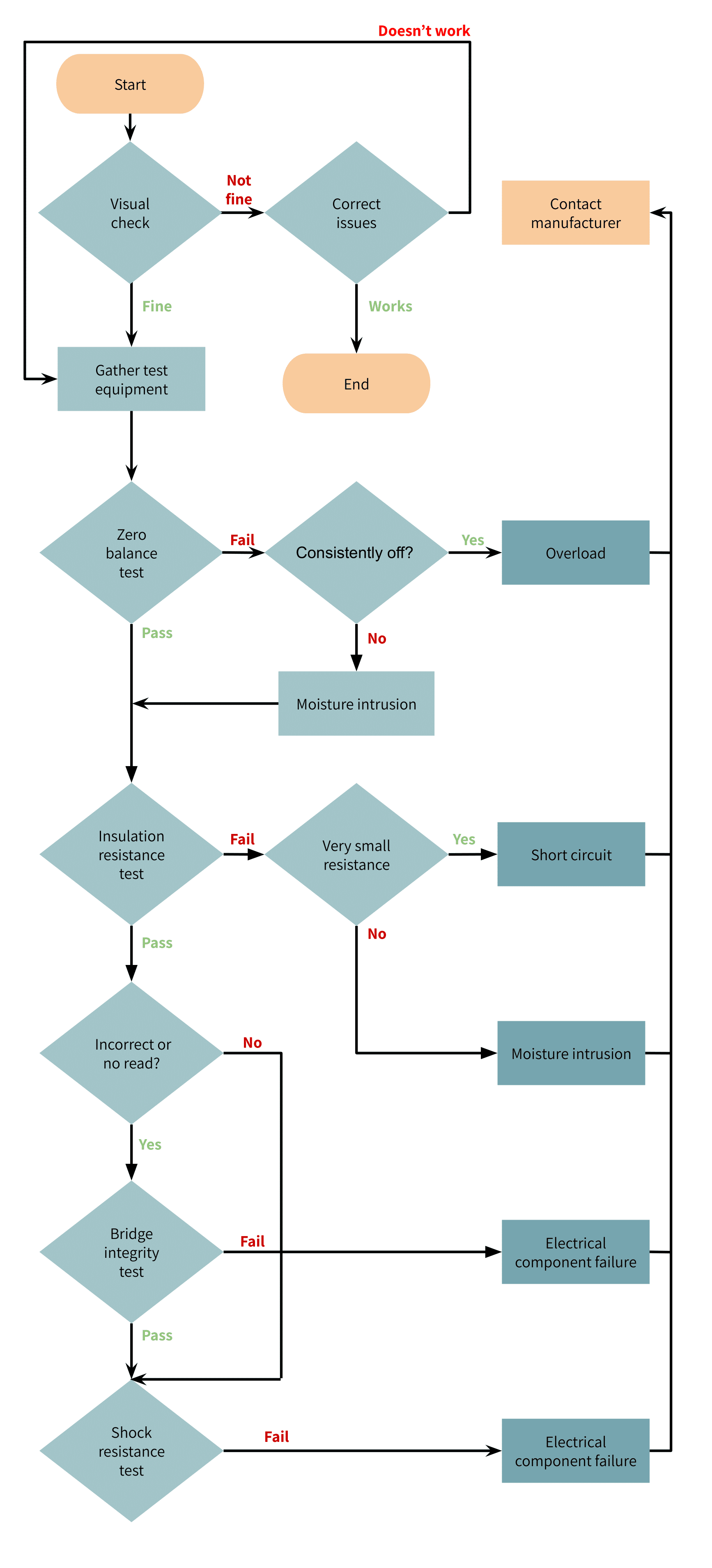
The load cell converts applied weight into electrical signals. When damaged, the scale won’t function correctly.
Spot Load Cell Damage
Watch for these warning signs:
- No response when weight is applied
- Phantom readings showing weight when the platform is empty
- Drifting numbers that change without any load
- Inaccuracy that persists after recalibration
- Scale was dropped or overloaded in the past
Understand Load Cell Failure Causes
Several factors can damage a load cell permanently:
- Dropping heavy objects onto the scale platform
- Exceeding maximum weight capacity, even briefly
- Corrosion from moisture or chemical exposure
- Static electricity discharge in dry environments
- Normal wear and tear after 5 or more years of use
Technical Note: Load cells detect micro-voltage changes. A static shock, even one you can’t feel, can disrupt calibration or destroy the sensor entirely.
Fix Display Problems
A blank, flickering, or partial display points to electronic issues rather than mechanical problems.
Troubleshoot LCD Display Failure
Common symptoms:
- Digits appear dim or faded
- Missing segments (such as “8” showing as “0”)
- Screen frozen after powering on
- Letters or symbols appearing instead of numbers
Troubleshooting steps:
- Replace the battery with a fresh CR2032.
- Clean internal contacts with rubbing alcohol.
- Test the scale in a warm, well-lit room. LCDs often fail in cold temperatures.
- Open the compartment and inspect the PCB for water damage or corrosion.
Upgrade Option: Industrial scales can be fitted with 7-inch color touchscreens (1024×600 resolution) for better visibility and data logging capabilities.
Place the Scale Correctly
Improper placement causes false readings or prevents the scale from starting altogether.
Use a Hard, Level Surface
Acceptable surfaces:
- Tile flooring
- Hardwood floors
- Concrete slabs
- Countertops
Surfaces to avoid:
- Carpets and rugs
- Uneven flooring
- Soft mats
- Bathmats
Soft surfaces absorb force and prevent the load cell from registering weight properly.
Stabilize After Moving
After relocating your scale, let it sit for 10 to 15 minutes before using it. Sudden temperature or pressure changes affect sensor accuracy.
Pro Tip: Always step on the scale in the same spot, centered and barefoot, for consistent readings.
Follow the Full Diagnostic Sequence
If basic fixes don’t work, run through this complete diagnostic process:
| Step | Action | Purpose |
|---|---|---|
| 1 | Remove battery and inspect | Find corrosion or leakage |
| 2 | Clean contacts with rubbing alcohol | Restore conductivity |
| 3 | Dry 24 to 48 hours in silica gel | Remove moisture |
| 4 | Insert new battery after 5 to 30 minute wait | Full circuit reset |
| 5 | Hold power button for 5 seconds | Force reboot |
| 6 | Place on hard, level floor | Ensure proper activation |
| 7 | Step on barefoot | Trigger sensor |
If failure persists after Step 7, the scale likely has hardware damage: a damaged load cell, PCB short, or permanent moisture damage that cannot be repaired.
Know When to Replace
Some scale problems cannot be fixed. Replacement is safer and more accurate than continuing repairs.
Five Signs It’s Time for a New Scale
Replace your scale if:
- Readings vary by more than plus or minus 1% of maximum capacity (such as plus or minus 1 pound on a 100-pound scale)
- Inconsistent measurements persist after recalibration with a known weight
- Display is dim, flickering, or shows missing segments
- Visible rust exists on metal components or cracks in the housing
- Internal circuits show green or white corrosion that cleaning cannot remove
Upgrade Tip: For humid environments, choose IP68-rated or stainless steel models that resist moisture damage.
Extend Scale Lifespan
Prevention costs less than repair. Follow these practices to maximize your scale’s life.
Clean Weekly
- Wipe the surface with a damp cloth, never submerge the scale.
- Dry thoroughly before each use.
- Clean your feet before stepping on bathroom scales to reduce moisture transfer.
Recalibrate Regularly
- Calibrate every 3 to 6 months for precision models.
- Recalibrate after battery replacement or moving the scale.
- Use a calibration weight or nickels for accuracy verification.
Store Smart
- Keep scales off bathroom floors where humidity collects.
- Elevate on a shelf or store in a dry closet.
- Avoid direct sunlight, cold drafts, and temperature extremes.
Replace Batteries Proactively
- Swap batteries every 6 to 12 months, even if the scale still works.
- Use high-quality brand-name batteries for longer life.
Expected Lifespan by Type:
- Pocket scales: 3 to 5 years
- Bathroom scales: 5 to 7 years
- Industrial scales: 7 to 10+ years
Choose the Right Replacement
When repair isn’t possible, select a scale that matches your needs.
Match Features to Your Use
| Need | Recommended Feature |
|---|---|
| High precision | 0.1g resolution |
| Fitness tracking | Bluetooth or Wi-Fi sync |
| Wet environments | IP67 or IP68 water resistance |
| Heavy loads | Stainless steel construction |
| Data logging | Touchscreen with USB export |
Buy From Trusted Brands
Arlyn Scales (Long Island, NY) offers factory-direct industrial scales with 30 years of engineering expertise. They provide custom designs, advanced indicators with quad-core processors, and direct customer support.
Why buy direct: Factory suppliers cut costs and offer better technical support compared to retail resellers.
Key Takeaways for Fixing Your Scale
A scale not working is rarely the end of the road. Most problems stem from dead batteries, moisture exposure, debris interference, or calibration drift, and all of these are fixable at home.
Your quick action plan:
- Replace the CR2032 battery with a fresh one.
- Wait 5 to 30 minutes before reinserting the new battery to reset the circuit.
- Clean battery contacts with rubbing alcohol and dry thoroughly if exposed to moisture.
- Reset by holding the power button for 5 seconds.
- Calibrate using a known weight or 40 U.S. nickels.
- Place on a hard, level surface and test.
If your scale still doesn’t work after trying these steps, internal damage is likely. A damaged load cell, shorted PCB, or permanent moisture corrosion means it’s time to replace the unit. Choose a model with appropriate features for your environment, such as IP68 rating for bathrooms or stainless steel construction for industrial use.
Keep this guide handy. Next time your scale fails, you’ll know exactly what to check and how to fix it fast.
Frequently Asked Questions About Scale Not Working
Why does my scale show no display even after battery replacement?
The battery may be inserted incorrectly, the contacts could be corroded, or the scale needs a full circuit reset. Remove the battery, wait 5 to 30 minutes, clean the contacts with rubbing alcohol, and reinsert the battery with the correct polarity.
Can a scale be damaged by moisture?
Yes. Bathroom scales are particularly vulnerable to humidity and steam. Moisture can short circuits, corrode contacts, and damage load cells. Dry the scale in a sealed container with silica gel for 24 to 48 hours before testing.
How do I know if the load cell is damaged?
Signs of load cell damage include no response to weight, phantom readings when empty, drifting numbers, and persistent inaccuracy after calibration. If your scale shows these symptoms, the load cell likely needs replacement.
Why does my scale give different readings each time I step on it?
Inconsistent readings usually stem from improper placement (carpet or uneven floor), calibration drift, or a failing load cell. Place the scale on a hard, level surface and recalibrate with a known weight.
How often should I replace the battery in my digital scale?
Replace batteries every 6 to 12 months, even if the scale still functions. Old batteries can leak and cause corrosion that permanently damages the internal electronics.
Is it worth repairing an old scale, or should I replace it?
Replace if the scale shows visible damage, reads inaccurately by more than 1% of its capacity after recalibration, has a flickering or dim display, or shows internal corrosion. For most users, a new scale costs less than repair labor and offers better accuracy.



