
You’re following a baking recipe that calls for 125 grams of flour, but all you have are measuring cups. Sound familiar? That guesswork ends the moment you start using a digital kitchen scale. More accurate than cups and spoons, this small device brings precision to your cooking, ensures consistent results, and cuts down on dirty dishes. Whether you’re a beginner or a seasoned home cook, learning how to use a digital kitchen scale correctly can transform your kitchen workflow. In this guide, you’ll master setup, taring, measuring multiple ingredients, handling tricky substances like honey or yeast, and avoiding common mistakes.
Power On and Prepare Your Scale for Accurate Weighing
Before weighing anything, set up your scale properly to ensure accuracy and longevity. Most digital kitchen scales run on 2 AAA batteries, often included in the box. Remove the insulating plastic strip, insert the batteries, then press the power button to turn the scale on. The display will light up, usually showing 0.0 or the last used unit.
Place the scale on a flat, level, non-slip surface. Uneven countertops, wobbly tables, or nearby blenders can cause inaccurate readings. Avoid drafty areas or spots near stoves and windows where temperature shifts affect performance. Press the unit button to switch between grams, ounces, pounds, or milliliters. Use grams for baking and international recipes because they offer more precision. Use ounces for U.S.-based volume conversions. Remember that milliliters are only accurate for water-like liquids.
After use, hold the power button for 3 seconds to turn it off manually. If you forget, most models shut down automatically after 60 to 120 seconds of inactivity to save battery.
Master the Tare Function for Effortless Measuring
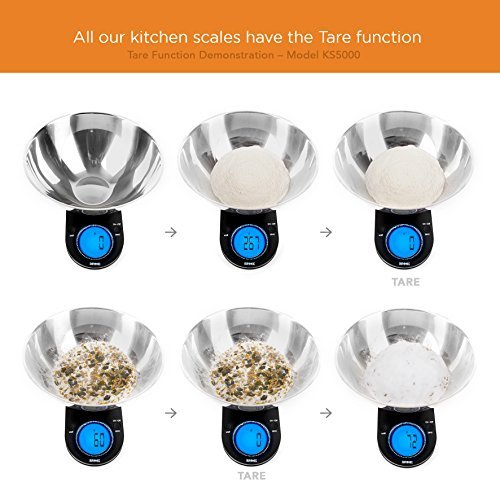
The tare function is the secret to efficient, mess-free measuring. It resets the display to zero after placing a container on the scale, so only the ingredient’s weight shows as you add it.
To zero out any container, turn on the scale and place your bowl, plate, or parchment paper on the platform. Press tare and the display should read 0.0 g. Now only the ingredient’s weight shows as you add it. If your scale lacks a labeled “tare” button, look for “on/clear” because many models use this for zeroing.
Re-tare between ingredients to measure multiple items in one bowl. After adding one ingredient like flour, press tare again before adding the next like sugar. This subtracts the weight of both the bowl and previous ingredients so you measure only the new item. This method allows sequential weighing in one bowl, reducing cleanup and saving significant time.
Weigh Single or Multiple Ingredients Without Confusion
For simple tasks like portioning coffee or butter, measure one ingredient at a time. Tare the container, then add the ingredient slowly. Stop when the display matches your target weight. If you overshoot, remove excess with a spoon rather than estimating. Pour slowly near the target weight because scales take a second to stabilize.
Combine ingredients in one bowl for ideal results with batters, doughs, or meal prep. Place your mixing bowl on the scale, press tare, then add the first ingredient. Press tare again before adding the second ingredient. Repeat until all ingredients are added. This approach means fewer dishes, better accuracy, and faster prep. Caution applies once ingredients are mixed because you cannot remove an ingredient easily. Be extra careful with potent ingredients like salt, baking powder, or chili flakes.
Use separate containers for control when precision matters or ingredients should not mix early. Weigh each item in its own bowl, then transfer to a mixing bowl after all are measured. This works best for sticky items like honey or peanut butter, or small quantities like yeast and spices.
Handle Different Ingredients Like a Pro
Dry goods like flour, sugar, and cocoa require specific techniques for accuracy. Fluff and sift dry ingredients before measuring to prevent clumping. Spoon gently into the bowl rather than scooping directly from the bag because this compacts flour. Only pack brown sugar if the recipe specifically says “packed.” Use 0.1 g increments for fine control.
For liquids including water, milk, and oil, place a heat-safe container on the scale and tare. Pour slowly until the target weight appears. Remember that 1 ml of water equals 1 g, but oil weighs less at roughly 0.92 g/ml, and honey weighs more at roughly 1.4 g/ml. For large volumes, use a spouted container to avoid spills.
Sticky substances like honey, syrup, and nut butter cling to spoons and bowls, leading to inaccurate measurements. Lightly coat the spoon or bowl with neutral oil before use. Place parchment paper or plastic wrap on the scale, tare, then add the ingredient. Use a silicone scraper to transfer every last bit.
For small amounts like spices, yeast, and salt, use a small dish or weighing boat to avoid spillage. Many digital scales offer 0.1 g precision, perfect for tiny but critical ingredients. Example: active dry yeast often requires just 7 g, which is easy to measure by weight but difficult with teaspoons.
Use Advanced Features for Better Results
Press the unit button to toggle between grams, ounces, pounds, and milliliters. Grams work best for accuracy, ounces are common in U.S. recipes, pounds are useful for large batches, and milliliters are approximate for liquids. Stick to grams when using European or professional recipes because they are standardized.
Some scales include a minus function that lets you see how much you have removed. Add a large container to the scale, press tare to reset to zero, then scoop out some contents. The display shows the negative weight, useful for tracking usage or portioning snacks from bulk bins.
Understand Accuracy Limits and Capacity
Most digital kitchen scales support up to 6.6 lb or 3 kg. Exceeding this triggers an Err or E error. Always check max capacity before weighing large items like whole chickens or big mixing bowls. If overloaded, remove the item, restart the scale, and reweigh in portions.
The minimum increment can be as low as 0.1 g, which is ideal for espresso, sourdough starters, or supplements. For general cooking, 1 g resolution is sufficient. Weight eliminates the variability found in volume measuring, where a scooped cup of flour can range from 140 to 160 g while spooned flour measures 120 to 125 g. Weighed flour is always exactly the target weight.
Fix Common Errors and Troubleshooting Fast
When the display shows Lo, it means low battery. Replace both AAA batteries immediately. Err or E indicates overload, so remove the item and reweigh within capacity. Flashing numbers mean unstable reading, so re-level the surface and restart the scale.
If readings seem off, check for debris under the sensor or unstable placement. Some models allow manual calibration using a known weight. Consult your manual before attempting calibration. If the scale becomes unresponsive, remove batteries, wait 10 seconds, then reinsert and power on.
Best Practices for Daily Kitchen Use
Weigh directly into mixing bowls to cut cleanup time. Line the scale with parchment paper for easy transfer and non-stick results. Keep a bench scraper handy to adjust amounts without touching food.
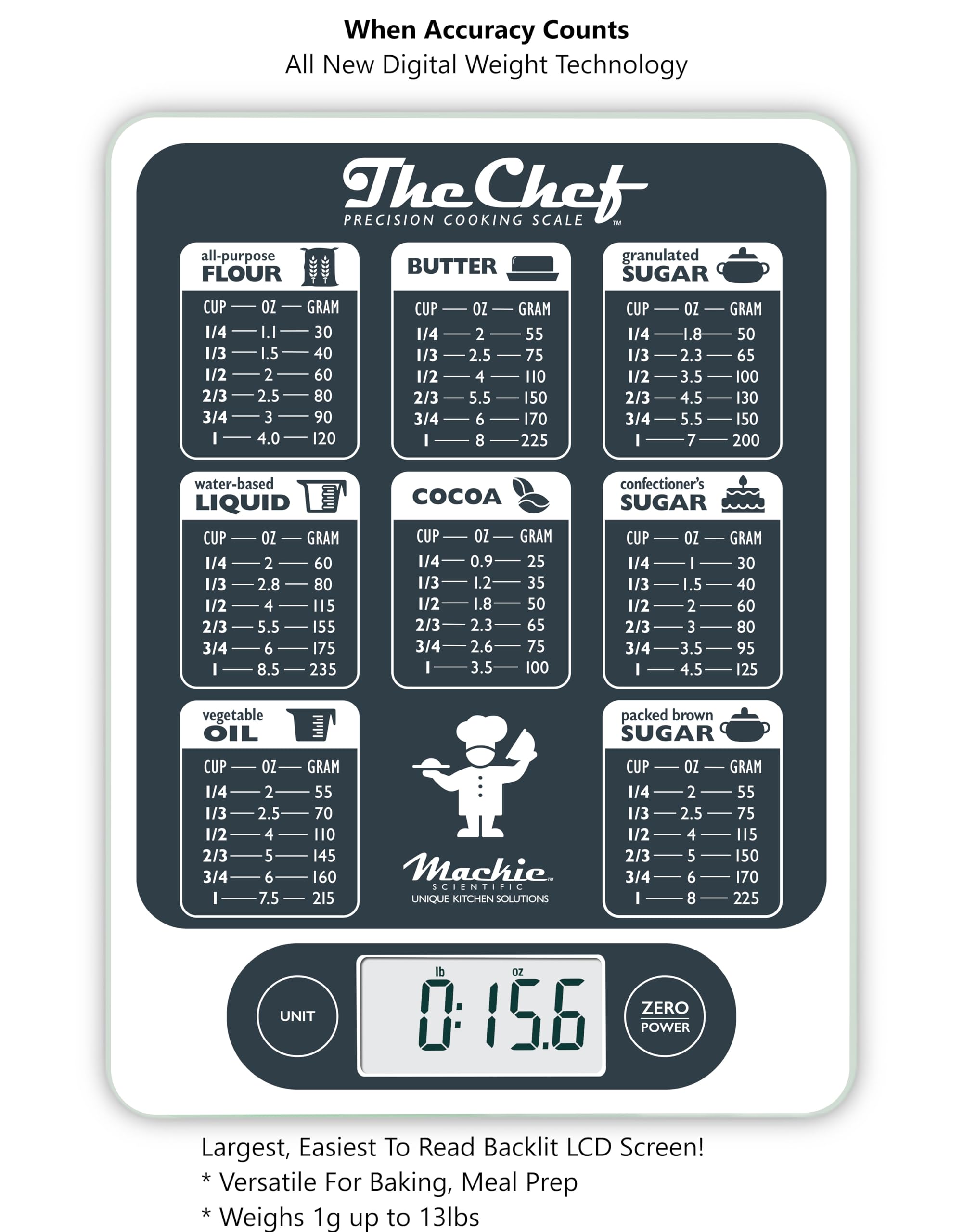
Convert cup-based recipes using standard weights. All-purpose flour equals 1 cup or 120 to 125 g. Granulated sugar equals 1 cup or 200 g. Butter equals 1 stick or 113 g. Brown sugar packed equals 1 cup or 220 g. Use online converters or apps to digitize old recipes.
Quality scales start at around $12 and with proper care can last 5 years or longer. This small investment frees up drawer space previously used for bulky measuring cups and nested spoons.
Frequently Asked Questions About Digital Kitchen Scales
What is the most accurate unit to use on a digital kitchen scale?
Grams provide the most accurate measurements on digital kitchen scales. They offer finer increments than ounces and are the standard in professional and international baking. Using grams eliminates the variability that comes with volume measurements.
How do I measure sticky ingredients like honey without mess?
Coat your spoon or container with neutral oil before measuring sticky ingredients. Alternatively, place parchment paper or plastic wrap on the scale, tare it to zero, then add the honey. Use a silicone scraper to transfer every bit for complete accuracy.
Can I measure multiple ingredients in one bowl using a kitchen scale?
Yes, using the tare function allows you to measure multiple ingredients sequentially in one bowl. After adding each ingredient, press tare to reset the display to zero before adding the next. This reduces cleanup and speeds up your workflow.
Why does my scale show an error message?
Error messages typically indicate overload when weight exceeds the maximum capacity, usually around 6.6 lb or 3 kg. Remove the item and reweigh in smaller portions. A Lo message means the batteries need replacement.
How do I convert recipe measurements from cups to grams?
Standard conversions include 1 cup of all-purpose flour equaling 120 to 125 g, 1 cup of granulated sugar equaling 200 g, and 1 stick of butter equaling 113 g. Use a reliable online converter or kitchen scale to convert your favorite recipes accurately.
Key Takeaways for Using Your Digital Kitchen Scale

Using a digital kitchen scale transforms cooking from guesswork into precision. The essential workflow involves placing the scale on a flat surface, turning it on and selecting grams, putting your bowl on the platform and pressing tare to zero, adding each ingredient to target weight, then taring again before each new addition.
The benefits are clear. Accuracy means no more dense cakes or flat bread. Consistency lets you replicate success every time. Efficiency means measuring faster and washing fewer tools. Versatility works for coffee, sourdough, meal prep, and tracking macros.
Start weighing by metric for best results. Your digital kitchen scale becomes an indispensable tool that delivers consistent, high-quality results every time you cook or bake.



