If you’re tracking your health journey, you need numbers you can trust, especially when it comes to weight and body composition. The VeSync Etekcity FIT 8S Smart Scale is a popular budget-friendly option that syncs with your smartphone via Bluetooth, offering more than just basic weight readings. But the real question remains: how accurate is the VeSync scale for everyday health tracking? Many users wonder if this affordable smart scale delivers reliable data or sacrifices precision for convenience.
This guide breaks down what affects the scale’s accuracy, how it compares to medical-grade devices, and what you can expect in daily use. You’ll learn practical tips to get the most reliable readings and whether this scale fits your health tracking needs.
Weight Measurement Consistency
The VeSync FIT 8S uses high-precision sensors to measure weight with a 0.1 lb (0.05 kg) increment, which is standard for most consumer-grade smart scales. When used on a hard, flat surface like tile or hardwood, the scale delivers consistent weight readings from day to day. Many users report that the weight results closely match those from doctor office scales when measured under similar conditions.
Reliable for Daily Tracking
For best results, always place the scale on a solid floor and avoid carpet or uneven surfaces, as these can cause fluctuating readings. Step onto the scale barefoot and stand still until the number stabilizes. The display updates quickly, typically within 2 to 3 seconds, and the large LED screen makes it easy to read your measurements.
Minimize Variables for Accuracy
To maintain consistency, use the scale at the same time each day, ideally in the morning after waking and before eating or drinking. Factors like food intake, hydration, and clothing can add temporary weight fluctuations of several pounds, which might make the scale seem inaccurate when it’s actually reflecting real, short-term changes.
Avoid jumping on and off repeatedly to check your weight. Each re-weigh without stepping off completely can produce slightly different results due to shifting balance. Instead, step off completely, wait for the display to reset to zero, then step back on for a fresh reading.
Body Composition Accuracy
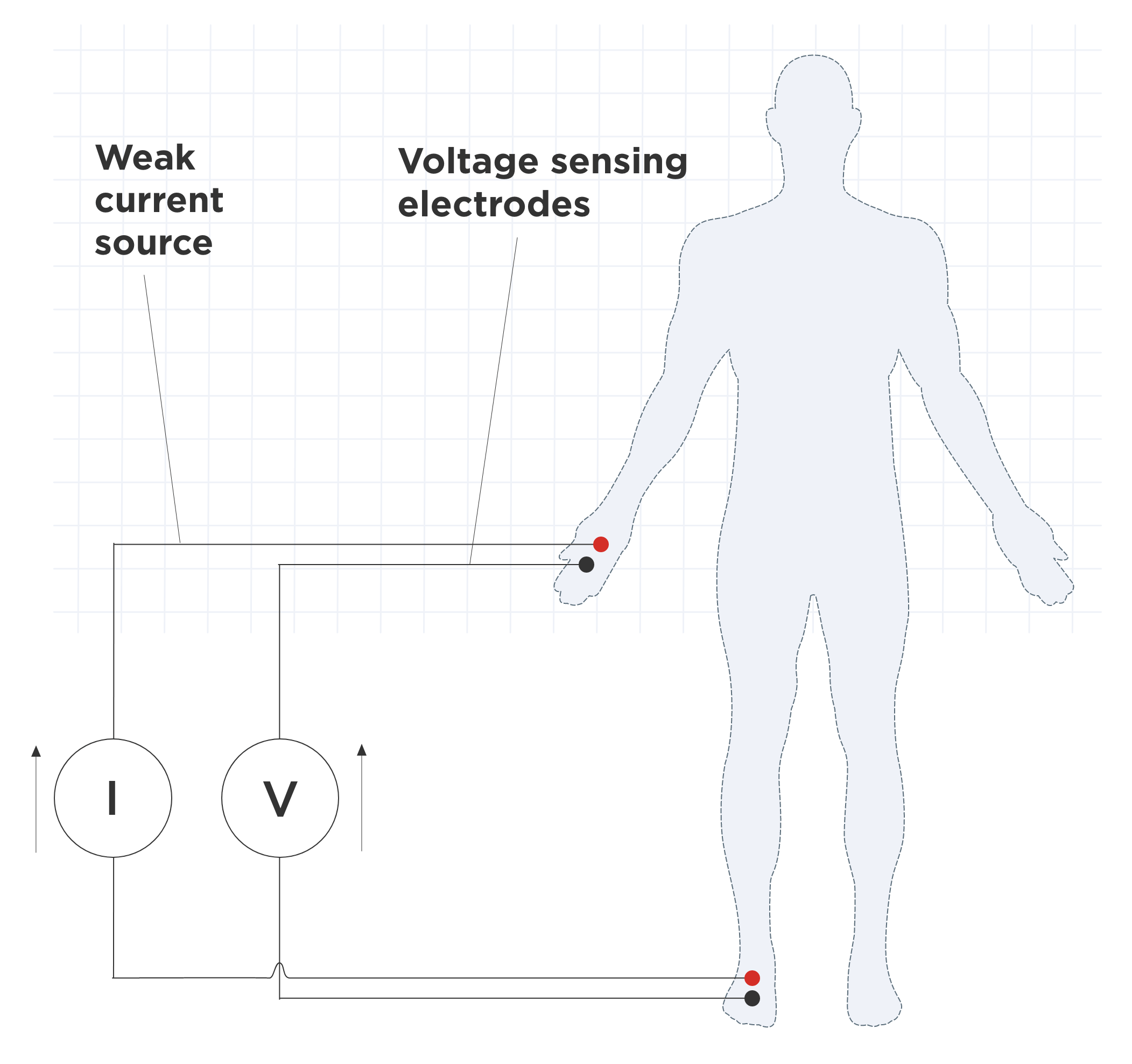
The VeSync scale estimates body fat, muscle mass, water percentage, and bone mass using bioelectrical impedance analysis, also known as BIA. A small, safe electrical signal passes through your feet and up your body. Since fat tissue conducts electricity more slowly than muscle or water, the scale calculates estimates based on resistance.
How BIA Affects Results
BIA is highly sensitive to hydration levels. If you’re dehydrated, the current travels slower, making your body fat appear higher than it actually is. Being well-hydrated can temporarily lower your estimated body fat percentage. This means two readings taken just hours apart, such as before and after a workout, can differ significantly even if your actual body composition has not changed.
Best Practices for Reliable Readings
To improve the consistency of body composition metrics, follow these guidelines:
Weigh yourself barefoot with clean, dry feet. Avoid weighing right after exercise, showering, or eating. Use the scale in a warm room since cold temperatures can affect circulation and readings. Stay hydrated throughout the day but avoid large amounts of water right before weighing. Use the scale at the same time daily for trend tracking.
Remember that the absolute numbers, like 22% body fat, are estimates. What matters more is the trend over time. If the scale shows a steady decline in body fat over weeks, that trend is likely real, even if the exact percentage is not lab-accurate.
Bluetooth Sync and App Reliability
One of the VeSync scale’s strongest features is its Bluetooth connectivity. Paired with the VeSync app for iOS and Android, the scale automatically syncs your data and assigns it to the correct user profile, with support for up to 8 users. This makes it ideal for households where multiple people are tracking their progress.
Seamless Data Tracking
Once synced, the app displays your weight, BMI, body fat, muscle mass, and other metrics in easy-to-read charts. You can view daily, weekly, or monthly trends, helping you stay motivated and informed. The app also allows manual entry of goals and notes, adding context to your data.
App Accuracy vs. Scale Display
In rare cases, users have reported slight delays or sync errors, especially if Bluetooth is weak or the phone is far from the scale. However, once connected, the data transferred is consistent with the scale’s display. If a reading fails to sync, stepping on the scale again while holding your phone nearby usually resolves the issue.
No data is stored on the scale itself, everything relies on the app. So if you do not sync immediately, you may lose that reading. For this reason, it is best to weigh yourself near your phone and ensure Bluetooth is enabled.
Calibration and Setup Tips
The VeSync FIT 8S features auto-calibration. When you step on the scale, it automatically zeros out and adjusts to your weight. You do not need to manually calibrate it each time, which simplifies daily use.
Auto-Calibration Works Well
To trigger calibration, simply step on the scale lightly with one foot. The display will flash and reset to zero before you step on fully. If the scale does not turn on or shows erratic numbers, remove the batteries for 10 seconds, then reinsert them to restart the system.
Battery and Placement Matter
The scale comes with three AAA batteries pre-installed. These typically last 6 to 12 months with regular use. Low battery can cause inaccurate readings or failure to turn on, so replace them promptly if you notice sluggish performance.
Always place the scale on a hard, level surface. Testing on carpet, rugs, or uneven tiles can lead to inconsistent weight distribution across the sensors, resulting in unreliable data. If you must use it on a softer surface, consider placing a hard mat underneath.
Comparison to Medical and Premium Scales

No consumer smart scale, including high-end models from Withings or Fitbit, matches the accuracy of DEXA scans or hydrostatic weighing. The VeSync scale is no exception. However, for home use and trend monitoring, it performs on par with other BIA-based devices in its price range.
Not Lab-Grade, But Practical
Compared to premium brands, the VeSync scale offers similar features at a fraction of the cost. While it lacks Wi-Fi, glass construction, or advanced athlete modes, it provides reliable weight tracking and decent body composition estimates when used correctly.
When to Consider a More Advanced Scale
If you are an athlete, bodybuilder, or someone needing highly precise body fat measurements, consider a scale with multi-frequency BIA or segmental analysis. These models send currents through different body segments for more detailed data. The VeSync uses a basic foot-to-foot method, which is less detailed but sufficient for general health tracking.
For most users focused on weight loss or fitness goals, the VeSync scale’s accuracy is good enough, especially when you focus on trends rather than daily fluctuations.
Common Accuracy Issues and Fixes
It is normal to see small differences in weight or body fat from day to day. But if the VeSync scale seems wildly inconsistent, check these common causes:
Improper surface such as carpet or soft flooring affects sensor accuracy. Dirty foot pads require wiping the metal electrodes with a dry or slightly damp cloth. Low battery means you should replace batteries if the scale powers off unexpectedly. Foot placement issues occur when you do not stand centered on the scale with feet in the marked areas. Hydration changes mean you should avoid weighing right after drinking water or exercising.
Fixing Sync and Calibration Errors
If the scale displays erratic numbers or fails to calibrate, follow these steps. First, remove the batteries and wait 10 seconds. Second, reinsert them and let the scale reset. Third, place it on a hard surface and step on lightly to trigger calibration. Fourth, ensure Bluetooth is on and the VeSync app is open during weighing.
If sync issues persist, uninstall and reinstall the VeSync app, then pair the scale again.
Maximizing Long-Term Accuracy
The biggest mistake users make is obsessing over daily fluctuations. A 2 to 3 pound shift in one day is usually water, food, or hormones, not fat gain. Instead of focusing on single readings, look at the weekly average. The VeSync app helps visualize this with trend lines, making it easier to see real progress.
Track Trends, Not Daily Numbers
Set up the app to send reminders so you weigh yourself at the same time each day. Consistency in timing, clothing, and conditions leads to more meaningful data.
Combine with Other Metrics
For a fuller picture of your health, do not rely solely on the VeSync scale. Pair it with waist circumference measurements, progress photos, how your clothes fit, and energy levels and workout performance. These non-scale victories often tell a more accurate story than any number on a display.
Frequently Asked Questions About VeSync Scale Accuracy
Does the VeSync scale measure body fat accurately?
The VeSync scale uses bioelectrical impedance analysis to estimate body fat, but these readings are estimates rather than precise measurements. Hydration, time of day, and foot placement all affect the results. For tracking trends over time, the body fat percentage is reliable enough for most users.
How does the VeSync scale compare to a doctor’s scale?
The weight measurement on the VeSync scale is generally consistent with medical scales when measured under similar conditions. However, the VeSync scale is not a medical device and should not be used for diagnostic purposes.
Why do my readings vary so much throughout the day?
Daily weight fluctuations of 2 to 3 pounds are normal and usually reflect water retention, food intake, or hormonal changes. Weigh yourself at the same time each day, preferably in the morning before eating or drinking, for the most consistent results.
Can I use the VeSync scale on carpet?
No, placing the scale on carpet or soft surfaces affects sensor accuracy. Always use the scale on a hard, level surface like tile or hardwood for reliable readings.
How many users can use the VeSync scale?
The VeSync app supports up to 8 user profiles, making it suitable for families. Each user can track their own weight and body composition data separately.
Does the VeSync scale require manual calibration?
No, the VeSync FIT 8S features auto-calibration. Simply step on the scale lightly to trigger the calibration process before taking your full measurement.
Key Takeaways for VeSync Scale Accuracy
The VeSync Etekcity FIT 8S Smart Scale offers reliable weight tracking and reasonable body composition estimates for everyday users. While not medically precise, it delivers consistent, trend-focused data when used correctly. The weight measurement is generally accurate and matches doctor office scales under similar conditions, while body composition readings using BIA are estimates that work best for tracking trends over time rather than exact percentages.
To get the most accurate readings, always weigh yourself at the same time each day on a hard, level surface with clean, dry feet. Stay consistent with your routine and focus on weekly trends rather than daily fluctuations. For a complete health picture, combine scale data with waist measurements, progress photos, and how your clothes fit.
By following these best practices, you can trust the overall direction of your progress. For most people focused on general health and fitness tracking, the VeSync scale provides exactly what they need to stay on track with their goals.