
If your Beurer scale not working properly, whether it won’t turn on, displays “0.0 kg,” or fails to sync with your phone, you’re not alone. Many users of popular models like the BF720 face frustrating issues caused by oxidation, battery problems, user profile conflicts, or Bluetooth glitches. The good news: most problems have simple, actionable fixes you can try at home. In this guide, you’ll learn exactly how to diagnose and resolve every common Beurer scale issue, from cleaning corroded contacts to resetting user profiles via the app.
Fix Power-On Failures on Your Beurer Scale
When your Beurer scale not working at all, start here. Power issues are often fixable without any tools.
Clean Battery Contacts
Even with new batteries, corrosion on metal contact points can block power flow. This is especially common in humid bathrooms where Beurer scales are typically placed.
Steps:
1. Remove the battery cover and take out the batteries.
2. Inspect the springs and terminals for white or green residue.
3. Gently scrub contacts with a pencil eraser or fine-grit sandpaper.
4. Wipe clean with a dry cloth.
5. Insert fresh alkaline batteries, avoiding rechargeable options.
Pro Tip: Use Duracell or Energizer AAA batteries. Rechargeables often output only 1.2V instead of 1.5V, which may not power the scale reliably.
Perform a Full Power Reset
If the scale powers on once but then dies, the internal microprocessor may be stuck and need a hard reset.
Steps:
1. Remove the battery completely.
2. Wait at least 5 minutes to drain residual power from capacitors.
3. Reinsert the battery.
4. Place the scale on a hard floor and step on it to test.
This method acts as a hard reset, and multiple users confirm it restores function, even if temporarily.
Restore Function After Moisture Damage
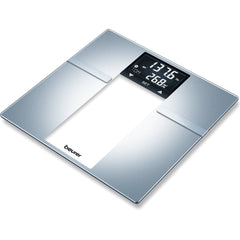
Beurer scales like the BF720 are often placed in humid bathrooms, leading to internal corrosion that causes your Beurer scale not working problems.
Clean Internal Footpad Sensors
Oxidation between the scale’s feet and sensor contacts kills conductivity entirely.
You will need:
• Small screwdriver
• Fine sandpaper or abrasive pad
• Clean cloth
Steps:
1. Turn the scale upside down and remove the screws.
2. Carefully open the casing without forcing it.
3. Locate the metal footpads on each foot and matching sensor contacts on the base.
4. Lightly sand both surfaces until shiny metal is visible.
5. Reassemble and install fresh batteries.
6. Test on tile or hardwood, never on carpet.
Warning: Opening the scale may void the warranty. Only do this if your scale is out of warranty.
Resolve ‘0.0 kg’ Display Issues

Seeing “0.0 kg” but no weight reading? Do not step on too early, or you will interrupt the calibration process.
Wait for Proper Calibration
The scale must stabilize before use for accurate measurements.
Steps:
1. Step on to power it on.
2. Wait for “0.0 kg” to appear on the display.
3. Step off, then back on to start measuring.
Common Mistake: Stepping on before the display zeros out interrupts calibration and causes false readings.
Use a Hard, Flat Surface
Soft floors like rugs or vinyl cause inaccurate readings or “0 kg” errors.
Best surfaces:
• Ceramic tile
• Wood flooring
• Concrete
Avoid:
• Carpets
• Bath mats
• Uneven tiles
Visual Cue: If the scale wobbles, it will not measure correctly.
Rule Out Low Battery
Weak batteries can cause false zero readings, even if the display lights up. Replace with brand-new alkaline batteries, even if the old ones seem fine.
Stop User Profile Conflicts
If your scale shows “P1” or “P8” and won’t sync, it is confused about who is using it. This is a common reason why your Beurer scale not working after someone else uses it.
Delete Unwanted User Profiles via App
The Beurer BF720 uses automatic user recognition with profiles P1 through P8. Leftover profiles from family members cause errors.
Steps:
1. Open the Beurer HealthManager Pro app.
2. Go to Devices and select your scale.
3. Tap User Profiles.
4. Find and delete unused profiles like P8.
5. Save and step on the scale.
Myth Busted: There is no Mode button on the BF720. You cannot delete users from the device itself.
Factory Reset the Scale
If profile issues persist, clear all data by performing a factory reset.
Reset button location: Tiny hole on the back, near the battery compartment.
Steps:
1. Turn scale upside down.
2. Insert a paperclip into the reset hole.
3. Press and hold for 5 seconds.
4. Look for “CLr” on the display to confirm reset.
5. Release and re-pair with the app.
After reset, re-register your user profile and reconnect via Bluetooth.
Fix Bluetooth Sync Failures
Scale shows weight but won’t send data to your phone? Try these solutions.
Re-Pair the Device
Bluetooth connections degrade over time and need to be refreshed.
Steps:
1. On your phone, go to Bluetooth settings.
2. Forget the Beurer scale.
3. In the HealthManager Pro app, remove the device.
4. Restart your phone.
5. Re-pair the scale from scratch.
Update the App and Check Permissions
Outdated apps or denied permissions block sync completely.
On iPhone or Android:
• Go to App Store or Google Play
• Update Beurer HealthManager Pro
• Ensure the app has Bluetooth access
• Ensure the app has Location access, required for BLE on Android
Reduce Wireless Interference
Wi-Fi routers, microwaves, and other 2.4 GHz devices interfere with Bluetooth connectivity.
Fix:
• Turn off nearby devices temporarily
• Weigh yourself away from electronics
• Keep phone within 3 feet of the scale during sync
Model Note: BF720 uses Bluetooth 4.0 (BLE) and works with iPhone 12 and newer and modern Android phones.
Prevent Future Problems
Keep your Beurer scale working longer with these simple maintenance habits.
Daily Maintenance Tips
• Wipe after use with a dry or slightly damp cloth, never soak
• Store away from showers to reduce humidity exposure
• Remove batteries during travel or extended storage
• Never immerse the scale in water
Choose the Right Batteries
Use high-quality alkaline batteries like Duracell or Energizer. Rechargeable AAA batteries often fail due to lower voltage output, causing erratic behavior even if the scale turns on.
Limit to One User
Automatic recognition causes confusion when multiple profiles exist. Delete all profiles except one to eliminate sync errors and misidentification.
When to Replace Your Scale
Some issues cannot be fixed and indicate permanent failure.
Signs of Permanent Failure
• Scale works only once after battery reset
• No response even after cleaning contacts and resetting
• Display remains blank with new batteries and full reset
• Intermittent readings despite all fixes
Likely causes:
• Failed load cell
• Corroded PCB
• Dead Bluetooth module
After 3 to 5 years of use, internal components degrade. Consider upgrading to a newer Beurer model with better moisture resistance or manual user selection buttons.
Quick Reference: Fix by Symptom
| Symptom | Solution |
|---|---|
| Won’t turn on | Clean battery contacts, wait 5+ minutes without battery, use fresh alkaline batteries |
| Shows “0.0 kg” | Use on hard floor, wait for zero calibration, replace batteries |
| Displays P1, P8, or cycles users | Delete profiles via app or factory reset |
| Won’t sync to phone | Forget device, re-pair, update app, check permissions |
| Works once then stops | Full power drain (5+ min no battery), clean internal contacts |
| Intermittent function | Likely corrosion, clean sensors or replace |
Frequently Asked Questions About Beurer Scale Not Working
Why does my Beurer scale only work after I remove and reinsert the batteries?
This typically indicates a stuck microprocessor or residual capacitor charge. Remove the battery, wait at least 5 minutes, then reinsert. This drains all residual power and often restores temporary function.
How do I delete user profiles on my Beurer BF720?
Open the Beurer HealthManager Pro app, go to Devices, select your scale, tap User Profiles, and delete unwanted profiles. The BF720 has no physical Mode button for direct user deletion.
Can I fix a Beurer scale that shows “0.0 kg” but won’t weigh?
Yes. Ensure you are using a hard, flat surface like tile or wood. Wait for “0.0 kg” to appear before stepping on. Replace batteries with fresh alkaline ones, as weak batteries cause false zero readings.
Why does my Beurer scale show “P1” or “P8” errors?
These codes indicate user profile conflicts. The scale is trying to match your weight to a stored profile. Delete unused profiles via the app or perform a factory reset to clear all user data.
Is it worth repairing a Beurer scale with moisture damage?
If the issue is just corroded contacts, cleaning them with sandpaper often works. However, if the scale continues to fail after contact cleaning and power resets, the internal PCB may be damaged beyond repair.
How long do Beurer scales typically last?
With proper maintenance, Beurer scales last about 3 to 5 years. Common failure points include battery contact oxidation, load cell degradation, and Bluetooth module issues.
Key Takeaways for Fixing Your Beurer Scale
A Beurer scale not working does not mean it is dead. Most issues stem from oxidation, low power, or user profile errors, all of which are fixable at home. Start with battery and contact cleaning, reset user data via the app, and avoid humid environments to extend your scale’s life. If problems persist after trying these solutions, a factory reset using the paperclip method often resolves software conflicts. For chronic hardware failures after 3 to 5 years of use, consider upgrading to a newer model with improved moisture resistance.



