
If your Eat Smart scale is not working, you are not alone. Many users face issues like blank displays, inaccurate readings, or failure to turn on, especially with popular models like the ESBS-01 and ESBS-58. The good news? Most problems have simple fixes that do not require technical skills. Whether it is a low battery, missing balance button, or calibration glitch, this guide delivers step-by-step solutions to get your scale back in action fast.
You will learn how to diagnose the exact issue, apply affordable repairs using common household items, and prevent future breakdowns. Each section covers a specific cause with actionable steps, from battery replacement to Bluetooth troubleshooting. By the end, you will know exactly what to check and how to fix it.
Replace Dead Batteries Immediately
A non-responsive scale often just needs fresh power. Eat Smart digital bathroom scales run on four AAA batteries, and when voltage drops, the display may stay blank or show “LO,” which is a clear sign of low power.
Swap in New Batteries Correctly
Locate the battery compartment in the top right corner of the base. Use your fingertip to slide the cover open. Push each old battery toward the coiled spring side and lift it out. Insert new batteries with proper polarity, matching the flat minus end to the negative terminal and the raised plus end to the positive terminal. Snap the cover back securely, then step on the scale to activate auto-calibration to “0.0.”
Even if the scale turns on intermittently, weak batteries cause unstable readings. Replace them every six to twelve months regardless of use.
Restore Missing Balance Buttons

One of the most overlooked yet critical fixes involves missing leveling feet. Eat Smart scales rely on four rubberized balance buttons under each corner to maintain flat contact with the floor. Lose one, and accuracy plummets.
Why Balance Buttons Matter
Without all four feet, the scale wobbles and activates only two to three load sensors instead of all four. In real-world tests, a scale read 245 pounds with three buttons intact but dropped to 220 pounds after removing a fourth button. This results in inconsistent startup, false low readings, or no response at all.
Replace with Hardware Store Parts
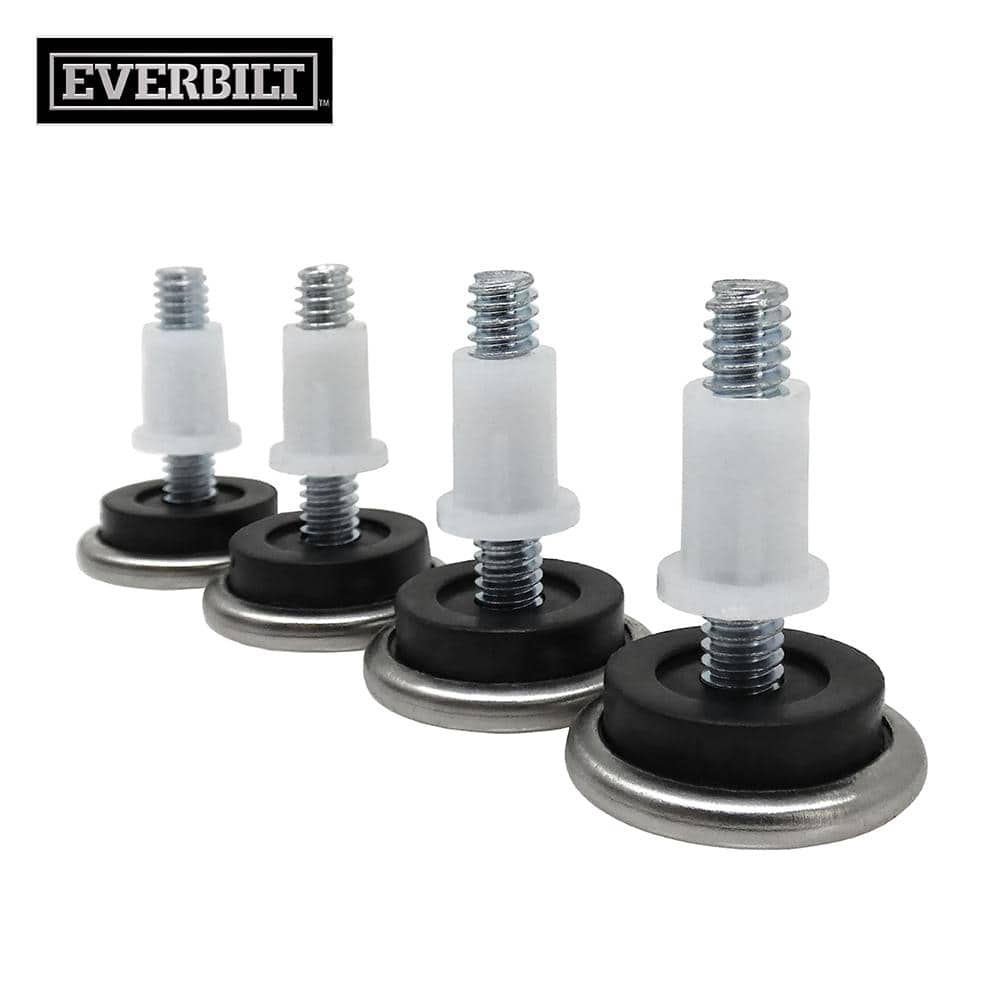
You do not need OEM parts. Users confirm success using quarter-inch plastic leveling caps from Home Depot. Go to Aisle 17 in the furniture hardware section. Look for soft-tipped plastic nails or chair stabilizers with a stem that snaps into place. Press one firmly into each corner socket on the underside.
Place the scale on tile or hardwood to test stability. It should sit flush without rocking. If it wobbles, double-check that all buttons are seated properly.
Use a Hard, Flat Surface Only
Even with good batteries and intact feet, your scale will not work right on carpet, rugs, or uneven flooring. Soft surfaces compress under weight, misaligning internal sensors and triggering erratic behavior.
Choose the Right Floor Type
Good surfaces include tile, hardwood, laminate, and concrete. Bad surfaces include thick rugs and bathroom mats unless they are thin and placed over hard flooring. After stepping on, watch for flickering numbers or delayed startup, as these often trace back to poor surface contact.
Recalibrate After Battery Change
Digital scales must reset to zero before each use. If yours skips this step, it will not read accurately or at all.
Force Auto-Calibration
Insert new batteries and place the scale on a hard, level surface. Wait two to three seconds for the display to show “0.0.” Step on only after the zero appears. If it does not zero, remove the batteries, wait thirty seconds, reinsert them, and retry.
Some models like the ESBS-58 may need a full reset. Remove batteries for one minute, then re-pair via the EatSmart app.
Fix Bluetooth Sync Issues (Smart Models)
If you own the ESBS-58 Bluetooth Smart Scale, pairing problems can stop body fat, BMI, and water percentage data from syncing.
Troubleshoot App Connectivity
Ensure Bluetooth is turned on both on your phone and in the app. Update the EatSmart Performance App, as outdated versions fail to detect devices. Restart both devices by turning them off and back on. Unpair and re-pair the scale in the app settings. On Android devices, enable Location Access, which is required for BLE discovery.
For a quick reset, remove batteries for sixty seconds, reinsert them, open the app, and attempt pairing again.
Diagnose Physical Damage or Sensor Failure

Sometimes the problem is not fixable at home. Internal load cells can fail due to dropping the scale, exceeding the weight limit, or long-term moisture exposure in humid bathrooms.
Signs of Permanent Damage
Watch for no response even with new batteries and stable setup. The display may flash but never show weight, or only one corner works while others do not respond. Load cells are not user-replaceable. If hardware failure is suspected, contact Eat Smart support.
Prevent Future Problems: Maintenance Tips
Avoid repeat issues with these simple habits. Check balance buttons monthly and pop them in if loose or missing. Clean with a dry cloth and never pour water or cleaner directly on the scale. Store away from steam and keep the scale out of hot, humid bathrooms after showers. Do not jump on the scale, as sudden impact damages sensors. Use the same surface daily, as switching between carpet and tile affects calibration. Keep the app updated for smart models.
Mark your calendar to replace batteries twice a year in spring and fall.
Contact Eat Smart Support When Needed
When DIY fixes fail, reach out directly. Email eatsmart@lifetimebrands.com or call 1-866-843-3905. Support hours are Monday through Friday, 8:00 AM to 5:00 PM MST. They offer technical help and can send digital manuals upon request. While they do not sell replacement parts, their team may guide you to compatible solutions. Keep your receipt, as proof of purchase helps with potential warranty claims.
Verify Accuracy After Repair
Before trusting your readings, run a quick validation. First, perform a stability check with no rocking on a hard floor. Second, wait for “0.0” to let the scale calibrate fully. Third, test with known weight using a dumbbell or gallon jug about 8.3 pounds. Fourth, repeat twice; readings should differ by one pound or less. Fifth, check app data for smart models to confirm body composition metrics update.
If numbers still jump or will not stabilize, repeat battery replacement and inspect all four feet.
Final Fixes by Symptom
| Symptom | Likely Cause | Solution |
|---|---|---|
| Blank screen | Dead batteries | Replace four AAA, check polarity |
| Shows “LO” | Low power | Install new batteries |
| Wobbles or rocks | Missing balance buttons | Replace with Home Depot leveling caps |
| Inconsistent weight | Unstable surface or damaged feet | Use on hard floor, reinstall all four feet |
| Will not turn on | Battery issue or sensor fault | Replace batteries, test on tile |
| Fluctuating numbers | Calibration failure | Reset, wait for “0.0”, avoid premature stepping |
| Bluetooth not pairing | App or connection error | Restart devices, re-pair, update app |
| No body fat data | Impedance sensor failure | Clean foot pads, ensure bare feet, reset scale |
Frequently Asked Questions About Eat Smart Scale Not Working
Why does my Eat Smart scale show “LO” on the display?
The “LO” message indicates low battery power. Replace the four AAA batteries in the compartment, making sure to insert them with correct polarity. The scale should then power on normally.
How do I fix a wobbling Eat Smart scale?
Wobbling usually means missing or damaged balance buttons. Replace all four leveling feet on the underside of the scale. Generic quarter-inch plastic leveling caps from Home Depot work as replacements.
Why does my Eat Smart scale give different readings each time?
Inconsistent readings typically stem from using the scale on carpet or uneven flooring. Always place the scale on a hard, flat surface like tile or hardwood. Also check that all four balance buttons are intact and seated properly.
How do I reset my ESBS-58 Bluetooth Smart Scale?
Remove the batteries for sixty seconds. Reinsert them, open the EatSmart Performance App, and attempt to pair the scale again. Make sure Bluetooth is enabled on your phone and Location Access is turned on for Android devices.
Can I repair the load cell in my Eat Smart scale at home?
No, load cells are not user-replaceable. If the scale shows signs of permanent damage like no response with fresh batteries or partial activation, contact Eat Smart support for further assistance.
Where can I find replacement balance buttons for my Eat Smart scale?
Generic replacement buttons are available at hardware stores like Home Depot in the furniture hardware section, typically Aisle 17. Look for quarter-inch soft-tipped plastic leveling caps or chair stabilizers.
Key Takeaways for Fixing Your Eat Smart Scale
Most Eat Smart scale problems stem from simple causes that you can fix at home. Dead batteries account for the majority of non-responsive issues, so always replace the four AAA batteries first. Missing or damaged balance buttons cause inaccurate readings and wobbling, and generic replacements from hardware stores work perfectly.
For smart models like the ESBS-58, Bluetooth connectivity issues often resolve with a simple app restart or battery reset. Regular maintenance, including battery replacement twice yearly and monthly checks of balance buttons, keeps your scale accurate for years. When in doubt, reset, recheck, and retest before contacting support.



