You just unboxed your Withings scale, inherited one, or it is stuck in a setup loop, and now you need to reset Withings scale to get it working again. Whether you are selling it, fixing sync issues, or starting fresh, a factory reset is often the solution. But here is the catch: not all Withings scales reset the same way. A wrong button press or skipped step can leave your scale unresponsive or stuck in a pairing loop.
This guide gives you exact reset instructions for every Withings scale model, from the classic Body to the advanced Body Scan. You will learn how to erase data safely, avoid common pitfalls, and get your scale back online fast.
Sync Data Before Reset
Before touching any buttons, ensure your latest measurements are safe in the cloud. A reset wipes unsynced data permanently.
Confirm Recent Measurements Are Saved
Open the Withings Health Mate app and check your timeline. If your most recent weight or body composition reading is not visible, follow these steps:
• Step on the scale barefoot
• Wait for the display to show your metrics
• Watch the app for a green checkmark or Synced notification
This process takes up to 30 seconds. Do not proceed until sync is confirmed.
Warning: Any data not synced, like body fat, muscle mass, or water percentage, will be lost forever during reset. No recovery is possible.
Unpair From Bluetooth Devices
Your phone or tablet may automatically reconnect to the scale if not fully unpaired.
Remove Scale From Phone Settings
- Go to Settings > Bluetooth on your device
- Find your Withings scale in the paired devices list
- Tap the i or … icon next to it
- Select Forget This Device
Repeat this step for every smartphone or tablet that previously used the scale.
Why this matters: Skipping this causes Already Paired errors or failed setup attempts, even after a factory reset.
Remove Scale From Withings Account
Even after a reset, the app might reattach old data if the device is not fully dissociated.
Dissociate Device in App
- Open Withings Health Mate
- Tap the Devices icon (top right)
- Select your scale
- Scroll down and tap Dissociate this product, then Remove from my account
The scale disappears from your device list.
Critical: Without this step, the app may block re-pairing or restore outdated user profiles.
Install Fresh Batteries
Weak power can interrupt the reset process or cause boot failures.
Use Alkaline Batteries Only
• Body, Body+, Body Smart: 4x AAA
• Body Scan: 4x AA
• WS-30: 3x AAA
Avoid rechargeable or zinc-carbon batteries. They often lack the voltage stability needed for firmware operations.
Clean Battery Contacts
Inspect for corrosion. Use a dry cloth or cotton swab to wipe terminals. Corrosion causes intermittent power and failed resets.
Pro Tip: For long-term storage, remove batteries to prevent leakage damage.
Reset Withings Body Scale
The original Body model uses a simple menu based reset.
Access Reset Menu
- Turn scale over
- Press and hold the button on the underside for 8 seconds
- Flip upright. Screen shows mac, upgrade, reset
- Tap button to cycle until reset is highlighted
- Release. Reset happens automatically
Success Signal: Hello! appears on screen. Setup mode is active.
Note: No confirmation press needed. Do not hold after selecting reset.
Reset Withings WS-30 / WBS01
This legacy model requires battery interruption.
Perform Hard Reset
- Remove one battery
- Wait 30 seconds
- Reinsert battery
- When √ appears, press and hold both bottom buttons
- Hold up to 30 seconds until Factory shows on screen
- Release. Scale powers off and restarts
Done When: Screen clears and behaves like new.
If It Fails: Try the forced reset method.
Reset Withings Body+ (Modern)
Purchased after April 2022? This version needs a 5-click confirmation.
Complete Factory Reset
- Press and hold underside button until menu appears
- Options: Info, Update, Reset, Quit
- Tap to select Reset
- Press and hold until progress bar fills
- Screen shows Reset in 5 clicks
- Press button exactly 5 times
- Scale restarts with Reset ok, then Hello!
Verified: Hello! means ready for re-setup.
Reset Withings Body+ (Legacy)
Pre-2022 models reset differently. No 5-click step required.
Quick Reset Steps
- Hold button to enter menu
- Cycle to Reset using short taps
- Wait 3 to 5 seconds. Reset confirms automatically
- Screen shows Hello!
Patience Required: Do not press repeatedly. The system auto-executes after delay.
Reset Withings Body Smart
A common mistake: confusing its bottom button with Body Scans top button.
Execute Correct Sequence
- Turn scale over
- Press and hold recessed button for 8 seconds
- Menu appears: Info, Update, Reset
- Tap to highlight Reset
- Hold until progress bar completes
- See Reset in 5 clicks
- Press 5 times quickly
- Final screen: Hello!
Button Location: Underside only. Do not look on top.
Reset Withings Body Scan
The flagship model has a top-edge button. Unique among Withings scales.
Follow Top-Button Reset
- Locate button on top edge, near display
- Press and hold 8 seconds until menu appears
- Navigate to Reset with short taps
- Hold until progress bar finishes
- Confirm with 5 clicks
- Restart ends with Hello!
Design Trap: Many users press the bottom, but Body Scans button is on top. Check your model carefully.
Forced Reset for Unresponsive Scales
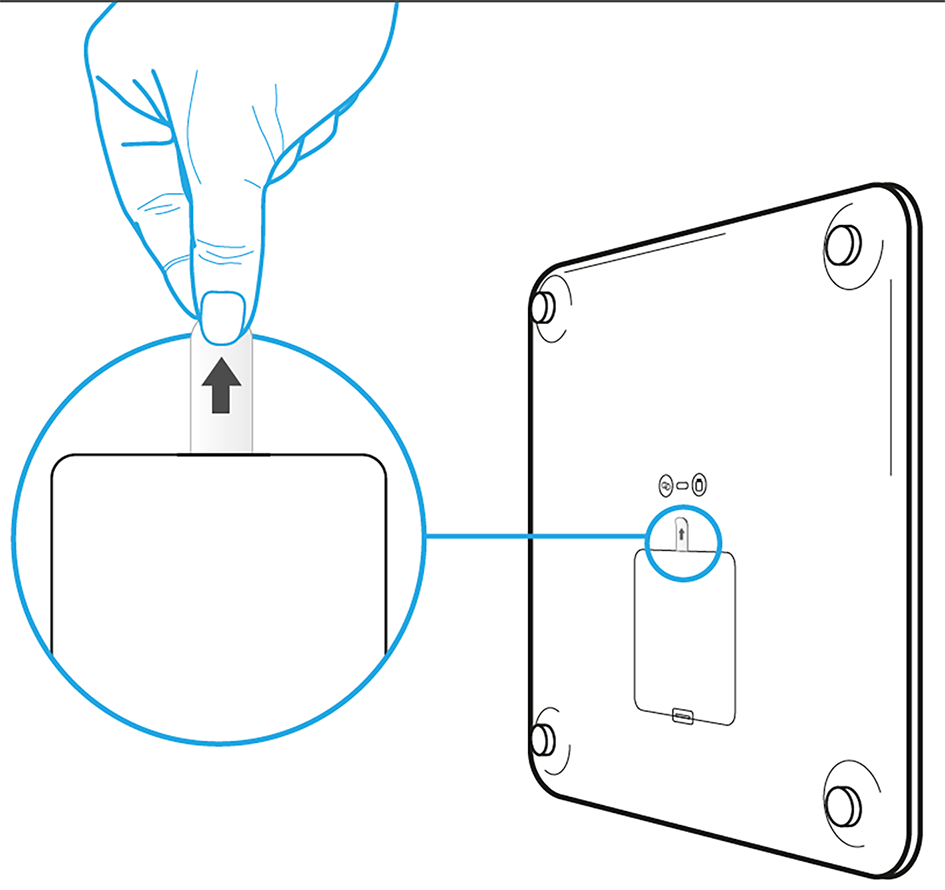
If your scale will not turn on or is stuck in a loop, try this emergency fix.
Revive a Bricked Scale
- Insert new alkaline batteries
- Remove one battery
- Press and hold reset button
- While holding, reinsert the battery
- Keep pressing for 10 to 15 seconds until screen flickers or shows symbols
- Release only after change occurs
What It Does: Triggers a low-level firmware reboot. Effective on WBS01, Body+, and Body Smart.
Fix Upside-Down Display
After reset, if text appears inverted, remove all batteries, wait 30 seconds, and reinsert. Do not press any buttons. Screen should correct itself on next boot.
User Success: Holding the button while inserting the battery fixed my Setup Failed loop. Saved me a return.
Model Comparison: Reset Differences

Knowing your model prevents errors.
| Model | Button Location | Confirmation Method | Final Message |
|---|---|---|---|
| Body | Underside | Auto after selection | Hello! |
| WS-30 | Underside (dual) | Release on Factory | Restart only |
| Body+ Modern | Underside | Hold plus 5 clicks | Reset ok then Hello! |
| Body+ Legacy | Underside | Wait 3 to 5 sec | Hello! |
| Body Smart | Underside | Hold plus 5 clicks | Reset ok then Hello! |
| Body Scan | Top edge | Hold plus 5 clicks | Reset ok then Hello! |
Key Rule: 5-click confirmation applies to all modern Wi-Fi models. Legacy and analog models do not require it.
Avoid Common Reset Mistakes
Even with correct steps, errors happen.
Why Pairing Loops Occur
• Forgot to unpair Bluetooth
• Skipped app dissociation
• Used rechargeable batteries
• Pressed too many or few clicks in 5-click sequence
Fix iOS Delay: Some iPhones take 1 to 2 minutes to detect reset scales. Restart the phone if needed.
Prevent Data Loss in Households
In multi-user homes, ensure all users have synced before reset. Warn others. Unsynced data from any user will be erased.
When Reset Is Not Enough
A reset will not fix hardware damage.
Contact Withings Support If
• Scale remains unresponsive after 3 attempts
• Display is blank or flickering
• Button is stuck or broken
• Sync fails repeatedly post-reset
Support Tip: Provide video proof of your reset steps. Withings responds faster with visual evidence.
Reset Success Checklist
Use this before and after resetting.
| Step | Done? |
|---|---|
| Synced latest measurements | ☐ |
| Unpaired from all Bluetooth devices | ☐ |
| Removed from Withings account | ☐ |
| Installed fresh alkaline batteries | ☐ |
| Identified correct model and button location | ☐ |
| Performed exact reset sequence | ☐ |
| Confirmed Hello! or equivalent | ☐ |
Final Check: After reset, set up via the app as if brand new. All historical data will reappear once synced.
Key Takeaways for Resetting Your Withings Scale
You now know how to safely and effectively reset Withings scale, regardless of model. The process is not just about pressing buttons. It is about clearing three layers: app, Bluetooth, and hardware.
Remember these critical points:
• Sync first. Never lose unsynced data.
• Unpair and dissociate. Clean all connections.
• Use alkaline batteries. Prevent power-related failures.
• Know your model. Body Scans top button differs from others bottom button.
• 5-click rule applies to modern models only.
• Forced reset works. Hold button while inserting battery to revive dead units.
With these steps, you have turned a frustrating glitch into a reliable fix. Whether for resale, troubleshooting, or fresh setup, your Withings scale is now ready to go.
Frequently Asked Questions About Resetting Withings Scales
How do I reset my Withings scale to factory settings?
Turn the scale over and locate the reset button. The location varies by model: Body, Body+, and Body Smart have buttons on the underside, while Body Scan has its button on the top edge near the display. Press and hold for 8 seconds, navigate to Reset using short taps, then confirm using your models specific method.
Will I lose my weight history if I reset my Withings scale?
No. All data already synced to the Withings Health Mate app remains safe. You will only lose any measurements taken since your last sync that have not been uploaded to the cloud. Always step on the scale and wait for the sync confirmation before resetting.
Why does my Withings scale show Hello! after reset?
Hello! is the success confirmation that indicates your scale has been reset to factory defaults and is ready for new setup. You can now open the Withings Health Mate app and begin the pairing process as if the scale were brand new.
What is the 5-click confirmation on Withings scales?
Modern Withings scales (Body+, Body Smart, Body Scan purchased after April 2022) require you to press the button exactly 5 times after selecting Reset. This prevents accidental factory resets. Legacy models do not require this step.
Can I reset my Withings scale without the app?
Yes. The factory reset is performed using the physical button on the scale itself, not through the app. However, you must also unpair the scale from Bluetooth and remove it from your Withings account for a complete reset.
My Withings scale is stuck in setup loop. What do I do?
First, try the forced reset method. Remove one battery while holding the reset button, then reinsert the battery while continuing to hold for 10 to 15 seconds. If that fails, ensure you have unpaired from Bluetooth and removed the device from your Withings account. Both steps are required to break the loop.