
Is your WW scale not working? You’re not alone. Thousands of Weight Watchers scale users encounter issues like blank displays, failed Bluetooth connections, inaccurate readings, or missing body composition data. These problems can disrupt your health tracking, but most are fixable with simple troubleshooting steps.
This guide covers every known issue and solution, from power failures and error messages to Android-specific Bluetooth problems and data sync errors. You’ll learn how to diagnose the problem fast, apply proven fixes, and know when it’s time to replace an aging scale.
Remove Battery Isolator Tab
Check for Plastic Pull Tab
A common reason your WW scale not working is the battery isolator tab still being in place. This small plastic tab prevents the batteries from making contact during shipping.
Flip the scale over and locate the battery compartment. Look for a white or clear plastic strip protruding from the slot. Pull it out completely.
If the tab is already removed but the display remains dark, open the compartment with a small Philips screwdriver to check for any leftover fragments blocking contact.
Confirm Correct Battery Installation
The scale requires 3 AAA alkaline batteries, unless your model uses CR2032 or AA. Check the label under the scale for your specific requirements.
Steps to install batteries:
- Insert batteries one at a time.
- Match the positive and negative ends to the markings inside the compartment.
- Close the battery door securely.
- Tighten the screw to ensure solid electrical connection.
Incorrect polarity can prevent power-up or damage circuitry. Double-check orientation before closing. After installation, tap the scale firmly with your foot to activate it.
Fix Bluetooth Pairing Failures

Enable Bluetooth and Location Services
Your WW scale connects via Bluetooth to the WW Scales by Conair app. If pairing fails, start with these settings.
For all devices, go to Settings, Bluetooth, and turn it ON. Do not manually select the scale in the Bluetooth list because pairing happens automatically through the app.
For Android users, Location/GPS must be enabled even if you don’t share precise location. Android systems tie Bluetooth functionality to location services. Turning it off breaks connectivity.
If connection drops repeatedly, go to Settings, Apps, the three-dot menu, Show System, Bluetooth Share, Storage, then Clear Data and Cache. This resets the Bluetooth stack but will erase all paired devices.
Follow Correct Pairing Sequence
The pairing sequence must be followed precisely for successful connection.
Steps to pair:
- Wake the scale by stepping on it until the display lights up.
- Open the WW Scales app.
- Tap Connect to Scale.
- Watch for a blinking Bluetooth icon on the scale’s LCD and blinking dots around a Bluetooth symbol in the app.
When successful, the Bluetooth icon shows a checkmark. Stand still on the scale until measurements appear in the app. A common mistake is trying to pair the scale in phone settings instead of the app. This does not work because pairing is handled entirely within the WW app.
Restore Missing Body Composition Data
Stand Barefoot on Electrodes
If your scale shows only weight and skips body fat, water, or muscle mass, the issue is likely poor electrical contact. The scale sends a safe, low-current signal through your body using stainless-steel electrodes on the platform. Anything insulating your feet blocks the signal.
Fix it by removing socks, tights, or slippers. Place entire soles flat on the electrodes. Avoid stepping on the glass edges and center your feet.
Users with pacemakers or implanted medical devices should avoid body analysis mode and use weight-only mode instead.
Improve Skin Conductivity
Dry skin increases resistance and can trigger an Err message.
Solutions include lightly moistening soles with water or unscented lotion. Wipe feet dry first if sweaty because excess moisture also interferes. Re-measure immediately after applying moisture.
Do not over-wet because slipping on a wet glass scale is a real hazard. Also verify your profile has correct age, height, and gender in the app. The scale must be set to Body Analysis mode, not weight-only.
Resolve Inconsistent Readings or Error Messages
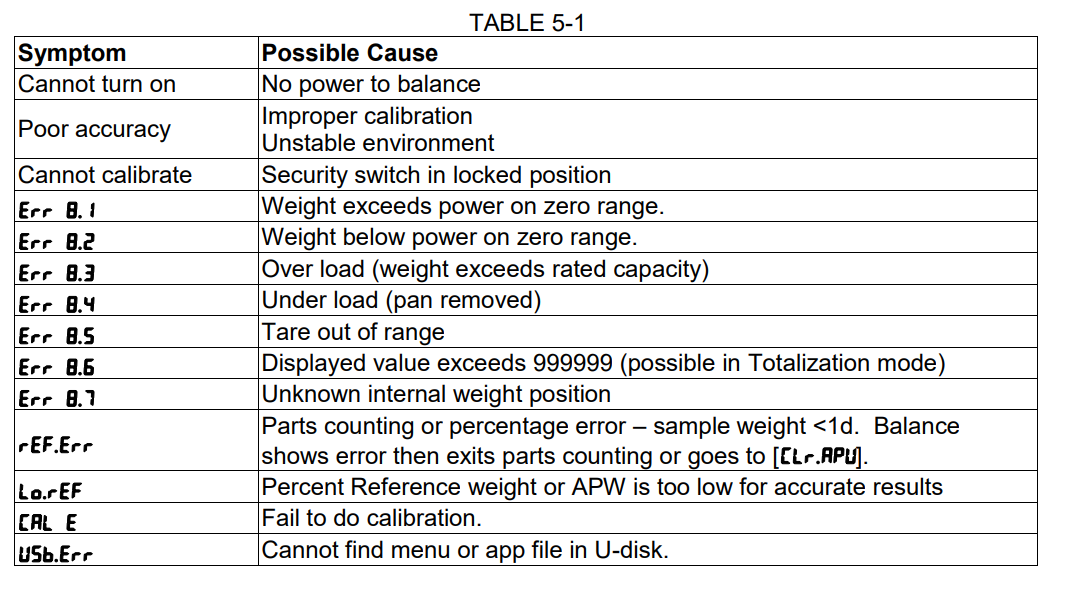
Replace Old Batteries
Weak batteries are a top cause of erratic readings and error codes, even if the display turns on.
Replace with fresh AAA alkaline batteries. Avoid rechargeable batteries because they often output lower voltage, which may not power sensors correctly.
After replacement, step on and off once to wake the scale. Step on again for a stable reading. Track consistency over three to five days. If readings still jump significantly, continue troubleshooting.
Use a Hard, Flat Surface
Soft or uneven floors cause inaccurate strain gauge measurements.
Best surfaces include tile, hardwood, and concrete. Avoid carpet, rugs, and vinyl with padding. Place the scale directly on the floor with no mats or towels. Ensure all four feet make full contact.
Consider Scale Age and Sensor Wear
Digital scales last seven to ten years under normal use. A scale far beyond its lifespan will show failing sensors.
Symptoms of worn sensors include frequent error messages, drifting or unstable readings, and delayed display activation. Internal strain gauges degrade over time, and unlike batteries or software, they cannot be replaced. If your scale is over a decade old and shows inconsistent results after battery replacement, replacement is the only reliable fix.
Fix Data Sync and Dashboard Issues
Understand Multi-Device Limitations
WW scale data is stored locally on each device. There is no cloud sync between phones or tablets.
Weighing in on an iPhone logs data only to that iPhone’s app. An iPad won’t show those readings unless manually added. No automatic cross-device sync exists, even if both devices use the same WW account.
Sync Across Devices Manually
Workarounds include using Apple Health or Google Fit by enabling integration in the WW app settings. Data flows to the health platform, accessible from all devices. Alternatively, tap the plus button on the app dashboard and enter weight or body composition values manually.
Designate one primary device for scale use to avoid confusion. Also note that resetting the scale does not delete app data, only user profiles saved directly on the scale.
Remove Blue Static Cling Film
Peel Off Protective Display Sticker
Some users report the blue backlight stays on even after removing batteries. This is not a malfunction. It is a static cling film left on the display.
Carefully peel it off before first use. It is designed to protect the screen during shipping. Leaving it on can interfere with visibility and may cause false impressions of screen burn-in or power issues.
Reset the Scale Properly
Use the Reset Button Correctly
To clear user data from the scale, locate the reset hole on the bottom. Insert a paperclip and press down. Hold until the display shows Clr.
All user profiles and settings on the scale are erased. The app will prompt you to select a new user number on next use. Only reset if you intend to wipe all users. For single-user deletion, just remove the profile in the app with no reset needed.
Manage Multi-User Setup
Assign Correct User Numbers
The scale supports up to nine users. Each gets a unique number from User 1 to User 9.
The first user sets up as User 1. The next user automatically becomes User 2, and so on. The scale remembers the last used number. Always confirm the user number before stepping on. In shared households, label each person’s number.
Prevent Data Misattribution
If multiple people use the same phone, the logged-in WW account gets the data. User A logs in, User B steps on, and data goes to User A’s profile.
Fix this by logging out after each use. Have each user log in with their own credentials. Use separate devices for each person, or sync to Apple Health or Google Fit with individual accounts linked.
Safety and Special Use Cases
Pacemakers and Medical Implants
Do not use body analysis mode if you have a pacemaker, an implanted defibrillator, or any electronic medical device. The low-current signal could interfere with device operation.
Use weight-only mode instead. No current is sent through the body. Always consult your doctor before using any BIA scale with medical implants.
Metal Implants or Prosthetics
Metal implants are safe to use, but expect slightly lower body fat readings due to altered electrical resistance. The reading may be off by two to five percent, but it is consistent. Trend tracking remains accurate.
Pregnancy Considerations
Avoid body composition readings during pregnancy. Increased body water skews BIA results, and algorithms are not calibrated for pregnant physiology. Weight tracking is safe and useful throughout pregnancy using the scale’s weight-only function.
When to Replace Your WW Scale
Signs It Is Time for a New Scale
Replace if the scale is over ten years old, error messages persist after battery change, readings jump erratically, Bluetooth fails despite troubleshooting, or the surface is cracked or electrodes damaged.
For a scale showing errors after thorough troubleshooting, replacement is the only practical solution. Repair is not feasible because sensors and circuitry are not user-serviceable.
Best Modern Alternatives
Upgrade to a new smart scale with Bluetooth 5.0 or Wi-Fi for reliable syncing. Look for auto-user recognition, cloud sync across devices, and compatibility with Apple Health, Google Fit, and Fitbit.
Recommended features include 400 lb capacity, 0.1 lb increments, multi-user support for eight or more profiles, and pregnancy and athlete modes. Price range is $20 to $50 USD. Recommended models include Renpho, Eufy, Withings, and Fitbit Aria.
Frequently Asked Questions About WW Scale Not Working
Why does my WW scale display show nothing?
The most common cause is the battery isolator tab still being in place. Flip the scale over, locate the battery compartment, and pull out the plastic tab. If the display remains dark, check battery polarity and replace with fresh AAA alkaline batteries.
How do I fix Bluetooth connection problems with my WW scale?
Enable Bluetooth in your phone settings and ensure Location is turned on for Android devices. Open the WW Scales app, wake the scale by stepping on it, and tap Connect to Scale. Do not manually pair the scale in your phone’s Bluetooth settings.
Why does my scale only show weight and not body composition?
Body composition requires bare feet making contact with the metal electrodes. Remove socks and tights. Ensure your entire sole touches the electrodes. Dry skin can block the electrical signal, so lightly moisten your feet with water if needed.
What causes error messages on my WW scale?
Error messages appear due to poor foot contact, weak batteries, overloading the scale above 400 lb, or worn internal sensors. Replace batteries, stand barefoot on a hard flat surface, and ensure proper foot placement.
Can I use my WW scale if I have a pacemaker?
Body analysis mode should be avoided with pacemakers or implanted medical devices because the electrical current could interfere with the device. Use weight-only mode, which does not send current through your body.
How long do WW scales typically last?
Digital scales last seven to ten years under normal use. If your scale is older than ten years and shows inconsistent readings or error messages after battery replacement, the internal sensors have likely degraded and replacement is recommended.
Key Takeaways for Fixing Your WW Scale
Most WW scale issues stem from three simple causes: battery problems, Bluetooth connection failures, or poor foot contact. Start troubleshooting by removing the battery isolator tab, replacing old batteries, and ensuring you stand barefoot on the electrodes for body composition readings.
For Bluetooth issues, remember that Android requires Location to be enabled, and pairing happens only through the WW app, not your phone’s settings. Clear the Bluetooth cache if connection problems persist.
If your scale is over ten years old and shows persistent errors or erratic readings despite new batteries and proper use, the internal strain gauges have degraded. Modern smart scales cost only $20 to $50 and offer better accuracy, cloud sync, and app integration. For persistent problems, contact Conair support with your model number and steps already tried.



